Harrison MixBus-A Pro Audio Secret Weapon

I’ve recently started working with a new software package that I stumbled upon at the Nashville AES recording workshop. It’s not something you’ll see full-page ads about in the magazines, and some folks might think of it as an audio professional’s “secret weapon.” But if you work with professional audio, you should definitely check it out.

At $79, Harrison’s MixBus package is a heck of a good deal… even better than Audacity, which is free. But only if you own a Macintosh system, since it’s a Mac- or Linux-only application. While it is very good, Audacity isn’t a pro-level program, and Mixbus definitely is. I had trouble getting an early version of Audacity to run on my Mac, though that was awhile ago. It’s probably different now.

Harrison is a small company in Nashville that makes very high-quality consoles for broadcast and studio use. I’ve use one once, for a telethon, and it was a REALLY nice board. Like most top-level console makers these days, they have branched into digital consoles, and MixBus is an extension of that experience.

What makes MixBus different is that it is designed from a console maker’s perspective, as opposed to a computer programmer’s point of view. As such, it has a great many of the same functions as other DAWs, but the interface and implementation of those functions is markedly different. The interface has a definite analog look and feel, and it certainly sounds terrific.
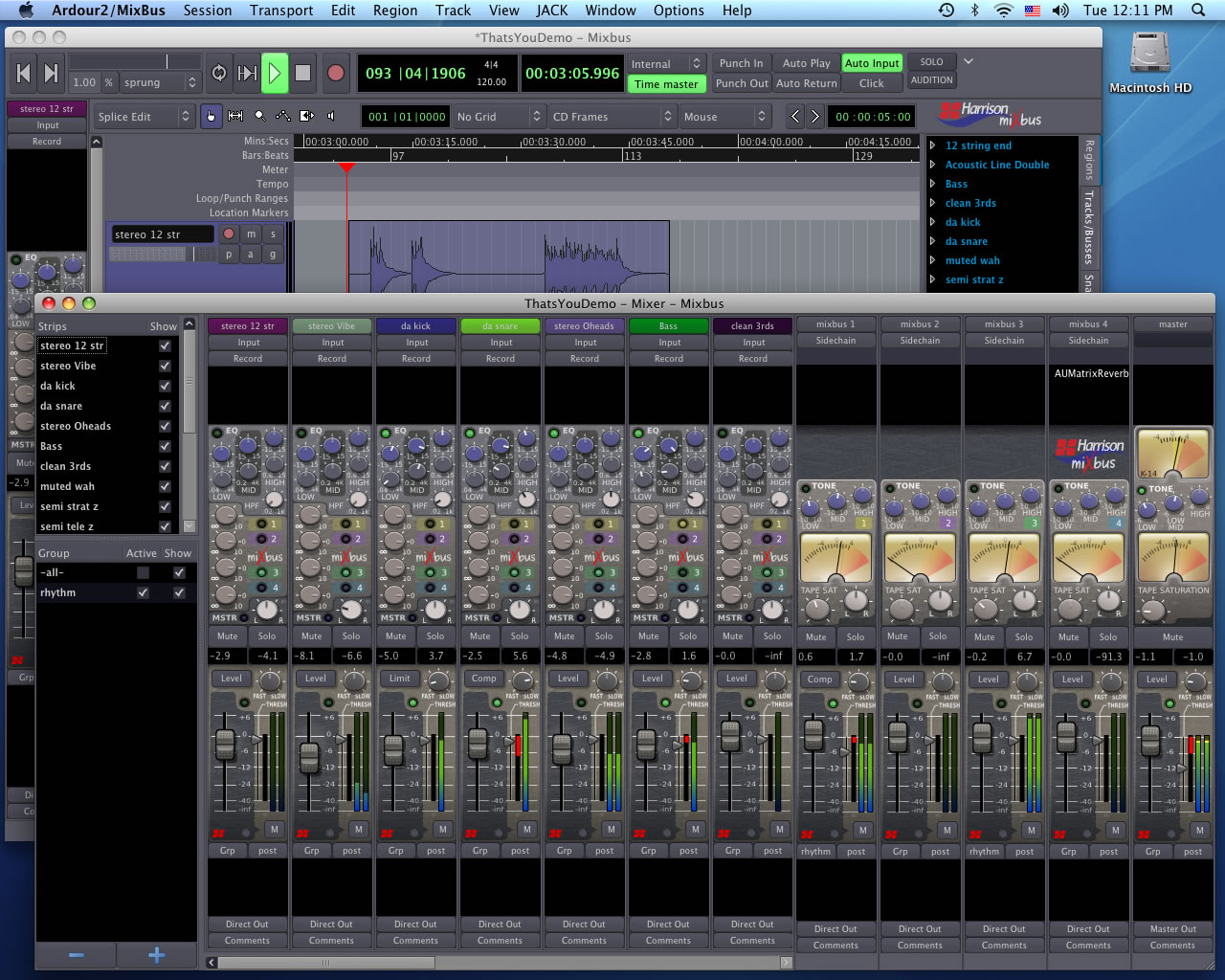
A screenshot of the Harrison MixBus DAW. It looks a lot like an analog console, an a large monitor can be an advantage.

Each input channel has a Harrison EQ and compression, and tape saturation controls are available on busses. These features would usually require a plug-in on another DAW, and these programs usually cost more than the entire MixBus package. (there are, of course, piles of other features and capabilities to this program that I don’t have room to mention here. Learn more about them from Harrison’s wesite,)

The reason that I think MixBus is a “secret weapon” is from something I overheard at the AES conference. A well-kown and highly-skilled mixer was complaining about  losing income to clients that pay for a single song to be mixed, then lift all his or her settings in ProTools and apply them to an entire album. By working in MixBus, there is a competitive advantage since you’re working in a program that everybody and his brother doesn’t already have. (of course, there’s still a potential problem since MixBus is so affordable. It’s based on the Ardour software framework, which is open-source as well, so this program should start appearing all over the place. But for now, not very many people have heard about it, and those that have seem to be keeping their cards close to their chest.)

The Downside: … and this is a disavantage only f you’re a PC person… it’s Mac- or Linux-only. It’s yet another reason to buy a Macintosh, which may not be the best for everybody, especially those who have invested heavily in the latest PC hardware. The documentation isn’t nearly as comprehensive as other DAWs, like Logic or ProTools. There is a $20 video that is available, and this is a huge help, and Ardour has a free print user’s guide PDF that you can find here:

http://en.flossmanuals.net/ardour/

(UPDATE: I have re-formatted this manual for a printer-friendly version so you can work with a hardcopy while the program is running. I’ve also added Mixbus-specific sections. I wouldn’t call this a Mixbus manual quite yet, since I’m not an expert with the program and there are still some questions I have that this document doesn’t answer. But it’s a start. I’ll email a PDF to any Mixbus owner who requests it… just send me an email with the program serial number to BGilbertSound at gmail dot com.)

If you have zero experience with DAWs, this might be difficult at first. MixBus has a lot of flexibility… you can configure it to suit your workflow, not the program’s… and there is at least some expectation that you know what you’re doing on a basic level. But if you stick with it, you may find that analog-style methods make a lot of sense for audio production, and this is an effective way to get work done.

The Upside:

  • Extremely affordable given the feature set (though this pricing is expected to increase).
  • Analog look and feel.
  • Logical workflow for old-school mixers.
  • Great sound.
  • Different from the usual ProTools pack, makes your work a little harder to lift.
  • (if you’re a Mac owner) Macintosh-native, not a rewrite of PC software. As a result it’s quite stable. (This also prevents lifting your work, at least by 75% of the usual suspects.)

I’m working on my own set of “MixBus Notes” that I’ll make available here if I can find the time to complete them. But for now, I can recommend this program highly… buy it while you can, but keep it a secret! The MixBus website is here:

http://www.harrisonconsoles.com/joomla/index.php?option=com_content&task=view&id=108&Itemid=42

MixBus review in Mix Magazine: http://mixonline.com/gear/reviews/audio_harrison_mixbus_daw/

Note: I have no financial connection of any kind with Harrison… I just bought the program an like it a lot, and I like to support smaller US companies that make great products. When they make great stuff and sell it at a great price, then it’s a double win. This is not to say that I’m above selling out to da man… Harrison is welcome to send a console, I’ll take a Series Twelve, thanks very much… I just haven’t been the happy recipient of corporate largesse up to now. I’ll let you know when that changes 😉

Discrete Operational Amps

The API 2520 discrete op-amp

Op-amps have been an important part of audio electronics for a long time. I remember reading as a kid about the “new” 741 types, and how op-amps would reduce electronic design to little more than building blocks. Than never exactly happened with audio circuits, but they did pretty much alter the landscape, and you’d be hard-pressed for find anything electronic in your studio that doesn’t use them.

The Melcor 1731 op-amp… somewhat rare

The “operational” part of op-amps refers to the inputs. There are two, an inverting and a non-inverting input. By taking some of the amp’s output and looping it around to one of the inputs, the amp can be made to do all sorts of handy things.

The venerable 709 opamp

There were some folks who realized early on that conventional op-amps required circuitry compromises, and that they could build their own operational amplifiers out of discrete parts (transistors, resistors, capacitors, and diodes) that better suited their needs, and outperformed the 309s and 741s that were available back in the day. The Jensen 990 and the API 2520 come to mind. There may have been others, but these two are the only ones that I can recall that have a long record of commercial availability and good performance. (Both companies are still producing audio equipment, and have a reputation for very high-quality, great sounding gear) These were used in a number of very high-end desks at a time when most desks were custom-built. Op-Amps for audio circuits have improved very dramatically since the days of the 741, of course, but there are still cases where discrete op-amps work very well.

So how do I get one of these little buggers? If you could find an affordable one used somewhere, you’d be extremely lucky… an API 2520 sold for $133 on eBay recently, and I saw no Jensens or Melcors. But there are some alternatives. My favorite is a tiny circuit board offered by

Four DOA2520 discrete op-amps… two have been completed, and two are about halfway done.

Classic Audio Products of Illinois. It’s an API2520 clone using available parts… some of these old circuits call for germanium transistors, which are impossible to find. I ordered one of the full kits ($17.50) and a few bare circuit boards ($2.30 each… a bargain).

Assembling these is not for the beginner or the faint of heart… they are very small, so that the finished op-amp has the same pin spacing and footprint as the original. Fortunately, these are very high-quality little boards. The holes are through-plated, so they take up solder very nicely. But they are so tiny that you need to be very careful when placing the parts to be certain that the right leads are going in the right holes. I have a stereo dissection microscope that I use to solder these boards… some sort of strong magnifier is necessary. Fortunately the boards come with a downloadable PDF instruction manual that guides you through the placement of the parts.

The circuit boards, like the originals, are pretty tiny.

Tip one is to use a pin jig to solder the pins. This is just a small block of wood with holes drilled in it to hold the pins straight while they are being soldered. I held the board over the block still with a spring clamp, and marked the location of each pin with a large needle. The needle pricks were drilled with a drill press. Now I place the pins in the holes, then place the board on top of the pins and solder from the top. Since the holes are through-plated, this works nicely, ensuring parallel pins. The pins on my first op-amp are a little wonky because I soldered it before I made my little wooden block pin jig.

Tip two is to solder the large transistors Q7 and Q8 just after soldering the pins, rather than following the recommended stuffing order. There are some nearby resistors that can be too tight to these transistors. By placing them first you can position the resistors in their holes with a little better fit. This is only cosmetic, but you may as well have these look nice. It goes without saying that you’ll need a good iron with a very fine tip.

A good stereo microscope isn’t a requirement, but it helps. Some kind of magnifier will be required to solder these.

I haven’t placed these in any equipment yet… just like the op-amps themselves, the preamps that use them are quite expensive. But just like the op-amps, there are kits and circuit boards available, and I’ll get started on some of these when time permits.

For the truly adventureous, you can roll your own from scratch. The circuit board for the Melcor DOA  can be seen here. Discussions about these and other discrete operational amps can be read on the Gearslutz forum, a fantastic resource for old studio gear lovers, and several folks have successfully reproduced classic circuits. Some of the difficulties include finding “unobtanium,” a favorite word of mine meaning electronic parts that are no longer manufactured, with no modern replacements. (germanium transistors, for example).

Update: Here are some other discrete op amp links:

  1. http://www.passdiy.com/pdf/diyopamp.pdf– a great article about discrete op amp design from Nelson Pass.
  2. http://www.forsselltech.com/downloads/design_discussions/JFET%20Opamp.PDF Fred Forssell’s article, “A Simple Class A JFET Operational Amplifier.”
  3. http://www.forsselltech.com/media/attachments/Class_A_JFet_Opamp.PDF Another op amp schematic from Fred Forssell
  4. http://www.johnhardyco.com/pdf/990.pdf John Hardy’s article, “990 Discrete Op Amp.” Several circuits here, including mic, phono, tape head preamps, a summing amp, and the MPC-1 preamp.
  5. http://www.diyrecordingequipment.com/directory/ Several discrete op amp designs are reviewed in the Project Directory. Click on “Other Gear” and you’ll see a heading for “Discrete OpAmps.”
  6. http://seniordesign.engr.uidaho.edu/2004_2005/tucson/Files/Final%20Report.pdf High Voltage, High Slew Rate Op Amp Design from Apex Microtechnology (Warning- high math hazard, may cause brain lock.)
  7. http://www.eisenaudio.com/diy500/tables/opamps/ Eisen Audio’s Discrete Op Amp page, has a large number of photos and descriptions of many opamps for the API 500 series circuits.
  8. http://www.sg-acoustics.ch/analogue_audio/discrete_opamps/index.html Samuel Groner’s discrete op amp page

New Manuals page added

I’ve just finished adding a “manuals” page above to house some of the old gear manuals that I have. Right now, there’s only the Sony MXP61 there. I didn’t see this info anywhere else, so I’ve just finished scanning it and that’s where it’ll live. The MXP61VU is a great little desk, with individual channel strips. The schematics show a provision for direct outputs at one of the circuit board connectors, but this feature was

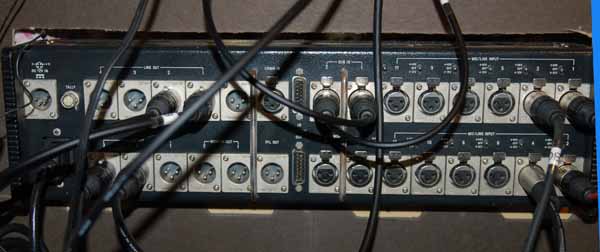
The back of the MXP61VU. The pair of D15 connectors in the center are the Cascade in and out... a good spot for a custom direct-out mult cable.

never implemented. There is, however, a pair of cascade input and cascade output connectors that are likely to never be both needed, so one of these could be converted into a direct output mult without major surgery.

Any vintage mixer could likely use some new capacitors, and could also benefit from updated operational amplifiers, and this one is no exception. But this model features typical Sony construction… it’s built like a tank.

Producer For Hire (Don’t Try This At Home)

I was recently in Nashville and met with studio owner Chris Mara at his all-analog studio. As I drove up to the  facility, I noticed “NTC” on the side of the building. Coincidentally, his studio is located in the old National Tape Corporation building, which was the company we used at OnLine Audio back in the ’90’s for most of our record duplication.

MCI JH428 all-analog mixer

Chris works with MCI expert Randy Blevins, so as you could expect, his studio is rotten with vintage gear. The main board is a 400-series MCI, 28-channel frame, routed to a Sony/MCI JH24 2″ 24-track. He’s got just about every configuration of tape machine you can think of, including 1″ 8-track, 1/2″ 4-track, and several 1/4″ mastering machines. It’s an all-analog signal path, but he has a Mackie HDR 24-track and Pro Tools for transfer of session files. Chris was recording “The New Belgravians” when I was there, and they rocked. In QUAD, no less!

Chris' collection of analog tape machines... more are around the corner!

While I’m primarily a location sound mixer/recordist, I’ve got an extensive background as a producer and engineer in music production as well, and have been considering taking on a FEW music projects. If you have been thinking about doing some recording, consider doing it “old school.” I have contacts at several studios, both local and in Nashville. And even though I own and regularly use several DAW systems, I greatly prefer working in analog whenever I can, especially for music projects. There’s an advantage to using the real thing instead of simulated plug-ins… there’s no such thing as “latency,” for one. Latency refers to the delay in all digital equipment where the computer tries to catch up to the music being fed into it. More plug-ins usually means more delay, as your computer struggles to do the math that each piece of simulated equipment requires.  This doesn’t happen with analog… everything is processed real-time. And analog has an infinite sampling rate.

The tradeoff is self-noise, as each piece of analog gear in the recording chain adds a tiny bit of noise that can add up really fast if you’re not careful. Software simulations of  reverbs, compressors, delays, and gates have no self-noise.

But the biggest disadvantage is talent… in other words, you need it. Recording and mixing in a traditional studio, in analog, is a much more musical workflow than mixing on a computer, but it requires more musical skill and ability than the typical home-studio, cut-and-paste GarageBand demo record. (Errors and mistakes are easily eliminated with mouse clicks these days. We used punch-ins and punch-outs on a multitrack for similar corrections, but rarely did the sort of microsurgery edits that are common in contemporary music.) Software simulations of classic gear are cheaper than using the actual gear, but cheaper isn’t necessarily better.

One of several tracking rooms. Not shown is Chris' hammond B3 with Leslie cabinets, or his rather extensive collection of vintage mics.

If you have an ear for classic rock ‘n’ roll, you’ll like the results that a dedicated studio space can provide… it’s a big difference over the typical bedroom recording. Contact me for rates and more information

Bargain Gear- the EV CO90

Most people can tell from my resume that I’ve been doing audio for a while. One of the advantages that I have over someone just out of school is in the gear department… I’ve used a lot of it. Some works great, others, not so much.

I first encountered Electro-Voice CO-90 lav mics at WCBD TV in Charleston, SC, nearly 25 years ago. These were wired lavs, and came with a transformer base to drive a balanced cable. While they weren’t particularly small or easy to hide, they are quite rugged… I’ve seen pissed-off news anchors slam them on a desk dozens of times, and they still work. They are omnis, which increases their usefulness in certain applications… even though I used to swear at them when we went to a tight 2-shot, since they would pick up the other anchor and phase cancel, especially when Jill Franco was wearing something busty and place the mic a long distance from her mouth.

The later version of this mic was the EV CO94, which had a TA3m connector on the mic head. This allowed them to be used with a wireless unit. The downside it that the 94s came with a slightly bulkier  rectangular “belt pack,” but it did work with 9v batteries which are easier to find. The head was the same size.

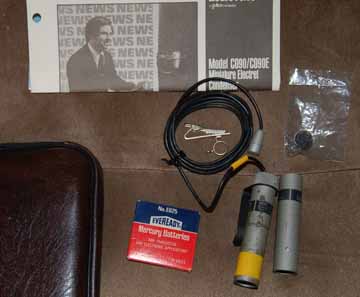
Here's a look at my latest eBay score… a CO90 complete kit. This one came with all paperwork, a battery (if you get one with a dead battery, please don't toss it in the trash for obvious reasons... save it for recycling), a single mic clip, a windscreen (easily broken and/or lost) and a second phantom power base... the only one I've seen.

So at the risk of driving the eBay price up, I can suggest buying a few of these as backups or extra mics. They are occasionally seen on eBay for about $25-35. Just a few things to be aware of before you buy:

1) The E625 batteries they used are no longer made, since they contained mercury. There are some substitutes that work (Z625PX, Energizer E625G). You might have to special order a few of these, since they aren’t commonly found at the pharmacy. But the current draw is miniscule– 150 microamps– and a battery will commonly last over 1000 hours.

2)Repairs. Electro-Voice was sold to Telex years ago, and the current company is a shell of its former self. Forget about factory service… I’ve called their parts department, and they have no replacement parts to speak of. There are two main failure points… the cable and the battery spring. The cable will often be just plain worn out, with cuts and breaks in the insulation. I’ve replaced the cables, but it’s quite a difficult task, as one end was soldered to a FET and potted in resin. If you buy one with a bad cable, then plan on quite a few hours at the bench to repair it, unless you get lucky. Sometimes a break in the insulation will be close to the base. In that case, the cable can be clipped ahead of the bad spot and re-soldered to the base, which is a good bit easier than re-soldering near the head. If you really want to change out the cable for new, you can buy replacement cable from Trew Audio’s repair department. It’s tiny and difficult to handle and solder, of course, so I wouldn’t recommend this as your first repair project.

A second place for these to go bad is the battery spring. These were special little dealies that EV made, kind of like a spring steel washer with three tiny leafs that press the battery against its negative contact and conducted current through the positive side. These little leafs are a weak point… I’ve had one with two of the three leafs broken off, so until I can come up with a suitable re-design, that mic will stay off-duty. You wouldn’t want to chance a dropout during operation because of a bad battery contact. A viable option in this case would be to skip the battery altogether… EV made a special phantom-powered only base, the CO90PM. These are gems if you can find them, but they’re extremely rare. It is possible to do your own conversion… details can be found here:

http://www.uneeda-audio.com/phantom/pl-76mod.htm

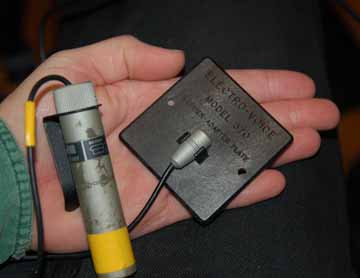
Another application for these mics that may be more useful is a plant mic, where the mic is hidden somewhere on the set. I’ve found a few EV model 370 Barrier Adapter Plates on eBay that just came in. These are simple glass-reinforced plastic plates, about 2-1/2 inches square, with a small recess and a clip to hold a CO90 head.

Electro Voice EV 370 boundary plate

The EV 370 boundary plate clipped to the CO90 head… an easy plant mic, surface mic, etc.

This will allow these mics to be used as a pseudo-boundary mic, though they will probably be improved by taping them down to a larger flat surface. The configuration isn’t a true boundary, like a PZM… a PZM(Pressure Zone Microphone) has the mic diaphragm parallel and very close to the boundary surface, 1/10-1/50″ away. A PCC configuration (Phase Coherent Cardioid) has the diaphragm set perpendicular to the boundary, except the CO90 isn’t a cardioid… so I guess that makes this a “PCO” mic, or Phase Coherent Omni. (To quote John Cleese, “He’s making it up as he goes along!)

Gear like this isn’t for everybody. To be honest, I rarely use these mics, and nearly always reach for my Countryman EMWs. But it’s good to have some hardwire choices in your kit in case the wireless situation gets buggy.

Teaching at Flying Monkey Arts Center

I’ll be teaching a production seminar this weekend called “Field Audio for the Underfunded Filmaker” at the Flying Monkey Arts Center in Huntsville, Alabama, Sunday (Feb 7th) from 2-4:30.

Professional grade audio hardware can get very expensive, and few self-funded filmakers can solve their audio problems by throwing money at them. But with some planning, difficulties inherent in low-cost equipment can be managed. The thrust of our discussion will be audio basics and how to capture decent sound with whatever gear you have… we’ll talk about microphones, simple wireless setups, common audio problems, post-production workflows, and planning your shoot for audio. Participants are encouraged to bring their audio gear, and if time allows, we’ll do some hypothetical setups and tests.

The class is free and open to the public, and will meet in Don’s Studio. The Flying Monkey Arts Center is located at Lowe Mill, 2211 Seminole Drive in Huntsville, AL. For more info, call Don at 457-5371. Their website is at www.flyingmonkeyarts.org/

CNN Heroes Link

Here’s a link to Loki Films website, where I did the field audio for the segment on JordanThomas here in Chattanooga. (My clip is the second one on the page)

http://www.lokifilms.com/CNN2009_videoclips.html

Camera work was by Julia Dengel, and the producer was Rachel Grady. Both were extremely professional and a joy to work with, and they produced a great story. It aired on Anderson Cooper’s 2009 Hometown Heroes Thanksgiving special on CNN.

Vinyl Transfer Station

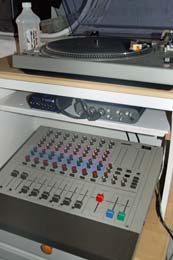
I’m in the process of moving my office downstairs, and now that I’ll have a little more space, I’m able to set up a small dedicated workspace for dubs and vinyl transfers. Right now, t consists of a Audio Technica turntable with an AT-400 cartridge, Sony MXP-29 mixer, and a new M-Audio Fast Track Pro interface. Not shown is the new LaCie 320GB triple interface hard drive that I’ll need to store all this data that I’m generating.

While I’m not a huge fan of the MP3 standard, there’s no denying it’s become pretty universal. And it is handy to have just about every record I’ve ever liked on a single ipod. Since I can leave this stuff hooked up, it’s much easier to do a vinyl to MP3 transfer now, though it’s still a fairly time-consuming process.

My dedicated vinyl transfer, dubbing, and encoding station.

Here’s a photo. The MXP-29 has a dedicated pair of inputs with phono preamps, so I’m able to go directly into the mixer. The Sony preamps are pretty accurate, if not a little sterile, but I think they sound a hair better than the small block-type preamp that I had been using. I monitor through a pair of AKG271 headphones, though I’ll occasionally listen to my Sony 7806 headphones. The AKGs are much more accurate overall, but the 7806s are more comfortable to wear and have a bass boost that sometimes makes a nice change. The turntable is a fairly nice Audio Technica that was donated by my brother-in-law. Fortunately the stylus and cartridge are still good… I’ve seen prices of $36 for a stylus. Last time I bought one, it was $2.59.

The records are recorded straight into Adobe Soundbooth with minimal processing. (See my previous post on Adobe Soundbooth.) While I can edit out all the crackles and thumps between songs, I usually leave them in for nostalgia’s sake. Occasionally a record will have a loud pop in a track… Soundbooth lets you highlight just the fraction of a second where the pop occurs, and then treat that section only, leaving the rest of the program untouched… A nice feature. While there are extensive EQ possibilities, I generally leave them alone unless I really want to play around.

Some of my newly acquired vinyl titles include Dark Side Of The Moon, and a near-mint pressing of Introducing The Beatles. Also picked up some Joni Mitchell, English Beat, and Candy-O by the Cars. My 14-yr old son wants to get some Queen as well… I force him to listen to some of these records as part of his mandatory cultural education.

On the Red Carpet at the New Moon Premiere

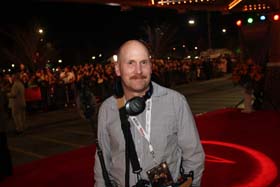
I was recently asked to work a special movie opening by Paul Gussack at DVCommunications. These are usually live sound events with large, heavy load-ins and load-outs, lots of gear, and very late hours. But this event was a little different. Paul’s production involved a three-camera shoot for the Regal Cinemas corporation of a benefit movie opening in Knoxville, and he needed me to be a boom operator. Turns out I was on the Red Carpet for the premiere of New Moon, the second movie in the Twilight saga and top infatuation for just about every pre-pubescent female in the western hemisphere. There were a few post-pubescent women there as well. And every one of them was screaming.

On the red carpet in Knoxville, TN. Image by Justin Fee, http://www.photographfee.com

So it was kinda fun to be on the red carpet. Besides myself, a photographer… Justin Fee of www.photographfee.com… were the only ones allowed there. Everybody else had to stay behind a barrier. We had a lot of downtime, so Justin snapped a picture of me and sent it to me. Now I can prove I was there. Now all my nieces are absolutely green with envy… thanks Justin!

March Of Dimes PSA for Atomic/Johnson Group

I recently completed a quick PSA for the March Of Dimes and The Johnson Group.

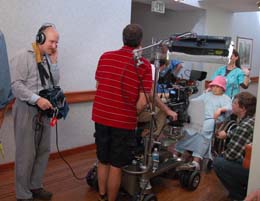
Me chasing the dolly with Atomic Films.

We shot for a half day at Erlanger North Hospital here in Chattanooga. The shoot was in a busy hallway during the day… there were people constantly needing to go through. Several times there were newborns in carts, which is always a big distraction for me… “Brian loves him some babies,” as my wife likes to say. The PSA was for the Make A Wish Foundation, and star of the PSA actually had cancer as a child, and is completing her degree as a Nurse practitioner. Nine years ago, as a Make A Wish recipient, she wished for an ice cream party and a shopping spree at Toys R Us… but they were both for the other kids on the cancer floor… nothing for herself.

Bobby Stone was the photographer. We shot with their Red One camera mounted on a Super PeeWee dolly. Most of the sound was from Lectrosonics wireless… I used a shotgun for some shots, but the noise from a working hospital meant that most of the useable tracks would come from hidden lav mics. The majority of the spot was voice over, only a few lines were sync sound.


CNN’s Hometown Heroes

I recently completed two days of shooting for CNN’s Hometown Heroes with Anderson Cooper. It will air over Thanksgiving weekend.

The shoot was coordinated by Loki Films in NYC. Rachel Grady wasCNN production team from Loki Films. L-R, Ted Pio Roda, CNN photographer, Rachel Grady, director/producer, and  Julia Dengel, DP director/producer, and Julia Dengel was director of photography. Both were extremely accomplished and professional. Loki Films normally works on documentaries– some have appeared on programs like PBS’ Independent Lens. Their current projects include the Saudi Arabia Youth Project for MTV, and “Freakonomics:The Movie.” Their production “Jesus Camp” won the special jury award at the Tribeca Film Festival and was nominated for an Academy Award.
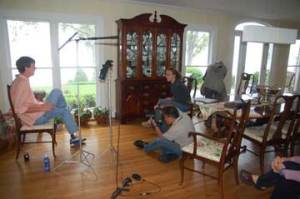
The subject was Jordan Thomas, who is an amazing young man. Jordan lost both legs below the knee in a boating accident. He was very fortunate to have survived, thanks to the fact that his mother and father are both doctors. While recovering in the hospital, he learned that most insurance policies limit coverage for prosthetics to $5000. His cost $24,000, and he’s on his third set, since young people grow out of them… not unlike a pair of shoes.

Within two weeks he had started the Jordan Thomas Foundation to help underinsured and uninsured families buy prosthetics for children. Once a candidate

Jordan Thomas

Rachel Grady interviews Jordan Thomas for CNN

is selected, the foundation commits to them until they are eighteen, meaning they will purchase several sets of limbs. We followed Noah–  a six-year-old beneficiary- through the Creative Discovery Museum here in Chattanooga. He went from basically a peg-leg to a real leg with an articulated knee. Where before he couldn’t run with other kids or ride a bike, he’s now EXTREMELY mobile and active… we all had a hard time keeping up.

I’ve just learned that Jordan has been selected as one of the top ten CNN Heroes, which means he’ll be traveling to Hollywood over Thanksgiving weekend for a celebration event hosted by Anderson Cooper. It couldn’t have happened to a nicer person.

Consider a donation to the Jordan Thomas Foundation, or help out by voting for CNN’s Hero of the Year here

Sound Devices MM1

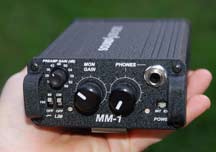
In the new gear department, I’ve just taken delivery on a Sound Devices MM1 mic preamp and headphone monitor. While it is possible to find a cheaper headphone monitor these days(for example, this one by Behringer), I decided to invest in this unit, partly because of Sound Devices‘ reputation for quality gear. My initial impression is their reputation is quite safe… this is a very well-built and functional little unit.

The Sound Devices MM1 is fairly compact and lightweight. A Portabrace-style casewould be nice to keep the unit from getting dings, though it's ruggedly built

The Sound Devices MM1 is fairly compact and lightweight. A Portabrace-style casewould be nice to keep the unit from getting dings, though it's ruggedly built

A recent shoot for CNN required NO mixer in the signal path… rather, they wanted a direct wireless lav in one channel, and a wireless boom in the other. While I have the wireless transmitters covered, the “butt plug” Lectrosonics that I’ll use with the boompole doesn’t have a provision for monitoring the signal. The MM1 will be perfect for this application… at least until I come up with the $3K for a Zaxcom 992 wireless camera link.(For a review by Glen Trew, click here.)

Besides reputation, the reason I selected this unit was for available features on the preamp section. Inputs and outputs are transformer-balanced, there’s a limiter and a high-pass filter that can be set to 80 or 160 Hz. Also of critical importance is the mic powering section, which can be set for 48 volt phantom or 12 volt T-power. I have two Sennheiser shotguns that use T-power, a long 815T and a medium 415T. The 415 has a smoother high end than my Sennheiser ME66/K6, but its power requirements and sensitivity to moisture mean that it doesn’t get used as often as I’d like.

There is one thing that I DON’T like about it… if the preamp section is set to 0dB, as in no added gain, the unit doesn’t pass a signal at all… no signal at the headphones or the output. So the unit can’t be used if you want to monitor a signal without boosting it. I tried to use it to monitor to my boompole signal before transmitting into a Lectrosonics 187 “butt plug” transmitter, but that requires a mic-level signal. Any boost will distort the transmitter, so this hasn’t been the solution I’d hoped. Some custom input cables for my Lectrosonics transmitters will help (thanks to Lectrosonics for making their wiring information available… click here.)

Building A Transformer-Balanced Mic Splitter

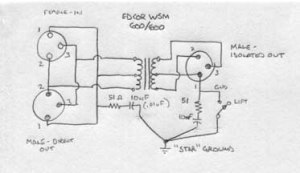
One of my latest DIY audio projects has been a simple transformer-balanced mic splitter for location work. While you can occasionally get away with splitting a mic signal with a Y-adapter, it can cause all sorts of noise and loading problems. Transformers… if they are high quality… do the job much better. Jensen transformers are famous for this application, but expensive, and cheap, lightweight transformers found in catalogs like Allied and DigiKey don’t handle high frequencies well. After much searching on the internet, I found Edcor audio transformers. This is a small US company that winds audio transformers… their WSM600/600 has a frequency response of 20hz-20kHz, and are affordable at around $12 each (I needed  a four-channel split for my Edirol R4Pro field recorder that I bought from Trew Audio… four signals to the recorder and four identical signals to the mixer that are then mixed and sent to camera.)

The splitter circuit is pretty simple. It's developed from the Jensen application notes, more transformer design info can be found at their website.

The splitter circuit is pretty simple. It’s developed from the Jensen application notes, more transformer design info can be found at their website.

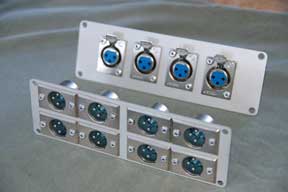
The circuit is pretty simple.  The only components required besides the transformers and connectors are a 51 ohm resistor and 10nF capacitor for a radio frequency network. I used polyester film caps and metal foil resistors for low noise. A ground lift switch is optional… it isn’t a bad idea because it allows for potential ground loops, but it does complicate the build a bit.

The front and back panels for the 4 channel splitter. There's barely enough room for the connectors.

The front and back panels for the 4 channel splitter. There’s barely enough room for the connectors.

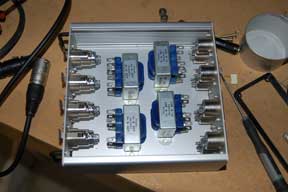
I first built a two-channel version, and I’m glad I did… I figured out where my screw-ups were. The case I selected was very tight… too tight for the two-channel version, really, so I was able to devise a better way to locate the components for the four-channel unit. When you build these, it’s best to wait to mount the transformers until after the connectors have been mounted and wired. And it’s difficult to machine the case sides for connectors or switches, you want to use only the smooth face plates for mounting hardware.

Wiring the unit was made easier by not bolting anything to the case before soldering… I made that mistake on my two-channel unit. And I saved a bunch of connectors by hard-wiring pigtails to the two-channel splitter, but it makes it cumbersome to store and vulnerable to damage. I decided to be conventional with the four-channel version and use connectors, but I’ll need to solder up eight short cables to go along with it. Soldering cables isn’t difficult, but rather time-consuming.

The case layout with the transformers in place. They'll be bolted into position after they're soldered.

The case layout with the transformers in place. They’ll be bolted into position after they’re soldered.

I’ll be adding more info on this project as it develops.

Update: Well, my splitter has been completed for some time now. It works great. In use, it’s a bit heavy… not something I can put in my bag, but it’s normally used on the cart anyway. The size isn’t inconsequential, either, though this is certainly the smallest case that would fit the unit. As it was, I didn’t have room for ground lift switches. Soldering the leads was a bear, because I was trying to keep the leads as short as possible. I used a mini shielded cable that I bought from Trew Audio that is normally used in lavalier mics.

On location with SpeedTV’s “Wrecked”

I managed to get a last-minute call for a shoot this week in Chattanooga for a segment of SpeedTV’s “Wrecked.” One of the show’s principals was receiving an industry award here, and they wanted to put it into the show. Eric Weatherington, freelance producer from North South Productions drove down from Knoxville. Local photographer Jeff Hannah was on primary camera, and Eric shot on the secondary, a pair of Sony Z1U. Equipment difficulties made the money shot a little questionable (the camera switched into high-gain mode right before the presentation, and Jeff couldn’t navigate the layers of menus fast enough to get it back. The shot ended up really grainy. The problem turned out to be a user-assignable button on the side of the camera that wasn’t cleared by the last photographer. The button was bumped, and Jeff was baffled.) The Z1s were really touchy about input level, and would clip hard if pushed over 0Db, but it sounded reasonably good in the end. (The metering on the Z1 is digital full scale, and zero is absolutely zero… meaning no more digital bits to record on. Anything  pushed over zero dBFS sounds absolutely awful.)

On Location with Majora Carter

Yesterday I completed a long day documenting a visit to Chattanooga by Majora Carter for the Benwood Foundation and Mindflow Media. Majora is an activist and environmental justice activist who did phenomenal work in the South Bronx, building the first park to be constructed in that neighborhood in 70 years. We started at about 8:45AM on a bus tour of Chattanooga (which was educational in it’s own right… did you know we have a place in Chattanooga called “residue hill?” Folks are so scared of this site that  disturbing the area is prohibited, since they don’t know what sorts of chemicals have been dumped there. It’s a relic of 70-plus years of manufacturing in Chattanooga.)

Recording audio on a small bus, packed with local dignitaries and careening down residential streets  is a particular challenge. I’m quite sore this morning.

A large luncheon and panel discussion at a local church and afterschool center was next, then a sit-down interview with Ms. Carter back at the Benwood offices. We had a few minutes for some pizza, then it was off to UTC to set up for her evening lecture. (I managed to swing through Starbucks on the way for a quick recharge.) We wrapped up at 9:00PM. A long day, but like all the shoots I’ve done with Dave Porfiri and the Benwood Foundation, it was educational.

Classic Audio- the RTS Systems HPM-41 mixer

As much fun as all the latest and greatest software-based audio technology is, I still like old analog circuitry. It has it’s quirks, of course, but there are lots of cases where high-quality analog still sounds outstanding… as good as, if not better than, digital.

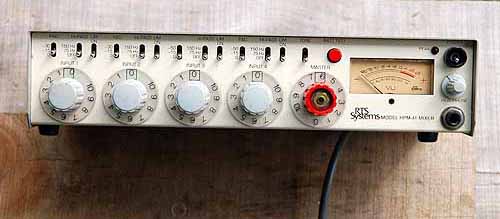
The front panel of the HPM-41 mixer by RTS Systems

The front panel of the HPM-41 mixer by RTS Systems

One of the mixers in my collection is the RTS Systems HPM-41, which is a 4-input mono mixer. Background info on this unit has been very difficult to find. RTS Systems abandoned the mixer business years ago to concentrate on intercom systems for television and broadcast stations. It looks like these were built to compete with the ubiquitous Shure M67 4-channel mixers in use in  just about every radio and TV station in the country. The Shures are built like tanks… dependability is critical in broadcast… but the RTS mixer has some big advantages over the Shure. Some are apparent from the front, and others you can see once you open the unit up.

The rear panel of the HPM 41

The rear panel of the HPM 41

Each channel has a two-position pad to drop the input signal 15 or 30 dB. There’s also a 75Hz and 150Hz high-pass filter, and a real bonus, individual limiters on each channel. On the back, each channel can be phase inverted, and channel 1 and 2 has phantom power, which can be switched between 12v A-B powering or 48v phantom. (I like this arrangement better than my brand-new and very expensive Shure FP33 mixer. To change the phantom powering, you have to open the unit up and poke around the battery compartment. It’s tight, your fingers are constantly touching the circuit boards, and it’s easy to forget the settings.)

All the switches on the HPM-41 are recessed toggle switches, which gives the whole thing a higher-quality feel.

This mixer is really heavy. This is due to the large mains transformer inside the unit. While it has a provision for battery power, it’s really designed for stationary operation rather than fieldwork in a bag.

Inside the HPM-41. The large rectangle on the left is the RF shield covering the AC mains transformer.

Inside the HPM-41. The large rectangle on the left is the RF shield covering the AC mains transformer.

Once you open the unit up, the differences between this and a Shure M67 become immediately apparent. The pots are Bourns sealed type, probably conductive plastic. These give better performance than the usual carbon type. Four big electrolytic capacitors are also immediately noticed. The 25-volt, 3300 uF monsters will be hard to replace since they are axial-lead type, and this type of lead is not  normally stocked in better grades. Electrolytic capacitors can degrade over time– especially through lack of use– and it’s usual to replace them in vintage equipment. But capacitors that are larger than their minimum requirements do last longer. I’ve even heard it suggested that with caps, more is always better. (but within reason, of course.)

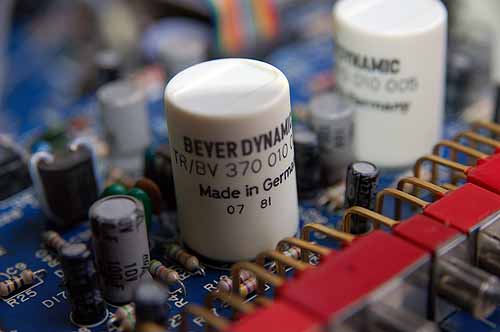
Beyer input transformers

Beyer input transformers

ICs in this unit are 5532s and TLO84s. While there are some other IC’s that might yield higher performance (such as the Burr-Brown 2134), the general consensus seems to be that 5532’s are pretty good chips. Also noted, but not usually seen, are four Beyer Dynamic German-made audio input transformers. Some good info on these and other circuits can be seen on the kubarth site.

The RTS Systems HPM-41 is a comparatively rare mixer. My guess is that these were very expensive units judging from the components, especially when compared to the Shure utility mixers from the same period. I don’t use mine very much… the weight and power requirements mean that I can’t use it in a bag, running around under battery power, which is 95% of my business. And it’s usefulness is further limited by being a mono mixer. But I expect to find a good use for it as a preamp or base for modification. Several ideas come to mind, including placing the heavy power transformer into a separate case, changing out the power plug to a 4-pin xlr, and adding direct outputs. If you happen to find one cheap, I’d go ahead and buy it, or let me know about it. Also, if anyone has any documentation on these, I’d very much appreciate a copy and I’ll add it to these pages.

The AFFT quarterly meeting

The AFFT Quarterly meeting at the Doubletree Hotel in Chattanooga.

The AFFT Quarterly meeting at the Doubletree Hotel in Chattanooga.

The quarterly meeting of the Chattanooga chapter of the Association for the Future of Film and Television as held this past Thursday. I helped a little to organize the event, but Emily Bowman did all the heavy lifting. We had a comparatively large turnout… over a hundred people… including several people who regularly work in LA or NYC in the film industry.  Congressman Zack Wamp addressed the crowd for a few minutes and declared his support of the film incentive tax credits program, which is an important AFFT goal.

I also distributed the first hardcopies of the AFFT Chattanooga directory. I had 42, and we went home with about 5, so the quantity was about right. These were a pain to create, since I had to do most of them at home. The office supply print shops have jacked their prices while no one was looking, so the first pile of these were laser printed and assembled at my office at a cost of zero. But we may need to put out a donation jar at the next meeting to help defer the cost of these, since they cost $1.40 each to produce. But if you’d like a copy right away, I have a PDF version that I can email you, as well as a VCard file that you can import into your address book. (I know it works well with Macs, and it’s supposed to work with Windows as well, but no promises.) My email is hammerguy at bellsouth dot net.

At The Brigand Shorts Film Festival

At the Brigand Shorts Film Festival

At the Brigand Shorts Film Festival

I’ve just returned from exhibiting at the Brigand Shorts Film Festival in downtown Chattanooga. While the day was a little dicey due to the weather, overall it was a nice event. Ben Todd and all the folks at Brigand Pictures worked long and hard to pull the event off as a prelude to their film opening for “Thick As Thieves,” which they produced here with no budget whatsoever. I did get a chance to meet and speak with several new folks… Chris Clark, for example. Chris heads the film production program at Bryan College, I’ll be doing a short lecture/seminar there  on audio production this sememster. I also met with Michael Laney, Communications Chair at Lee University. I hope to speak there as well.

Spotty participation by several vendors hurt the festival a little, but overall I think it was very worthwhile for me (and the other participants) to be there.

My table at the Brigand Shorts Film Festival. Having all the gear exposed with dark, foreboding skies (and reports of heavy rain at my house) made me jumpy, but the rain held off until four.

The weather held until four o’clock, when I had to pack up and head home. With all the equipment, I couldn’t take a chance of it getting wet. There were a few drops of rain hitting the windshield as I was leaving, but I managed to get everything safely unloaded without getting wet.

Adobe Soundbooth- First Impressions

I recently purchased Adobe Soundbooth for audio editing and sweetening of soundtracks. It’s normally a part of a large, and expensive, “suite” of Adobe programs. But Adobe recently made Soundbooth available as a standalone app at a lower price.

I’ve used Adobe software for many more years than I should admit, usually for graphics production… Photoshop, Illustrator, Acrobat Pro, etc. While their stuff has never been cheap, they have always produced pro-grade products that deliver real work.

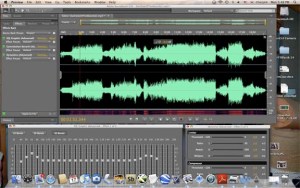
Soundbooth is turning out to be a similar experience. Like the others I’ve used, it’s aSoundboothScreen good, capable program with lots of flexibility. I haven’t used it with video files yet, but just to get my feet wet, I decided to try some music remasters of old vinyl that I have, and see if I could transfer the result into iTunes. Vinyl records– especially the classics that I grew up with– were made with vinyl in mind as its final output. The format was part of the musical decisions the bands made, and it has a characteristic sound. And for those of us who are a certain age, we remember that “sound” of a vinyl record as part of the music. Old Beatles records sound better with some turntable rumble and a few crackles and pops at the head. It was all a part of the experience… the giant cardboard squares with all the groovy graphics, the bonus of a printed paper liner, or better yet, a separate sheet with lyrics, methodically cleaning the grooves and checking the needle for the evil dust, and then you “dropped the needle.” The resulting thud and the crackles that came just before the music only heightened the anticipation. The whole thing became a ritual. It made music more fun.

I used Soundbooth to import a record side– complete with the crackles and rumble– as an MP3 (though there are several other file formats that I can use), then cut each song out of the side and save it as an individual file. It was a simple matter to add fade ins and fade outs before program audio starts. Then, just for grins, I used the advanced graphic EQ to add a little “air” to the top end and a slight bump to the bass, while cutting out the freq beyond the range of the vinyl… at least the vinyl I have. Most of the records are somewhat worn, and my transfer process didn’t yield any audible program material much above 15kHz, so that was notched out, and the same with subsonic rumble  below 31 hz. Switching the EQ in and out showed a nice, though subtle, improvement.

 The parametric EQ and mastering screens in Adobe Soundbooth

The parametric EQ and mastering screens in Adobe Soundbooth

There are several otther “effects” that are available in this program, including parametric EQ, reverb, noise gates, compressors, expanders, etc. I haven’t had much of a chance to play with these yet, and most wouldn’t really apply to this particular job anyway. Being a former mastering engineer myself, I was careful not to change much of the EQ that the original engineers so meticulously set for each record.

After I applied a slight amount EQ and trimmed the heads and tails, I went through and fixed any particularly loud pops or scratches using a “reduce noise” command only at the offending sections. This leaves most of the program untouched.

After saving these doctored files, I moved them into the folders where iTunes stores its music. They appeared in iTunes as “unknown artist” and “unknown album,” but the song titles were there, and they played. I just had to “get info” about each song and manually add the album name and artist. Then iTunes moved the files into their correct folder, and the album appeared in the iTunes library. I even added the album artwork by dragging the image from Wikipedia articles.

All in all, I’m quite pleased and will probably look into buying the other Adobe production programs. That’s not to say I loved everything… there are a few odd bugs that need fixing, and this program could really, REALLY use a good printed manual. But I’m enjoying myself with it- BG

8/14 AFFT Meeting

Just returned from this month’s organizational meeting of AFFT Chattanooga,  which was, as usual, well-run by the capable Dave Porfiri, who had the agenda prepared and completed within the alloted hour’s time. It was good to see some new faces there… Jeff Hanna and Beth Newhoff.

The 8/14 breakfast meeting of the AFFT in Chattanooga. I'm on the laptop just to prove I was there.

The 8/14 breakfast meeting of the AFFT in Chattanooga. I'm on the laptop just to prove I was there.

Mark your calendars… the next AFFT Chattanooga quarterly meeting will be on Sept 3 at 6PM, a panel discussion on film education in the Chattanooga region… it should be a worthwhile event.