2012 in review

The WordPress.com stats helper monkeys prepared a 2012 annual report for this blog.

Here’s an excerpt:

4,329 films were submitted to the 2012 Cannes Film Festival. This blog had 33,000 views in 2012. If each view were a film, this blog would power 8 Film Festivals

Click here to see the complete report.

My New Tape Machine

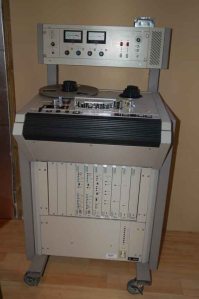
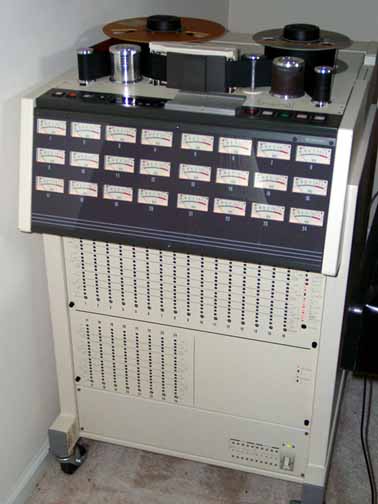
Here’s the latest acquisition for my studio… an Otari MTR10. This was purchased from Chris Mara of MaraMachines and Welcome To 1979 Studios in Nashville, TN. I saw it when I was there for the Producer’s and Engineer’s Summit. Unfortunately it violates my “large equipment rule” (don’t buy anything that’s too big to resell on eBay if you need to), but this one is worth the exception.

My Otari MTR10

My Otari MTR10

We had a similar MTR12TC of these at On Line Audio in Charleston, SC. It was the same machine, with the addition of a special head that laid a narrow timecode track in the center of the tape. We only used this a handful of times, and that feature isn’t quite as useful nowadays.

I’m a big fan of these machines. Their large size means they’re easy to align and maintain. Now that they are all “of a certain age,” they’ll need more care and attention than they did at my old studio (if I recall correctly, both our MTR12 and  our Otari MX80  24track version were brand new. Of course, they worked like a charm.) Fortunately this machine is in fantastic condition… everything works except the return to zero function, and even though it’s non-essential, I’ll have that sorted in a few days.

This one has probably seen quite a few miles of tape through it, as it was formerly owned by Disney. The heads were at the end of their service life, so Chris had John French of JRF Magnetics put on a pair of refurbished heads. Now the record and repro spec is back up to factory standard. (JRF Magnetics was the go-to company for any kind of head work as far back as I can remember, and I was pleased to hear that they are still doing work on tape machines. I wish I’d thought to have John sign my head stack somewhere… he’s a rock star in the tape machine world.)

The deck lifts up for easier servicing... no screwdriver necessary

The deck lifts up for easier servicing… no screwdriver necessary

I’m especially excited to have this machine in my inventory. As far as I know, I’ve got the only real analog tape machine left in town, so that’s a competitive advantage. It opens up several creative options… in addition to using it as a straight mastering deck, it can also be used as a tape delay, as well as for straight tape-to-digital transfers.

There is a real difference in the sound of projects that have been mastered on analog tape. It is very subtle, but it’s there. And while plug-in emulations of tape machines are cheaper and more convenient, they aren’t the same… they will always be copies, and this is the real deal.


The Ribbon Mic Transformer Challenge!

Here’s a little bit of fun for all you mic builder and engineer types. I put two different transformers onto the same ribbon motor for a very casual test. One of these transformers is found in the typical Chinese ribbon mic. The other is a US- made, high-performance custom wound transformer from Les Watts. (Les tells me that he may have more of these available soon.) I hooked each up and recorded a few lines lines of voice and some scratches with my fiddle.

The fiddle playing sucks… really, I’m not being modest here… because I just got it back from the shop, it has brand-new strings, and a brand-new bow as well that doesn’t have enough rosin on it yet, so the strings slide and scratch all over the place. It also sucks because I can’t really play fiddle.

You’ll notice a good bit of hum with these samples because the transformer is dangling in the air & has no shielding. When I did my final installation, most of that noise went away.  It’s pretty impossible to do an actual evaluation with all this noise present, and perhaps in the future I’ll do some better samples with shielding, etc. But this was all I had time for… at least for now. There are only two transformers in this test… if someone has a pal at Cinemag, Lundhal, or Samar, get them to send me a transformer and I’ll make it a larger comparison. I’ll probably order an Edcor in a few weeks, and perhaps then I’ll do some better samples.

These are really casual samples, so they’re MP3 files recorded at 44.1kHz, 320kbps files using an M-Audio Duo preamp and a Sony PCM-10 recorder. And remember that it isn’t really a fair test… there are lots of variables that might make one transformer work better than another with any given ribbon motor. I just wanted to see if I could hear the differences.

So here are the samples… transformer “B” first:

XfmrBedit

And now transformer “A:”

XfmrAedit

Which transformer do you prefer? Can you guess which one is the cheapy and which is the better? I certainly have my favorite, but it might be because I know which one is supposed to sound better. (This kind of bias is well documented, and it’s surprisingly difficult to overcome!)

I’ll show you the man behind the curtain here in about a week.

UPDATE: Time to spill the beans… transformer A was the better grade unit, and transformer B was the less expensive garden variety type. I’ll try to put together a better transformer review in the future using more transformers and a better (less noisy) samples. Thanks for playing our game, and here are some lovely parting gifts for you. Sorry, our production assistants appear to have eaten those.

Ribbon Mic Test

Here’s a look at my latest… a ribbon mic motor under test on my bench. Right now, it sounds pretty good. In fact, I’m tempted to just toss it into the case and call it done as it is, but I’m going to wait a bit. I can see some tiny problems with this one that I’d like to correct first. I’m not sure if you can tell in this photo, but the ribbon has a very slight curve… it’s closer to the magnet on the middle on one side, and the edges on the other. This is probably due to the way I corrugated the ribbon, using a fluted dowel pin and rolling it on a mousepad. This method works, but it is hard to get an even amount of pressure, and I probably pressed down a hair more on one side than I should have.

A completed ribbon motor of my own design

Still, it sounds quite nice. It has a fair amount of output, though I might like to squeeze out a bit more signal. A more accurate assessment will have to wait for a new ribbon… I’ve bought a “Paplin Crimper” on ebay for $15, which should be adaptable into a better ribbon corrugator. It’ll at least be an improvement on my current method.

I’m especially pleased with the transformer on this mic. I managed to get a pair of these from Les Watts. He has them wound for use in his microphones, and they have specifications that rival some of the best ribbon transformers available. Of course, it’s hard for me to tell what is due to the transformer and what’s the result of my ribbon motor design. Hopefully I’ll be able to source some cheap Chinese ribbon transformers soon so that I can compare the two.

A “Paplin Crimper Tool.” These are readily available on eBay for about $15, and I’m told they make good ribbon corrugators… we’ll see shortly!

Remaining work on this microphone is a new ribbon and adding some ground connections, but apart from replacing the ribbon, it’s just a matter of wiring it up and screwing it closed. The shell will certainly affect the sound to a degree, but I don’t think it will be too detrimental… the EM shielding that a mic shell provides will likely be an improvement, though I’m not hearing much in terms of self noise as it is.

Here’s a voice test MP3 of this mic just as it appears in the photo above. This isn’t a critical test, just a check to hear if it’s working. It’s on my workbench, not the perfect place for this… I hear reflections from the rear, and the fan noise from the laptop is audible. The cable being used to connect the mic was quite prone to noise depending on it’s position… I just placed everything where the noise was lowest. The mic is connected directly into an M-Audio Duo interface, sample rate was 44.1. Have a listen… comments and opinions are most welcome.

RibbonTestRevA

Bargain Gear: The Crest Audio iPro One Preamp

As you probably know, I’ve been doing a bunch of ribbon mic experiments lately. The thing about ribbons is that, in general, their output level is fairly low, and the mics I’m building are no exception. As a result, you have to crank the input gain pretty high on a ribbon, and when I tested the Austin ribbon mic, it was pretty clear that my preamp department was lacking. And until I start making thousands of dollars in the studio, I won’t be able to buy a nice John Hardy M1 preamp like we had at OnLine Audio (list price, $2905 for four channels. It sounded REALLY good…)

So my alternative was to build one myself. A conversation with Les Watts told me he uses THAT chips for the pres that he’s built, and their performance equals or exceeds discrete mic preamps like those used in the M1. So I began looking at designs and collecting parts to build one or two myself.

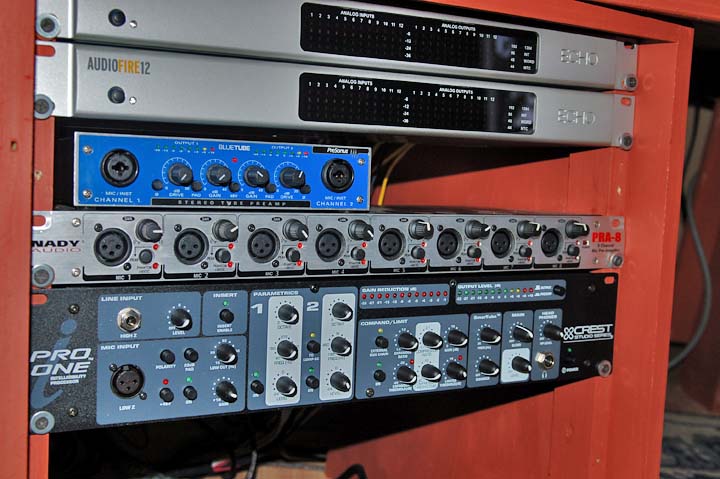
The input side of the studio. The two interfaces are usually fed from these preamps, though I have direct outs on my mixer if I need more. I bought the Nady years ago. It works, but isn’t the best solution… I only use it when I’m looking for a quick signal input. It’s due for a complete overhaul soon. My other preamps are relatively new additions, a Presonus Bluetube, and on the bottom is the main subject of this review.

That’s when I came across the Crest iPro One. It uses THAT chips and has a very low EIN (Equivalent Input Noise) spec of -129dB. I found one on eBay for $140, including the shipping, so while I probably shouldn’t have, it was too cheap not to try one. They seem to be discontinued, I can only find them from a seller called Audiosavings. But they are brand-new units and arrived via FedEx just a few days after ordering.

It came in the other day, and I’ve set it in my rack and gave it a listen. Here’s my initial impressions.

About the only real beef I could find was that the name starts with an “I,” which has gotten really overused. The rest is pretty darn good… crazy good considering the price that I paid for it. It is indeed a low noise preamp, and my ribbon mic sounds way better when connected to this box.  In fact, it’s made the mic a viable option for a speaking voice signal, where before you really couldn’t use it for anything relatively quiet like spoken voice.

The Crest preamp and mic processor controls

And there are lots of other options available on this unit for coloring the signal to your liking. Going from left to right, first is a low-cut filter, which will be useful in several cases. It has a fairly gentle 12dB/octave slope, so it won’t be like a brickwall filter or anything like that, but it’ll help with low-frequency noises and resonances.

Next is a basic 2-band parametric EQ section that can be switched into or out of the circuit as needed. With the controls set flat and no mic connected, I noticed very little added noise when the section was switched in and out of the circuit, which was a good thing. It’ll probably be most useful as a notch filter to knock out an offending frequency, and has a greater cut range (24dB) than boost range (12dB). A very handy feature is a parametric to sidechain switch. With this, you can set up a de-esser easily by using the parametric to boost the frequencies that cause the compressor to to operate, causing it to clamp down on the highs. Or if the compressor is reacting too much to, say, a bass note or kick drum, the parametric-to-sidechain button can be used to doctor the compressor’s operation.

Next is a dynamic section which includes a basic expander (I prefer the term noise gate, though that isn’t exactly correct. A noise gate acts more like an on/off switch when a signal falls below a certain threshold, while an expander acts more like a fader that activates below a certain threshold). The release time is fixed, so this unit can seem abrupt on a signal like a voice, but you do have a ratio and a threshold control, so it has a pretty broad adjustment range. The compressor section has threshold, ratio, and make-up gain controls. It isn’t as adjustable as a standalone compressor, of course, but it’s easy to use and works well. There’s also a limiter with fixed attack and release times, I’d imagine this would be useful to prevent overloading your DAW input. The dynamics section also has an external sidechain input and an on-off switch, which are pro-level features.

The “SmarTube” feature adds high-frequency harmonics, which can “brighten up” a signal, according to the manual. I haven’t used it much yet. Personally, I believe that if you want “that tube sound,” you should use tubes. But then again, good tube gear can cost a fortune, so this may be an alternative. It could be especially useful when using the unit as an instrument interface, thanks to the inclusion of a line input and level control… another reason I bought the unit, it should work well as a bass direct in. I haven’t tested that yet, though.

The unit also has a headphone out, which is super handy to have. I love it when these options are available, as I can plug in and concentrate on a single function. It saves time since I don’t have to think about the signal flow.

There are two meters, gain reduction and output level. Sure, Crest could have saved a few bucks by using a single meter and a switch, but it’s great to have visual confirmation of the unit’s operation.

What I really appreciate are the little things, though. The fact that this has front panel connections AND rear panel connections, for example. It increases the cost to the manufacturer, and the suits would argue that the unit would still work with connectors on either the front or the back, but I really prefer both. Sometimes I’ll want to keep things clean in the front and use the back connectors, but when I want to plug in a mic or guitar cord, it’s great not to have to crawl around to the back of the rack, then realize I need my glasses, then go find a flashlight so I can see what the heck I’m connecting… you get the idea. And something as simple as putting the power switch on the front… somehow Nady seemed to think that on the PR8, the back was a good place for a switch, so on my other preamp, I have to reach around the backside of the rack to power it on and off… a stupid place to put a switch on a piece of rackmount gear, makes me cuss every time I do it. (Actually, the Nady is being scheduled for a full heart transplant. I’ll keep the connectors and the case, but replace the power supply and all the circuit boards with something that works better… probably a bunch of THAT circuits.)

Now, I haven’t put this unit through an exhaustive battery of tests, and I’ve only used it on a few actual sessions. A proper audio job is always much more telling than just going through the functions. But it really seems to be an affordable, very functional piece of gear. The overall weight seems lighter than you’d expect for a box of this size, and I’d imagine the switches and pots won’t last into the next century. But waddaya want for 140 bucks? For what it can do, I think it’s a terrific buy… if you’ve been wanting to try an external preamp, and you’re on a really tight budget, this would be a good choice.

Full Disclosure: I don’t have any connection to Crest. This unit was purchased at retail on ebay, and was done so for use in my own studio. I don’t receive any sort of benefit from this review. (though I’m not above that sort of thing at all. Feel free to send me your expensive gear, and I’ll publish an equally expensive opinion.) The post above is strictly my personal impressions, accuracy and correctness are not guaranteed, and your mileage will almost certainly vary- BG

A Ribbon Microphone- Design 001, Rev A

Since I have to give away the Austin Ribbon Mic that I built, I decided that I wanted one of my own. I purchased raw materials for four more ribbon mics and have been working diligently on another mic. It isn’t completed yet, but I’ve done enough (and it looks good enough) that I can show off some preliminary photos.

My progress so far on ribbon mic no. 2, which incorporates a large number of design changes from the previous mic.

This microphone is similar to the Austin ribbon, but it’s a completely new design inside. The body style is similar, and I’m using a similar motor frame of clear acrylic plastic with drilled vent holes as a frame for the motor, but that’s where the similarity ends.

The Austin mic sounds great, but my outboard preamps are… well… let’s just say they aren’t top-of-the-line models. (Except for my lovely pair of VP26 pres from Classic Audio Products of Illinois, but I don’t have a Lunchbox yet to mount them in. I’ll get them racked one of these days, but the studio needs to generate some income first.)

So as a result of my gear, I’m having to crank the preamps up a good bit on the Austin mic. It sounds great on a source like an acoustic guitar, but for voice it requires a super clean preamp. (The Crest preamp that I recently purchased is a significant improvement.) This new design is an attempt to increase the output a little so that I can get a better signal with more common equipment.

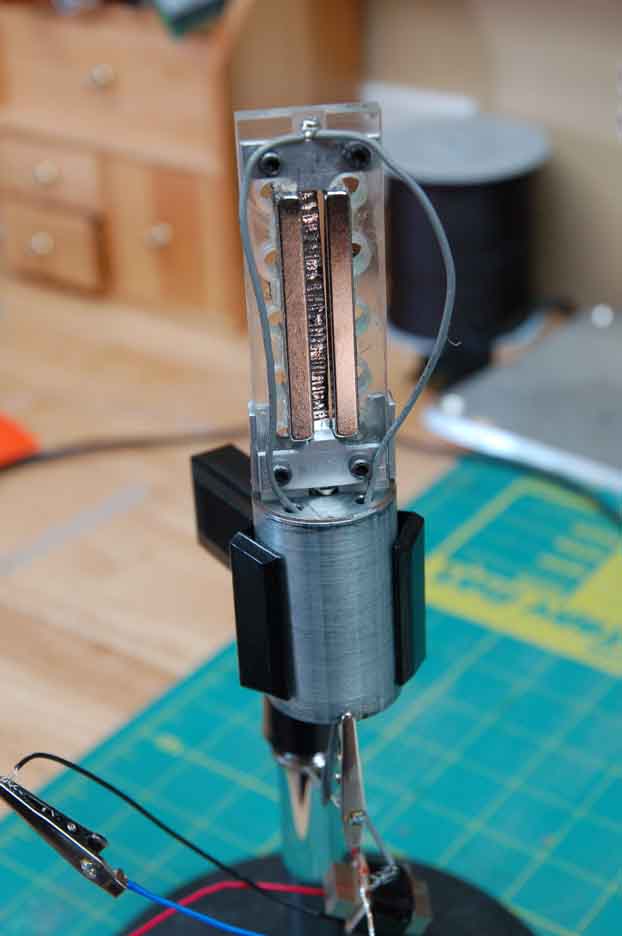
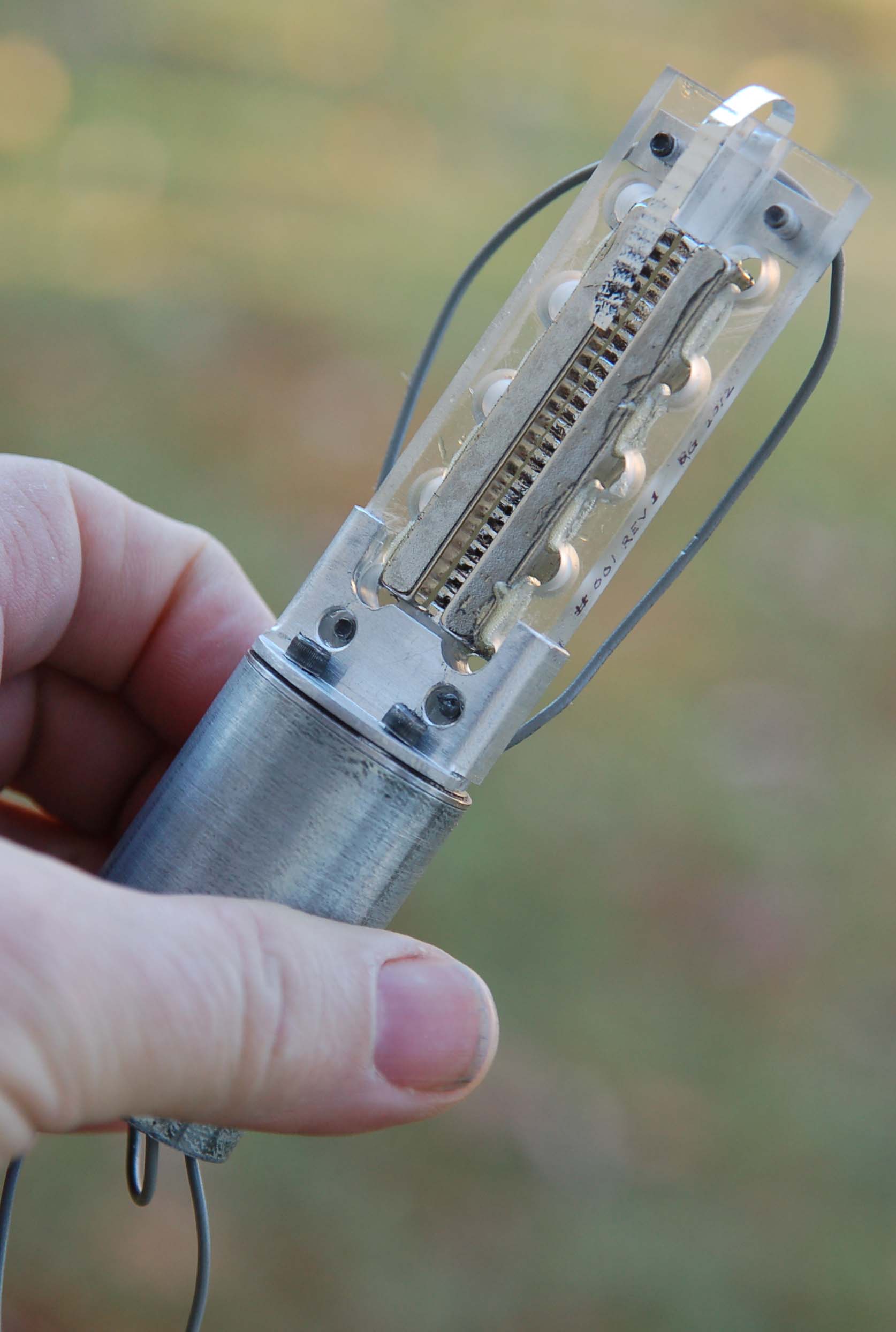
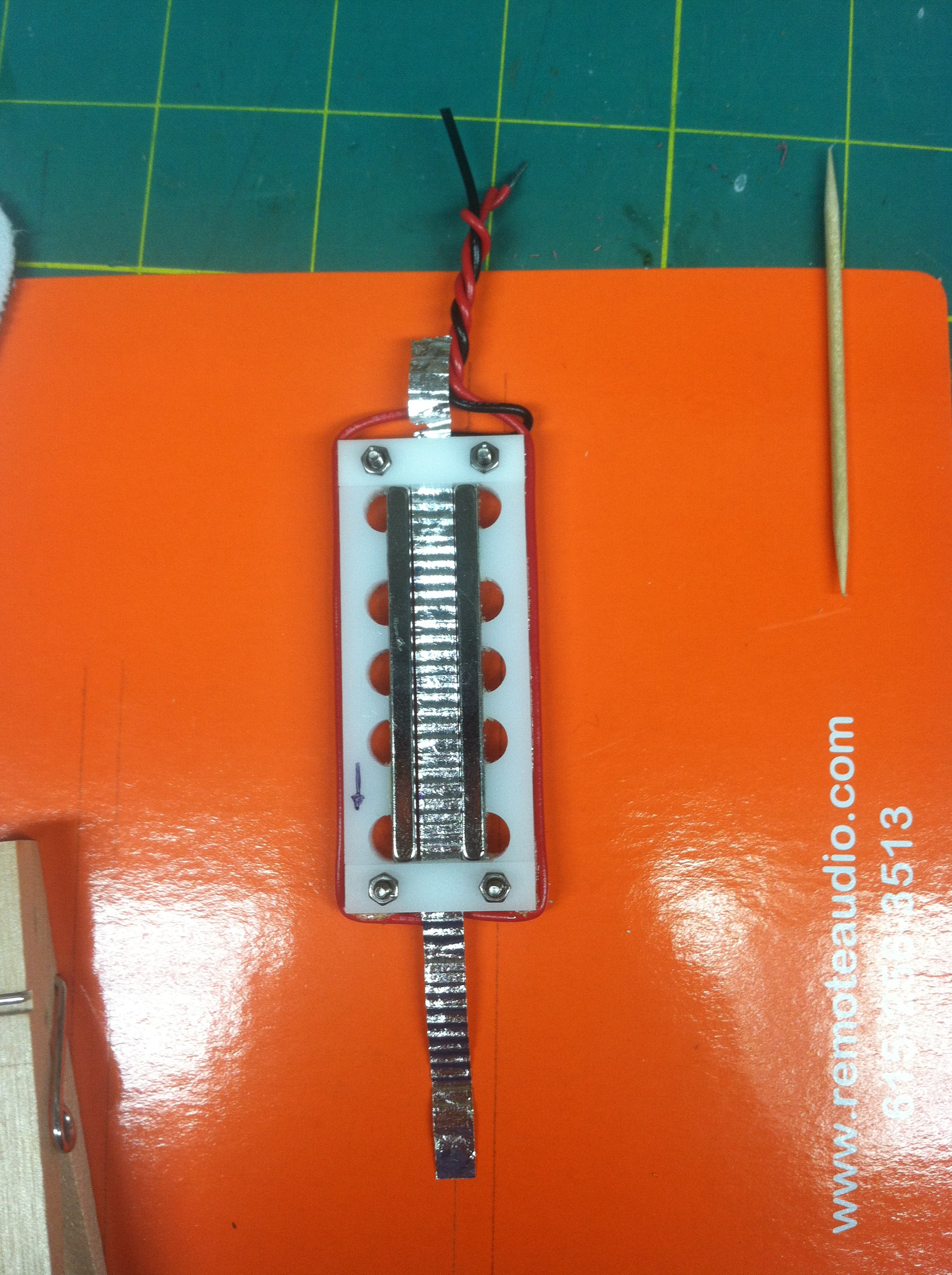
My redesigned ribbon motor frame with magnets in place. A central groove is milled in the plastic for positioning the ribbon. The magnet spacer is just a piece of 4mm aluminum.

I’ve redesigned the motor frame using magnets that are slightly larger at 5mm x 10mm, and a ribbon that is slightly narrower, about 3.5mm. It’s counterintuitive, but narrower ribbons have a higher output. I’m using a 2.5 micron aluminum ribbon foil. The plastic frame is machined with a slot down the middle to hold the ribbon, and a pair a milled aluminum clamps to hold the ribbon in place. I didn’t want to use copper here because of galvanic reaction concerns. Everything is held in place by 4-40 capscrews, which are magnetic & will probably be a pain in the ass to install, but we’ll see. I’m waiting until most of the work is completed before I install the magnets and the ribbon, since the magnets will attract bits of ferrous crud in handling & the ribbon is so very fragile. That’s why they aren’t in place in the photo above.

The frame installed on the motor mounting tube. The ribbon clamps have been machined and are in place. I’ll probably secure the wiring with a dab of glue once the ribbon is installed.

Another difference is in the motor mount. I’ve built a secondary can that slides inside the mic body from a small piece of galvanized fence tube with a fender washer silver soldered to the top. This will shield the transformer almost as well as a Mu-metal can, and it makes a sort-of “mic-within-a-mic.” This same type of construction is used with great results on the Electro-Voice RE50 reporter’s mic, one of my favorites. This sub-assembly is isolated from the outer shell of the mic with a wrap of foam. This will be of limited benefit, since a ribbon mic is never handheld except when used as a prop in music videos. But I did want some way to take the mic apart and put it back together as a single unit… the Austin design has the motor pressed against the mic body with strips of neoprene foam. It works well, but isn’t ideally suited to taking the mic apart. I expect to do that a bit more with this mic, as I experiment with things like silks around the ribbon or waffle-plate resonators.

I’m calling this one Revision A, since I redesigned & rebuilt the mount to correct a grounding problem. I’m already working on Revision B, which will be largely similar except for the ribbon clamps and  more space at the bottom of the frame for mounting the motor with screws. (Revision A’s mount is secured with glue.) I’ve got some other ideas to try with magnet sizes and frame designs, but I need to give these an extensive listening test first.

I’m still waiting on a few parts… the transformer and the XLR, mainly… but I hope to have this project finished soon, and I’m anxious to hear the results. In the meantime, I’ve started milling parts for another one.

The semi-completed shell. I still need to machine the brass cap at the bottom and mount the XLR connector. Overall length is just about six inches.

The cost for this project is fairly high, mainly due to the amount of time that is spent in construction. If you add in the cost of the machine tools, the cost goes from fairly high to astronomical. I’m using a benchtop drill press, a 7×10 Chinese lathe and Taig milling machine to make these. All three have been essential for various parts of the work. While it would be theoretically possible to build a mic with hand tools, it is a lot easier to get good-looking results in less time with some heavy machinery. (If you lack the tools, Rick Wilkinson’s Austin ribbon mic kit is highly recommended, see my previous post.) And actually, my setup is pretty minimal… I could use a larger lathe & a CNC mill for faster and better results… but now we’re talking about an investment that would require going into business as a mic manufacturer, which isn’t my intent. These are experiments. I’ll probably make a few available for sale at some point, just to recoup some of the cost of the parts. And I expect the price on them to be rather high, just because they take so very long to make. But these are primarily built for my own satisfaction. It won’t hurt the resume, either.

I owe a great debt to Rick Wilkinson and Les Watts (former mic designer with Shure and EV) for teaching me a large majority of what I know about building ribbon mics. Their help is very much appreciated.

UPDATE: I’ve very nearly completed this mic… I recut an existing XLR connector on my lathe, so now it fits the microphone. The magnets were fitted to the frame, and I mounted a 2.5 micron ribbon yesterday. I’m guessing it’s about 3.6 mm wide. It’s a nice, tight fit. The ferrous capscrews were a pain in the ass, but not impossible to deal with.

The ribbon motor completed, with magnets and ribbon installed. Using 2.5 micron ribbon material is much easier than signwriters leaf, though it’s still not a simple process to install.

Now I’m just waiting on the transformers to arrive. These will be a special custom-wound ribbon transformer that should meet or exceed specifications from the usual suppliers. Unfortunately, it probably won’t arrive in time for the DIY seminar… I was hoping to have this working before then.

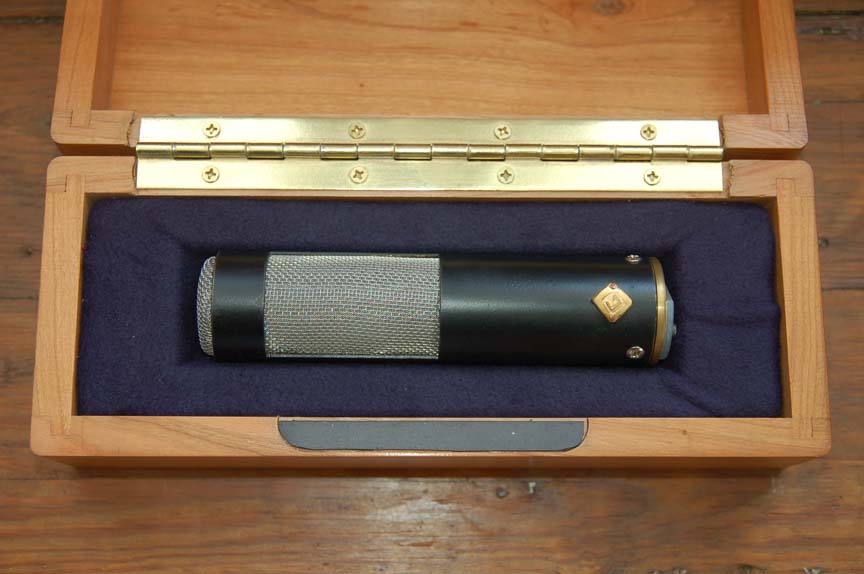
This mic comes with a custom walnut mic box that I had built by a local cabinetmaker. Nothing on this mic is sourced from Chinese suppliers… that sort of thing is easy enough to get from just about anywhere these days. If nothing else, this mic will be different from the common stuff that is so prevalent these days.

UPDATED UPDATE: When I went to use this mic recently, I discovered that the glue had failed on one of the magnets and it had separated from the frame, bringing the two together and turning the carefully-placed ribbon into aluminum dust. So while this is an easy-to-build example of how ribbon mics work, it isn’t the best design in terms of longevity.

My new design incorporates a steel frame rather than plastic. This is slightly better from a magnetic perspective, and it’s naturally stronger for threads, etc. I’m thinking of trying a frame made from small pieces of 1/4″ square steel. Machining from solid would be a possibility, or I could even get crazy and go to the blacksmith shop and forge something… I was formerly a full time blacksmith and still have access to some large and heavy tooling. And I’m pretty sure that nobody else is hot forging their ribbon mic parts.

But the key design element will be a small notch to hold the magnets apart. I should have done this before, as it could be incorporated into my earlier frame design. It’s yet another thing to put on my long list of projects.

The finished mic in its custom-built, handmade walnut box.

Austin Ribbon Mic Completed

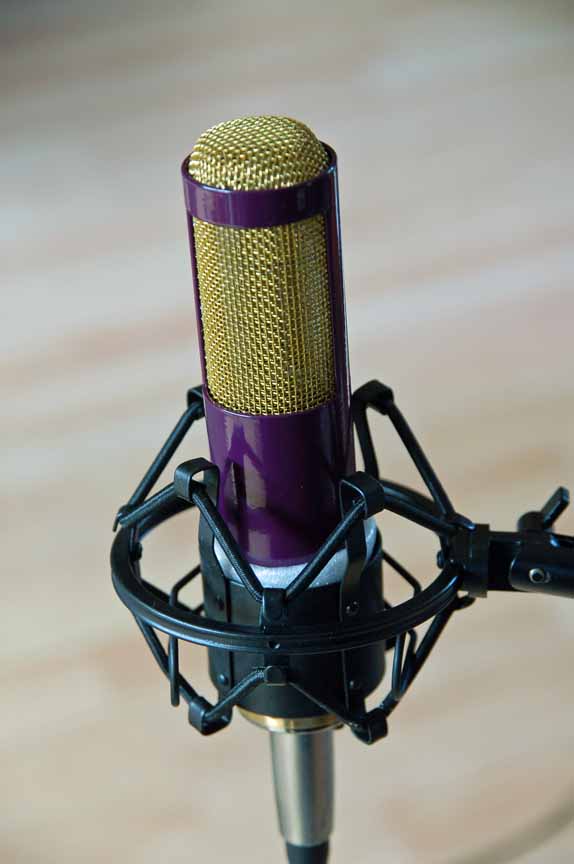
The completed Austin ribbon mic. This one will be given away at the Producer’s and Engineer’s Summit at Welcome To 1979 in Nashville, coming up in November.

Here’s a look at my Austin ribbon mic, I completed it yesterday. Building this mic certainly was actually really easy, except for one part… installing the ribbon in the frame. I had to do this several times… six, to be exact. I  had various problems. One, for example, didn’t show it’s ugly head until I’d completed an installation… tiny tears all along the edge of the ribbon. I learned they were caused by the ruler I was using, which had a cork backing that was set slightly behind the ruler’s edge. This small unsupported space allowed the foil room to stress and tear. I corrected this by using a length of rectangular aluminum as a straightedge, this pressed down on the foil right at the cutting edge.

Another problem I had was corrugating the ribbon. I was trying to protect the ribbon by corrugating it with the release paper on the top and bottom, but doing so a) causes the ribbon to curl up, and b) makes the corrugations shallower. If the ribbon isn’t sufficiently corrugated, it is extremely difficult to get it tensioned properly. The tension is important… the ribbon can neither sag in the frame, nor should it be too tight. I had the latter problem, and the ribbon developed a longitudinal curl, so scratch that ribbon.

But thanks in no small part to Rick’s patient support via several emails, I finally got one in. It wasn’t perfect… it could be centered just a hair better… but it looked ok, so I closed it up and finished the mic.

And considering everything, it sounds quite lovely. The last time I used a ribbon mic was 25 years ago, when I did my thesis recording using a pair of RCA TK77’s that the university owned, so I don’t have much of a frame of reference, but it seems to have a nicely balanced frequency response. From what I understand, construction errors show up as poor highs or lows. I don’t have a frequency analyzer set up yet so I can’t give any numbers, but my subjective analysis says “nice.” Now, like all ribbons, the output is rather low, and I did my testing using a rather crappy mic preamp. On voice, one has to crank the gain up quite a bit, and this gave me a lot of preamp noise. For someone who is a low talker, this wouldn’t work. But I got a rather useable level on my acoustic guitar.

Again, I can recommend Rick’s kit quite highly, especially if you’ve never built a mic before. He’s done everything that can be done to insure a good outcome, and the one I built certainly worked out well. That’s not to say it’s simple… you need patience, and good, steady hands will help as well. But I’ve already got parts here to build four more for myself!

ESPYS Video “Pat Summitt”

Here’s a link to a production I worked on for ESPN on Pat Summitt:

http://espn.go.com/video/clip?id=8158231

I made two trips to Knoxville for this production, once to shoot Pat Summitt’s final home game, and once to interview Pat, her son Tyler, and her assistant coach Holly Warlick.

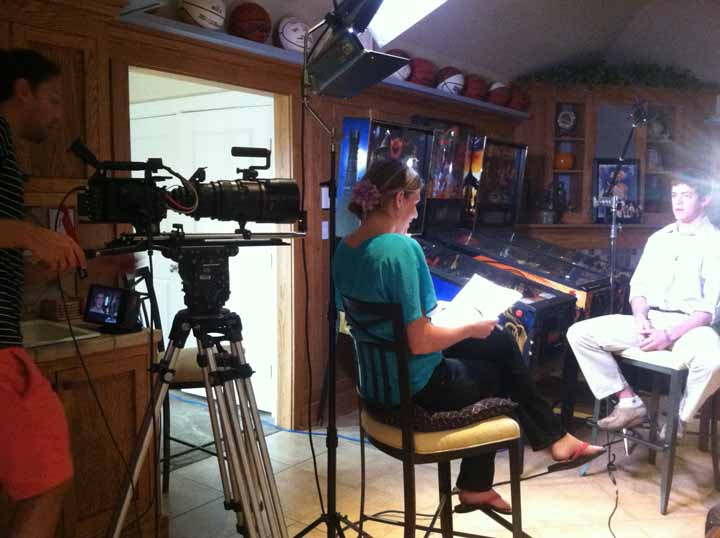
Producer Becca Gitlitz interviews Tyler Summitt for the ESPSY video

My favorite off-camera bit was when Pat and Holly were chatting about her earliest coaching days, and how the team was called “The Corn-Fed Chicks…” It was certainly a different time!


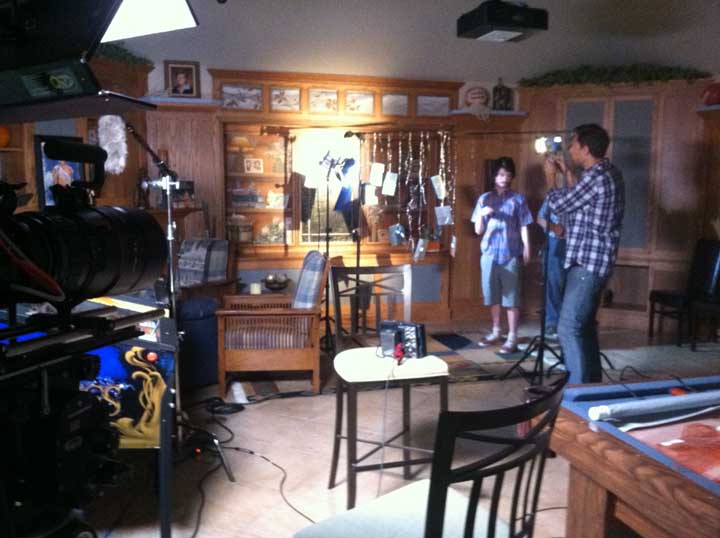
DP Christian Hoagland adjusts his background… it’s just a bunch of shiny wire with bits of metal hanging off. When thrown out of focus, the effect is rather nice… see the video above for the results.

The Austin Ribbon Mic

I recently received an Austin Ribbon mic kit from Rick Wilkinson (Rickshaw Records) out in California. Unfortunately, I can’t say I’m the proud owner… this mic is going to be built and given away as a door prize at the DIY panel at the Producers and Engineers Summit at Welcome To 1979 in November.

I haven’t finished the build yet, so I can’t give a complete review of the mic, but I can make some comments about the kit and the resources that come with it. Building a ribbon mic is not that complex- IN THEORY. It’s just a thin metal ribbon suspended between two magnets. There isn’t much electronic inside the mic, just a transformer. The design has been around since the 30’s.

The theory is simple. But like most things, it’s the Devil in the details. You can find articles and instruction on the web for free. And that’s what I started to do years ago. I got halfway through the project and shelved it… there wasn’t enough detail for me to be successful.

Or you can spend some money and increase your chances. Rick sells plans for ten bucks, or his ribbon kit for $275 with a Cinemag transformer. (There is a less expensive version with a stock transformer, and I understand the stock transformer is exceptionally high quality. It’s sold out right now, but should be available again shortly) Rick sent me a kit with a Cinemag transformer, so that’s the version I’m reviewing here.

The kit itself is extremely well done. The mic tube is powder coated brass, 1 1/2″ diameter, and exactly machined. All the holes are already drilled, so you don’t need a drill press. The motor frame (a critical part) is a machined piece of plastic. The fit was perfect. I especially liked his design… I designed my own once, and it was a cumbersome mess. Ricks is elegant, simple, strong, and works well. (some folks claim that metal frames are superior. Perhaps they are… I’m not sure… but I think that at least part of the reason behind this claim is that’s what is available from China.)

The greatest value for me, though, is Rick’s instructional materials. When you buy a kit (or his plans), he sends you a link where you can download  PDF instruction manual and several videos where he goes through the process of building a mic. These videos are really helpful, especially when it comes to corrugating and installing the ribbon.

Commercial mics use ribbons that are anywhere from 5 microns to 1.8 microns thick. The ribbon material that Rick supplies is about 0.8 microns. (Thinner ribbons increase high-freq sensitivity.) This is similar to “imitation silver” guilding leaf, it’s readily available on the internet. I’ve bought some from Hobby Lobby before and tried to cut a ribbon from it. I can say without hesitation that it ain’t easy. But that’s the beauty of these videos. Once you see someone doing it, you understand the method better… much better than just reading about it. And you can see that it is possible to make a well-functioning ribbon from scratch, but understand that it’ll take some practice. Even breathing can cause a cut ribbon to fly off your bench. So be ready to make several practice ribbons before you get one correctly made and mounted in your mic frame. And if you just can’t get it, there is an internet source for commercial ribbon foil now. A company called Lebow sells pure aluminum foil in a variety of thicknesses, including 1.8 and 2.5 microns. This would be vastly easier to handle, but it’s also vastly more expensive at $25/sheet. (There may be other sources as well, but this was the only one that I could find. I ordered two sheets to use in my own mics, but they aren’t in yet.)

Ribbon-making details is a big advantage of his instructions, but it isn’t the only one. For example, I learned that you can use a brass footrail cap on the bottom of your mic to hold the XLR connector. These things are nice, solid castings, and if you shop around, you can find them at about $5 apiece. (I wish I’d thought of that.) Circular Switchcraft connectors fit well in these caps.  This would be a good solution for any tubular-bodied homebuilt mic.

The videos do have a slight downside. You have to remember that Rick has built a lot of mics, so some of the things he does in the videos look easier than they will be to folks like you or I. It’s really difficult to explain the things that practice teaches you. But I’m pretty sure that I’ll have a working ribbon mic once the dust settles… I’ll keep you posted.

UPDATE: I finally got up the nerve to install the ribbon today. It worked on the second try, which really isn’t bad. I’m pretty sure that my success with this is pretty much due to Rick’s instruction. Like I said previously, I’ve tried this before and failed miserably. Seeing it done (in a video) makes all the difference.

A just-placed ribbon in the motor frame. This job requires lots of patience, but it can be done.

That is not to say, however, that it was easy. The foil is the definition of flimsy… if it were any thinner I think it’d fly off my bench because of the rotation of the earth. Using the more expensive 2.5 micron foil should be easier (though I expect still no picnic), and that’s what I’m planning for my own ribbon motor frames. (I figured this one should be made as a stock kit, in order to give a fair review.) There will be some slight differences, like slightly thicker magnets… I’m still in the design and prototype phase. But if they work, it’ll be fun to try some design variations like waffle plates (resonators) and silks.

DIY Discussion Panel at Nashville Producers’ and Engineers’ Summit

I’ve been invited to be on the DIY Gear panel at this years’ Producers and Engineers Summit at Welcome To 1979 Studios in Nashville. This year the P&E Summit will be November 9-11, 2012. I’ll be there to discuss mic building and modification, and general do-it-yourself studio electronics.

A session at last years’ P&E Summit at Welcome To 1979

The summit is limited to 60 attendees ( it’s held in a working studio, not a conference center, so space is naturally limited) and costs $150 per person for the weekend. I’m very much looking forward to it. See you there!

United Bates of America Airs Aug 13th

The latest reality show that I’ve been working on is scheduled to air at 9pm on Monday Aug 13th. I’ve done the location sound work for much of season one, along with Raleigh sound mixer Neal Gettinger and Nashville mixer Steve Grider. The Bates family lives just north of Knoxville, TN, and is  little larger than most… 19 children, age 23 to 4 months. My favorite one is, of course, whoever I’m talking to at the time… a running joke, especially with the little ones, is to say, “you know you’re my favorite… but don’t tell anybody!” It always brings a smile.

On a break with some of the Bates kids.

Some of the crew when we flew out to Texas… That’s John Rotan, camera, who also shoots for the Duggers, Steve Grider, Nashville soundmixer, Will Rodriguez, Producer, and Zach Bates.

The Archetypes at OnLine Audio

I don’t have much from my old studio days. We had a few photos, but Robert (Graves, studio owner) and I can’t seem to find them. The equipment, of course, is long gone… I especially miss the Neumann U87 and KM84 that we had. About all I have to prove I was there is a small number of test cassettes and a portfolio of graphic designs. (This includes one OnLine Audio “Don’t Worry, We’ll Fix It In The Mix” T-shirt… my best design.)

Up until the last year or two of the studio’s operation, I held two jobs… I’d work at the studio from about 10AM-2pm, then drive across the bridge to do the news at Channel 2. So for many years, I would do daytime sessions, and Robert would do the nighttime. (though for the last year or two, I had resigned from the station and worked at the studio full time… Robert was getting really tired of being there every night during our busy periods.) Most of the serious musicians wanted to schedule at night. And since he was the owner, Robert got first right of refusal on sessions. That meant I did a LOT of rap music and people who had never been in the studio, so many of the projects I did were… well… not so notable.

But some were. I believe that my very favorite project where I did the majority of the album was the Archetypes. I can’t remember how it came to pass that I got this one and not Robert, but if I remember correctly, I did most of the tracking and mixing on this album. Perhaps not all of it… I think Robert might have done some work on it as well.

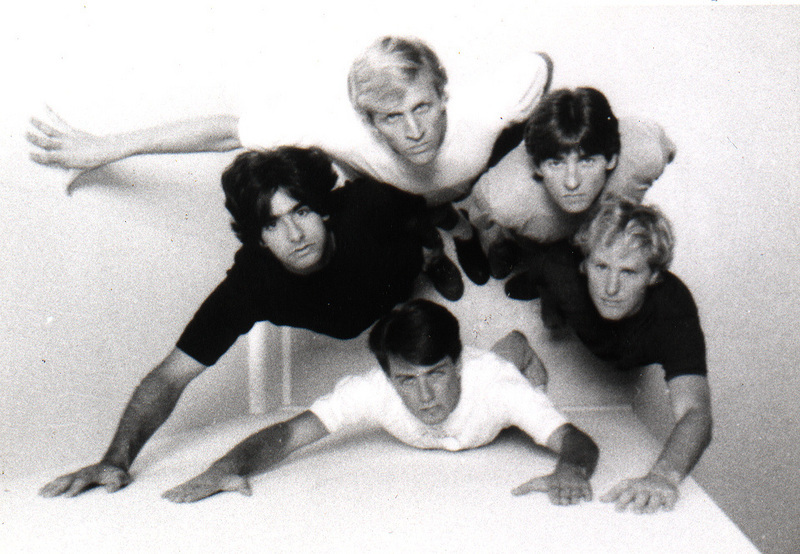
The Archetypes, circa 1989

Since nearly all of our artists were self-financed, we did all the basic tracks… guitar, bass, drums, and usually vocals… on the same pass, since setting up and tuning a drum kit could take a couple of hours. We’d cut eight songs in a single day. The bass was recorded direct, drums in the drum room, rest of the group in the main studio. (Though we learned later to put the guitar amp in the drum booth, then record the drums in the main room, which was big and “live…” maybe 18×25 or so, with high  ceilings and hardwood floors…) OnLine Audio was in a business incubator at 701 East Bay St., in the shadow of the old bridge to Mt. Pleasant. The place has gone condo now.

Once the basic tracks were laid, we’d do overdubs and punch-ins. Our Otari MX80 was great at this, and is another machine I wish I could afford.

An Otari MX80, 24 track version… a sweet machine.

While this method keeps the studio time affordable, it also tends to make mixdown a little harder, since you have the same basic sound to work with, and I remember having to struggle a bit in order to get the songs on the album to sound “good but different.”

Two of the songs  from this album have been posted on ReverbNation, and you can listen to them here. If you like the songs, buy the album (and tell them I sent you!)

ArchetypesSample

Hurricane Hugo in 1989 put an end to the studio. While we were mostly able to repair the water damage and held on until 1990, the drop in business volume and rising monthly costs forced us to throw in the towel. I went off to grad school, and Robert went into real estate and renovation, where he was very successful until the market crashed. Unfortunately, tinnitus has severely limited his recording activities, but he made some really good records at OnLine Audio.

The Archetypes in 2010

Read an article about the Archetypes from 2003 in the Charleston Post & Courier here, another from the Charleston City Paper here.

POSTSCRIPT: If you recorded at OnLine Audio, please drop me a line… I’d especially like to get a copy of any photos or music that you might have. Thanks!

More Mic Mods- the ADK SC-2

Because of my posts about modifying microphones, I recently received an invitation to visit a proper mic designer. Les Watts is an engineer who worked  for some VERY prominent microphone companies… I’m fairly certain that at least one of them is in your locker right now.

Les lives about a three-hour drive from me, so I went by for a short visit recently. It was, of course, extremely educational. I brought along a pair of mics that I had doctored, and we tested them using his calibrated setup.

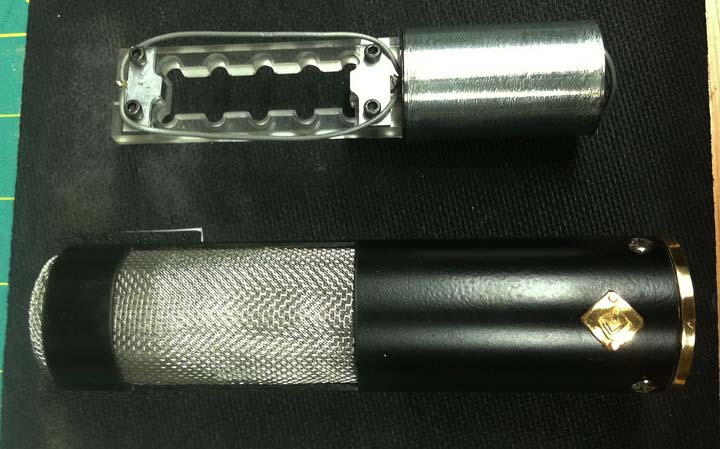
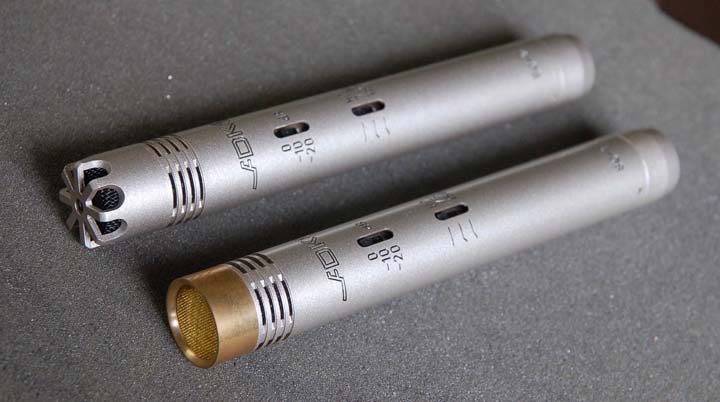
The ADK SC-2 small-diaphragm condenser microphone. The stock mic is on top, the modified capsule is shown on the bottom.

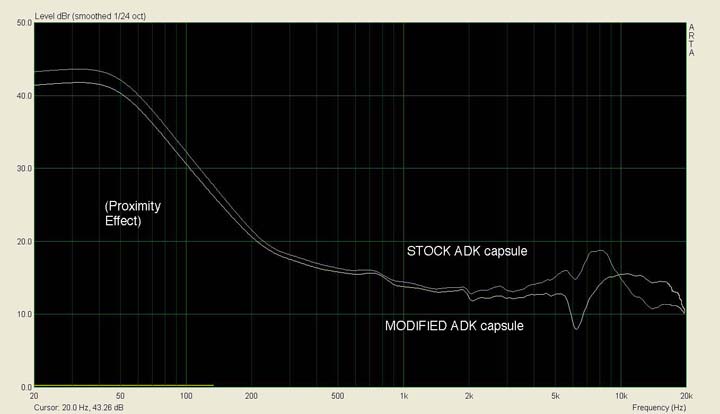
One of the things that I learned… or rather confirmed… on my trip is that real microphone design is a very slippery fish. A microphone is a true “complex system…” one small change affects a whole host of other factors. The mod that I did (not so much a design as a “I-wonder-what-will-happen-if-I-do-this” sort of affair) was to cut away the area in front of the mic diaphragm, leaving the area more open and less restricted by the grille and metal in front of the diaphragm. It turns out that the “cup” shape that is created by the area that I cut away forms a high-frequency resonator, which I’ve essentially removed. Sometimes this  is a good thing, sometimes not.

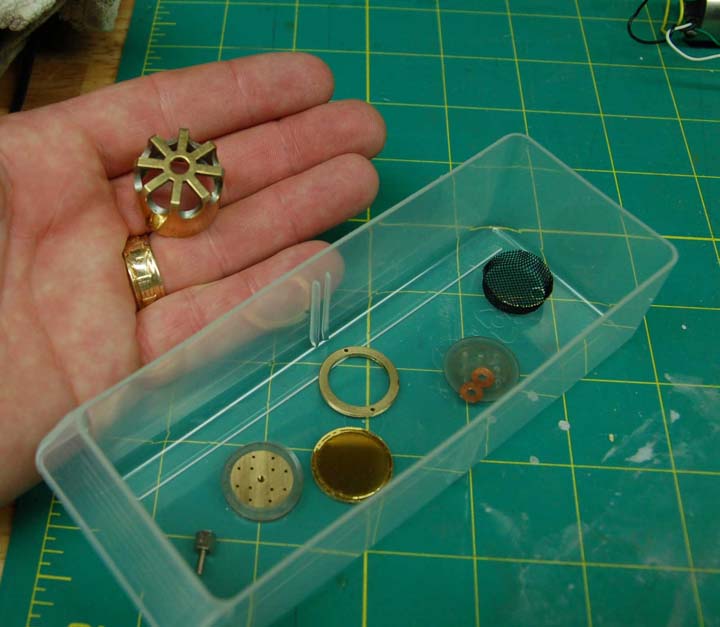
The ADK capsule shell disassembled for modification. As you can see, a small-diaphragm capsule is a fairly simple affair with just a few parts. An important part that you can’t see is the spacer ring that lies between the diaphragm and the backplate. It’s a simple washer made from thin mylar film that looks much like diaphragm material… about 6 microns thick.

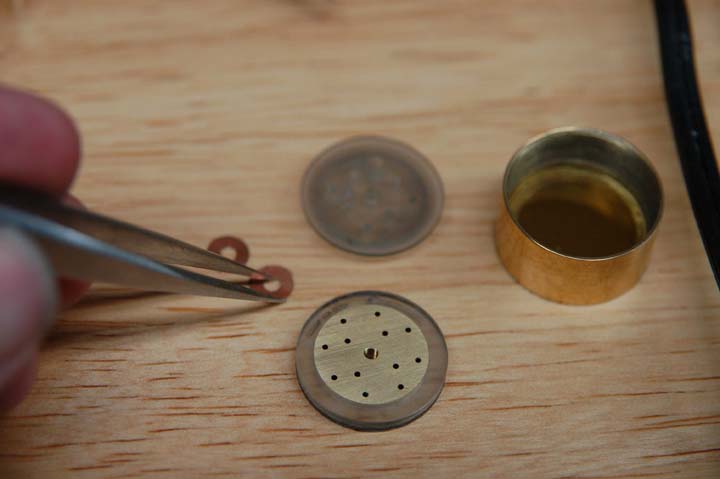
Assembling the modified SC-2 capsule. Any dust trapped between the diaphragm and backplate will ruin the capsule. It took a few tries.

Consider the following two mic capsules. These are for some ADK SC-2 small-diaphragm condensers that I have. I had an extra pair of dead capsules, so I figured I could play around with these without much risk. (I did get them working again) The only change was removing the cage at the front of the diaphragm, lowering the height of the sides to about 2mm, giving the edges a gentle radius, and using a finer brass screen in front.

I did a quick recording of both modified and unmodified capsules. On guitar, I really couldn’t tell much difference at all. But Les’ test rig tells a different story. Take a look at the following response curves:

First off, you should ignore the huge rise below 200 Hz, which is due to proximity effect of the test setup. What I found interesting was the rise in response of the stock capsule centered around 8kHz. Les told me this is a pretty typical Chinese mic response. Looking at the lower of the two curves, we see that modifying the headshell does even out this rise, and gets us a slightly extended high end response…  but it also introduces a pretty deep notch at around 6kHz. This notch is present in the unmodified capsule too, but to a lesser degree. This could be why the capsule shell was designed the way it was.

Another take-home lesson from my trip is the need for a better testing setup at my studio. Remember, on guitar I could make out very little difference in the two mics. (I don’t have golden ears, but I have done a lot of listening.) Perhaps another recording of something with more transients, like a snare, might be more revealing. Again, according to Les, notches in a response of this sort are very difficult for the average person to identify in listening tests. What I could really use is a setup that’s similar to his.

Les uses ARTA software, which is available as a download. His calibration mic is an extremely expensive calibrated B&K, and his loudspeaker (for generating the test tones) is custom-built. It might be possible to get a similar setup at my studio using some equipment that I already have. It won’t have the accuracy that Les’ system does, but I believe I can get something put together that will show the relative changes of a modified vs unmodified capsule. I’ll need a few things, like a Windows computer… I’ve been a Mac guy for many, many years. (Our first Mac II at the recording studio gave us a HUGE advantage, enabling us to design several cassette and CD releases in-house. Back then, graphics ability was a big deal that only Mac folks could do… nowadays, not so much!)

So I’m currently on the hunt for another inexpensive computer (this will be #4) that I can use with ARTA as a dedicated test machine. My son’s old Dell doesn’t seem to want to generate any video, but I may yet be able to get that one going. If not, it’s off to the thrift store for some computer shopping.

I’ll also need a calibration mic and a speaker. The mic might not be too bad, and I may be able to borrow or beg this one. The speaker will be a little harder, though I do have a pair of KRK5s that might at least get me started.

Lots more to come… stay tuned!

Small diaphragm Condenser Modification Results

Last week I sent the small-diaphragm condenser mics from the post below to a friend in Nashville, John Billings. John’s been working in Nashville for years as a session bass player, and  has a very nice studio. I only wanted his general impression, but he went the extra mile and set up a quick A/B test during a recent session. Here’s what he had to say:

First off WOW, thanks for some toys to play with! Here’s what I’ve got so far:Did a session the other day. One song was just these mics out in the room, capsules aligned and secured. You can hear a distict but subtle difference. The mod is much smoother, whereas the stock mic seems to have a significant rise. The other song was a drum corp type of thing, just snare rudaments. Mics placed a few inches over the head, inch or two inside the hoop. I much prefer the mod, though if you need something hyped for top end, the stock mic might be the better one to go to. The mod is smoother, not brassy. Preamps were Yamaha, very neutral. No compression, straight to my SSL AD, 44k 24bit.

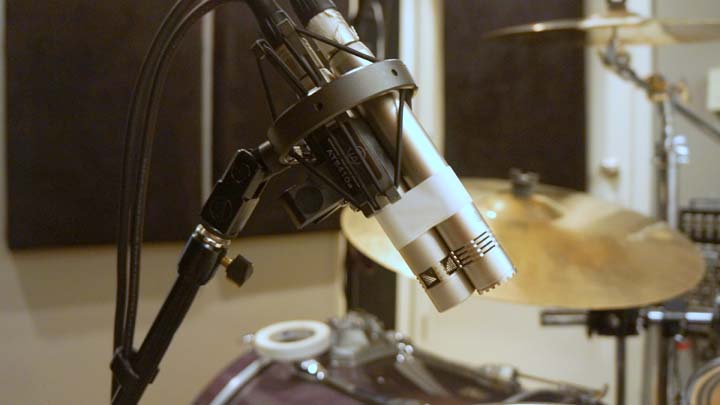
The snare mic setup at John’s studio. John Billings photo

I’ve been meaning to upgrade my WordPress account for quite awhile now, but John’s efforts gave me the final push. Now I can post these files here so you can hear the results and judge for yourself. First, the snare drum solo using the stock, unmodified CM90:

drum corp- Snare 1 N Stock

And next is the modified mic:

drum corp – Snare 1 N Mod

Now the same two mics placed further back as a room mic on a full drum kit. Again the stock mic is the first sample:

Drums Room Nady STOCK

And now the modified mic:

Drums Room Nady MOD

John’s studio is equipped with Genelec monitors, so he’s able to hear things very accurately. I listened to these samples on the best headphones that I have, a pair of  AKG 271s, and on my KRK Rokit 6 studio monitors as well. I noticed a slight drop in level on the modified track, and raising this a touch in Mixbus gives more closely-matched tracks in terms of level. (As you probably know, you’ve got to have levels very close when doing A/B comparisons. In blind tests, people always select a source that’s slightly louder as the better track. )

I tend to agree with John. I’m hearing an overall improvement in freq range, with a touch less upper-midrange and an increase in overall smoothness. It’s a subtle improvement… but when comparing them side-by-side, it’s noticeable.

But something that I always find surprising is the fact that really, these mics aren’t all that horrible right out of the box. I’m showing my age here, but in my studio days you couldn’t even approach this kind of signal for less than three or four C-notes. Sure, the quality control isn’t there… for example, the tiny screws that hold the mic body in place are chewed up and look like they were forced together at the factory… but I can’t really complain given the list price.

In order to make some proper mic comparisons, I’m going to have to buy a proper reference mic, so I’m currently selling some excess gear to buy a Neumann KM184. I’d rather have a vintage KM84, but they’re just much for my current budget to bear…maybe someday. And I’m also on the hunt for an affordable BV107 (or perhaps a suitable equivalent) mic transformer… I want to experiment with a transformer-balanced version of the above mod.

A Small-Diaphragm Condenser Rebuild

Back in my studio days, we had a pair of AKG 451s, and we thought we were hot stuff. The 451 is a beautiful microphone, and we’d been using them for several years with great results… my favorite job for these was stereo drum overheads. Then one day Robert brought in a pair of these tiny little microphones… Neumann KM84s. We set them up right next to the 451s as a pair of drum overhead mics, and switched back and forth to compare them and… wow… the difference was amazing. The KM84s sounded every bit as bright as the 451s, but smoother, as if they had more “air.” They quickly became my favorite mic.

Sadly, they went away when the studio closed. One got stolen… their tiny size makes them easy to pocket. And they were pricey even 25 years ago. But I’ve wanted my own KM84 ever since,  even though I don’t really “need” one. And the price has gone up since then… Neumann no longer makes them, their current model is the transformerless KM184. Some have said that the older KM84 is the preferred mic, as these are said to be “warmer” and “smoother” in their sonic character.

KM84’s can typically be found used for about $1200 or so. I still want one, but I can’t really justify spending that kind of cash on a mic unless it’s going to generate the same amount in revenue. (I did spend that much on my shotgun mic, but I use it on every shoot. A KM84 would mostly be useful on location as an interview mic.)

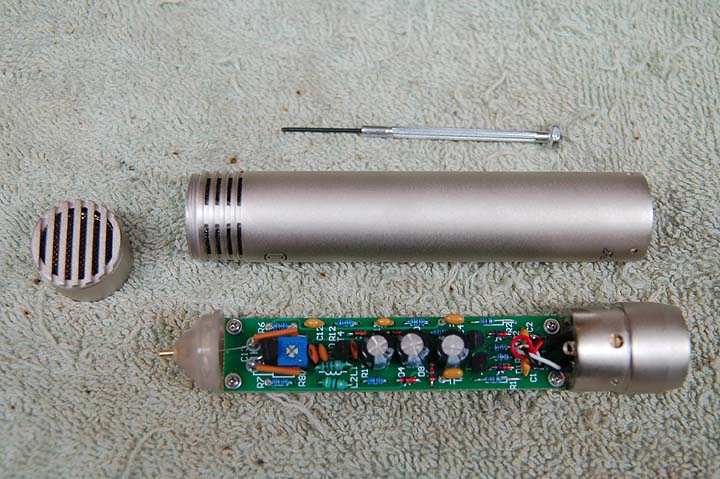
The Nady CM90 disassembled. I understand these are pretty much identical to a number of inexpensive small-diaphragm condenser mics available, like the MXL603.

I can, however, afford a Nady CM90. This mic is one of the thousands of Chinese clones that have flooded the market. It uses a capsule that is supposedly a copy of the Neumann KK84 design. The circuitry is derived from a Schoeps CMC6 transformerless amplifier. Nearly identical to the Nady CM90 is the MXL603, Apex 180, CAD GXL 1200, Cascade M39, and others. Some folks have reported that there is a difference in the diaphragm thickness… the Nadys have diaphragms that are 3-microns thick,  and MXL603s have 6 micron diaphragms. Personally, I can’t tell. I bought the Nadys because they were only $35 each from B&H Photo, and if I totally ruined them, it would be less painful.

Arrows show the new capacitors.

Typical circuit improvements are the replacement of some capacitors, changing ceramic types with polyester film types. Face it, at $35 you can expect to see the cheapest components that’ll work in mics like these. I switched out three, using some parts I had on hand. The values are the same, it’s just the cap types that are different.

A side note: I didn’t come up with the actual number-crunching engineering to figure out the electronics. There is a small community of microphone builders on the internet (examples HERE and HERE) who, thankfully, are willing to share their experience and knowedge. A few of these folks actually did design work in the factories… it’s a real treat for sound geeks like myself to have access to these people. Without their help, I’d surely have a pile of dead mics as a result of my experiments, so I have to express my gratitude to these folks.

Increasing the back vent area with my Taig milling machine. (Taig tools are the perfect size for machining microphone parts, BTW.)

The next modification was to the back vent area. As I understand it, (from Michael Joly of OktavaMod) decreasing the back vents increases the high frequency (HF) response of the mic, and these are known to exhibit a typical HF “peakiness.” Even though the Nady probably didn’t need it, (there are more back vent slots on the Nady than on the MXL 603)  I fired up my trusty Taig milling machine and cut away the ridges in the back vents. I cleaned up razor edges with a small file and replaced the screen.

The other reported problem with these mics is the capsule mount. Again according to Michael Joly, the diaphragms on the chinese clones are set back into the body of the mics about 5mm, where the KM84s diaphram is positioned much closer to the top of the mic. That 5mm ridge around the diaphragm is enough to cause all sorts of HF problems. So I very carefully disassembled the capsule, chucked the shell up in my lathe, and shaved down the pocket. I also took the extra step of beveling the sharp edges, making it look similar in shape to the KM84.

Parting off the face of the capsule shell in the lathe. The brass is a little bit thin and easy to scratch, so I wrapped the shell with masking tape. It machines beautifully, though. This operation could be done with a file in a pinch, but using a lathe gives better-looking results.

I screwed everything back together and powered up the mic. The modified mic is clearly better than stock… the high frequencies do seem more extended and better defined. The stock CM90 exhibits a very slight kind of “splatter,” if you will. Make no mistake, my mic does NOT sound as good as a KM84. I didn’t expect it to. But it is interesting, and a little bit fun as well. I think I’ll send these up to another engineer in Nashville to see what he thinks.

The next step in my upgrade path will have to wait a little while. I want to see if I can build a true KM84 amp and see how this sounds when coupled with the modified Nady capsule. An important part of the KM84’s sound comes from its transformer, and the Nady circuit is transformerless. I haven’t been able to find a source for a BV107 transformer (the original part used by Neumann) or a small enough substitute. I understand that Cinemag 2510 will work in this circuit, but I think these are physically too large for a KM84-sized body… I’ll keep you posted.

The completed mic. I’m looking for some finer brass screen for the next one, but this one looks and works pretty good.

A LARGE chunk o’ glass…

Here’s a quick snapshot for all you photogs out there… some glass lust. This was for an ESPN shoot that I worked on recently in Knoxville, a documentary about Pat Summitt. The DP (Christian Hoagland) pulled out a Sony F3 with an Angenieux Optimo 24-290mm T2.8 zoom lens… the biggest piece of glass I’ve seen on a EFP shoot. It gave some gorgeous images, though it was a bear to lug around. I understand this lens probably cost more than my house… good thing it’s a rental!

Image

DP Christian Hoagland from NYC at Pat Summit’s house

Image

Sony F3 with Angenieux 12x lens

The Chew at the Bluebird Cafe

Here’s a quick couple of photos from a recent interview for ABC’s The Chew with Carla Hall (ex Top Chef runner up from season 5). Carla interviewed two of the principal cast members  from the upcoming TV series Nashville, Clare Bowen and Sam Palladio.

Carla Hall interviews Sam Palladino and Clare Bowen for ABC’s The Chew at the Bluebird Cafe in Nashville, TN

While the interview itself was fairly straightforward, it was a bit whacky in terms of the interconnection. Three wireless and an overhead shotgun going to two cameras… simple, right? Except the producer wanted separate iso tracks on everything and I don’t have a multitrack for location work (yet… it’s on order this week).

The 442 setup with direct outs to the camera. The bag construction doesn’t allow access to the direct out connections, so I had to disconnect everything, take it out of the bag, and reconnect on the table… not something you want to do in a hurry.

Once I determined that we weren’t going to be moving around, I was able to feed two wireless signals to one camera, then one wireless and the shotgun signals to the other using my Sound Devices 442’s direct outs The downside was that the 442’s direct outs are pre-fader, so the only way to adjust levels was at the camera. Not ideal, but it did work and the client was happy… but it illustrated the real need for a good multitrack location recorder. Right now I’m going against conventional wisdom and considering Tascam’s HS-P82 over the Sound Devices 788T or the Zaxcom Nomad. While I generally prefer Sound Devices gear as a matter of course, I like the Tascam’s feature set a little better (8 XLR inputs rather than six, for example) and their pricing is a lot easier to swallow at $3,500 (vs. $6,000 for the Sound Devices). Since the 788 has been out for awhile now, I have a feeling that they’ll be announcing a “new and improved” 788 sometime soon, and the Tascam might fill in the gap until then.

A New Microphone

NOTE: This mic is for sale… $230, includes a custom built walnut case. Email me for more info.

It’s always fun to get a new mic in the studio. This one is twice as nice, since I built it myself. It’s based on a typical large-diaphragm cardioid pattern mic from China… identical to most of the ones you see from ADK, Behringer, MXL, etc. This one is different. It uses the stock mic diaphragm, transformer, and metalwork, but the circuitry was completely replaced with higher-quality components from Mouser. I got help from the folks on the Micbuilders groupon Yahoo.

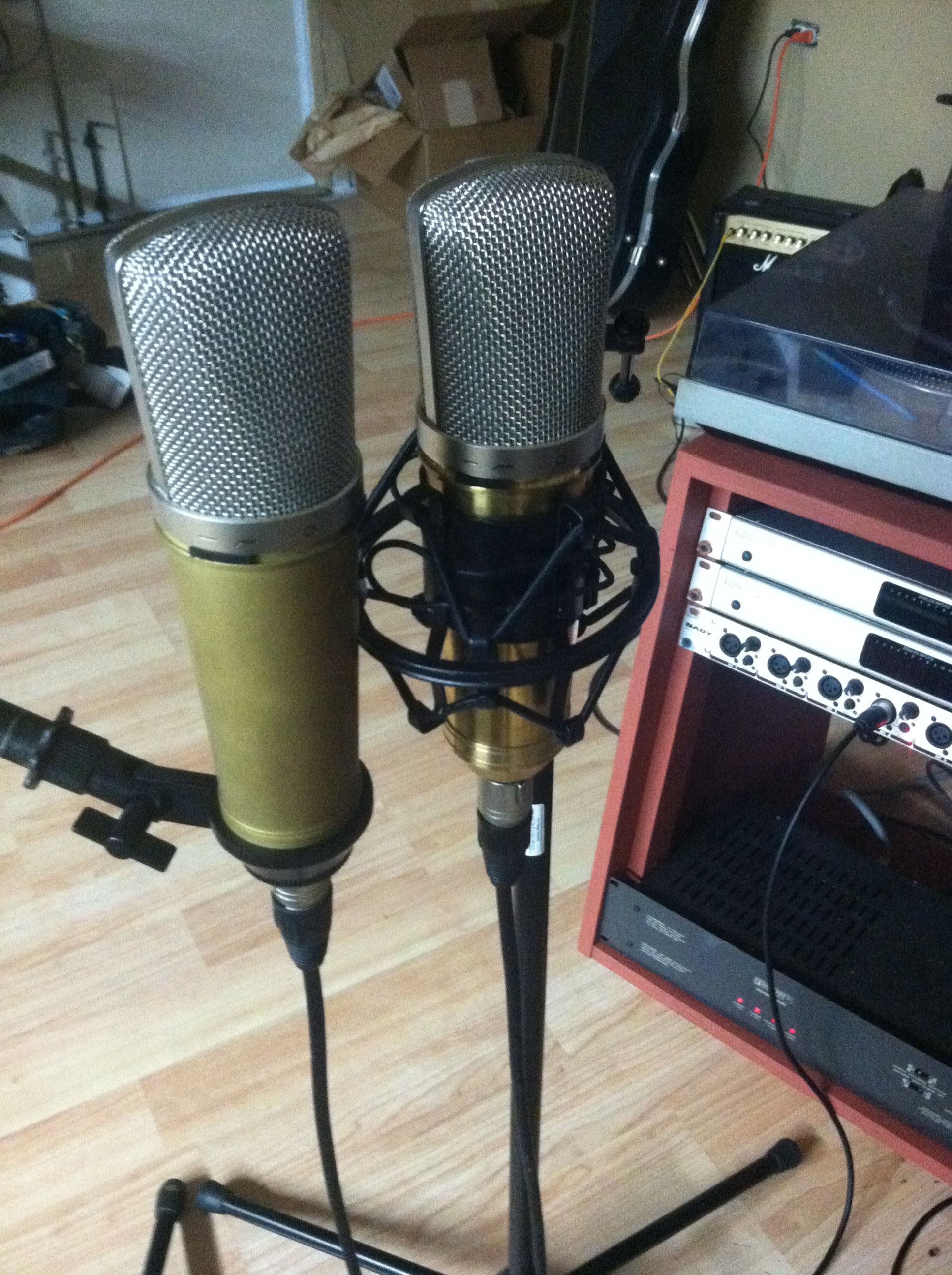
My new mic setup for testing. Stock mic is on the left, modded mic is on the right, in the iso mount

I’ve built a pair of these in the past that were all stock, so I have a baseline to compare changes that I make. This latest mic is better… the difference is very subtle, but I think that I could pick out the modified mic in a blind test. There is a slightly extended bass and more definition overall. This is probably due to the capacitors… the stock mic uses tantalum caps, the mod uses all polyester film and Nichicon electrolytics. I think this probably contributes most to the improvement in the sound.

Some other changes that I’d like to try are some different transformers, though this can be a pretty expensive upgrade with an unknown benefit. Only one way to know for sure. But I’ll likely save that experiment for another mic. Right now, this one is good enough to put directly into inventory to either use or sell. It was a fun build, though mic #2 took me quite a while to finish. I thought I’d popped a JFET, but it turned out to be a bad solder joint on a capacitor that took me forever to track down. All straightened out now, though.

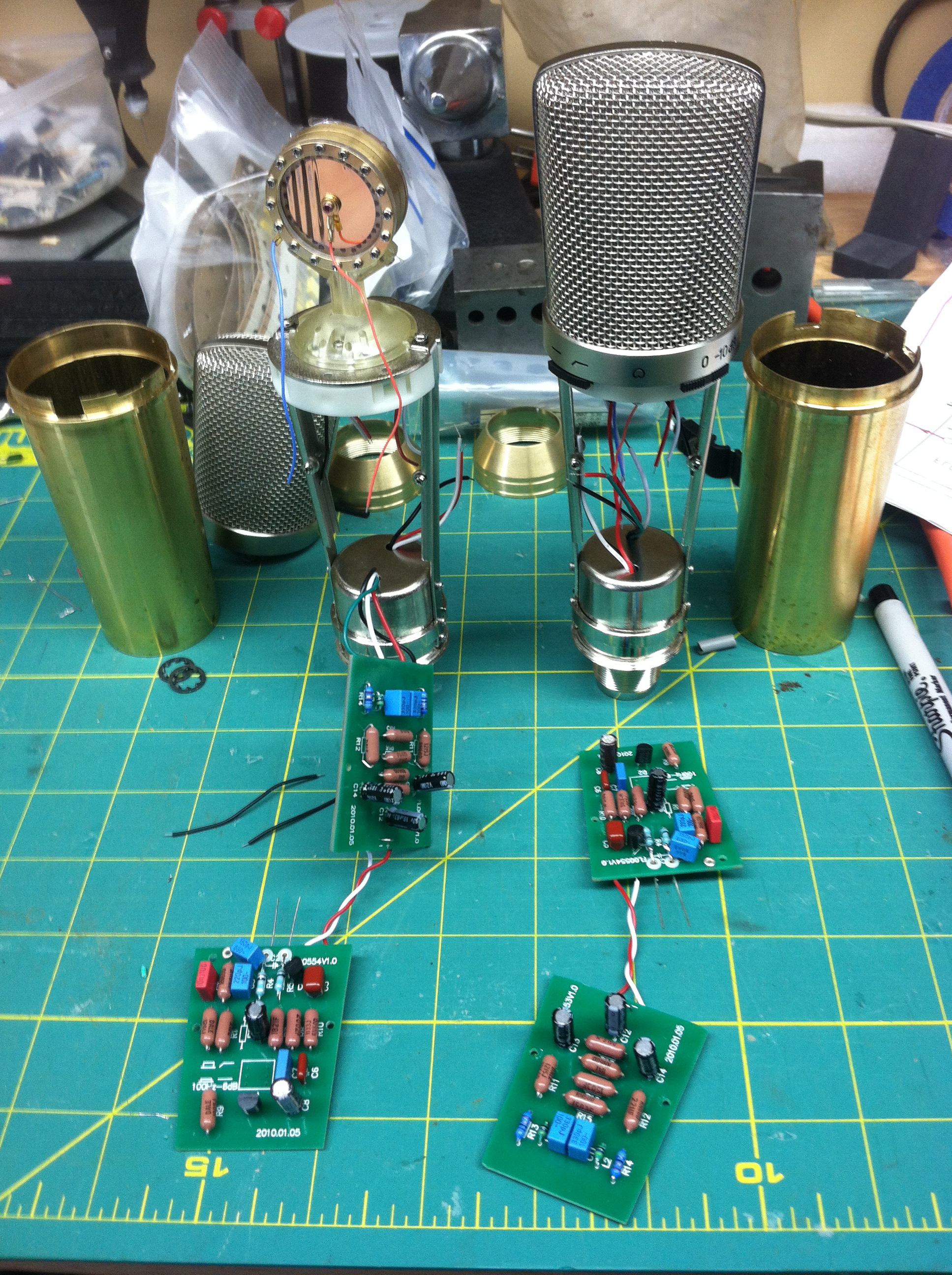
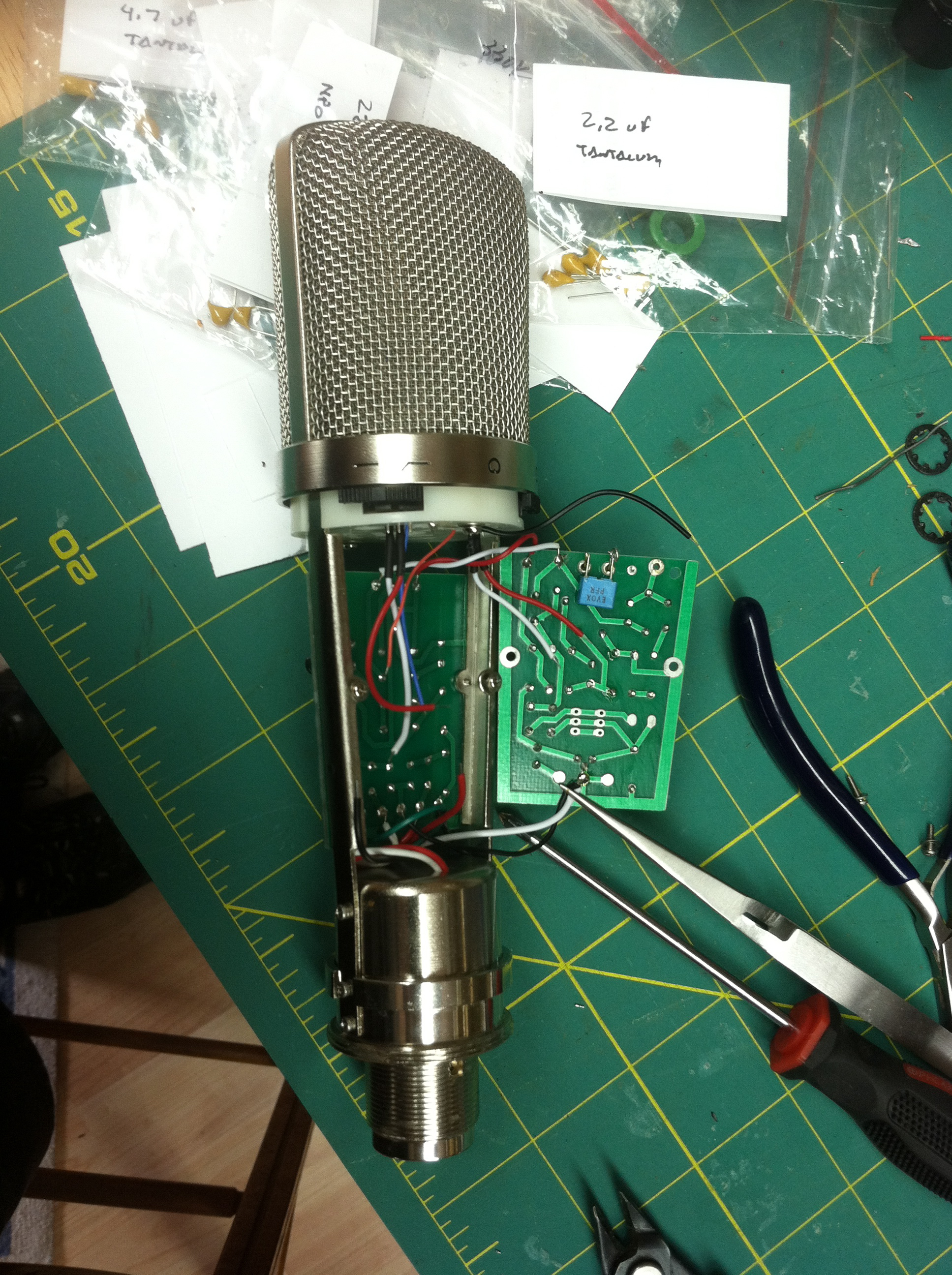
A pair of mics under construction. One of the capsules has lost tension, it was replaced. I’m still having difficulty getting #2 to work… I believe I have a bad JFET caused by me miswiring the transformer.

Making the boards work in the new mic is a trick, since the components are all physically larger, but I was able to coax them into place.

Creation Audio Labs

If you’ve been reading this blog for awhile, you know that I’ve been setting up a small studio. The heart of the studio will be my analog mixer, my 1981 Soundcraft 800, which I found in Atlanta for $500. The heart of this mixer is the master module, and the master module didn’t work. There were a number of baffling problems with it… no tone osc, no headphone signal, left side meter read off the scale while the right side read nothing… so I was a little afraid to try to tackle these repairs myself. And a cursory inspection showed no obvious problems that I could see… no burn marks, bulging caps, or exploded bits. I needed professional help.

I had no idea that Creation Audio Labs existed until I read a recent article in Pro Audio Review, where someone had their Soundcraft Ghost extensively rebuilt and upgraded by these folks. That they are only 100 miles away in Nashville, Tennessee, was a bonus. I exchanged some emails with Alex Welti and found out that yes, they could help me. He gave me a rough estimate and I sent the module off to have the work done.

It took them awhile to get to it, but I just got the word yesterday that my module was repaired and on the way back. Reading over the work order reveals that this was the smartest move I’ve made in some time. Apparently, someone else had tried to fix the module and thoroughly f^$&ed it up. They had to repair many broken traces on the PC boards (there are two main boards stacked on top of one another, and another small board for the meter… another reason I didn’t want to tackle it) and found a number of bad transistors, replaced and socketed several ICs… three and a half hours of bench work. While this is a lot of time, it’s also amazing that they were able to get it all done in just three and a half hours. It would have taken me three and a half days, and I’m sure they found problems I’d have missed.

I’m really grateful that these guys are in business, I’d have been in big trouble otherwise. The work was fairly priced… I feel I got a REALLY good deal, since without them I’d have nowhere to turn. I recommend them highly.

Record Store Day

I always manage to hear about this after the fact, but this year I got lucky. You can too… Saturday, April 21 2012 is Record Store Day, celebrating independent music stores everywhere. They’re becoming harder and harder to find. The record store day website has a handy participating store finder that helps locate a vinyl store near you, but it isn’t perfect… my local favorite in Chattanooga, Chad’s Records on Vine Street, isn’t included. It also doesn’t show up on my handy vinyl finder app, The Vinyl District, which locates vinyl stores based on your location.

Image

The Sony LX300USB, available online for $88

Don’t let the lack of a turntable stop you, either. Sony has a LX300USB turntable for $88 available online, and if you’re really strapped for cash, Ion has one (the QuickPlay)for $30. And you can always try to find a deal on eBay, but competition for a good turntable is usually pretty stiff, and they are fragile… easily damaged in shipping unless the seller is extra careful with their packing job.

And while you’re at the record store, ask if they have a copy of Goldmine’s Record Album Price Guide. I have the 6th edition, which lists most records fro late ’50’s until 2009. The prices in the price guide may seem high at first glance (most average from $10-20), but these prices are for records in near mint condition. This condition is truly rare in most record stores. Near Mint means, basically, opened and played one time, then put away. No cut-out notches, scuffs or wear marks of any kind allowed Most of the records you’ll find are VG or VG+, and some will be lower. A VG grade record lists for 25% of the NM price. (More on grading here) But once you’re in the store, you’ll find that the popular bands sell for the most money, and the common stuff is in the dollar bin… with some exceptions. I’ve always managed to find some good music there.

Image

The Ion Quickplay, a budget turntable for $30

Some of my other favorite vinyl stores… Disk Exchange in Knoxville, and Grimey’s Records in Nashville. I’ve gotten some great stuff at each of those places, though Grimey’s and Chad’s has a much larger vinyl inventory. I haven’t managed to find a store in NYC that I could afford, though they did have some really hard-to-find titles.

UPDATE: I made a trip to Chad’s Records on the 21st and scored the following: Steeley Dan’s Cant Buy A Thrill for five bucks, Santana Abraxis for three bucks, Wings Venus and Mars for a buck, Kornog On Seven Winds for six bucks, and from the discount rack, Tannahill Weavers,, Third World, and The Call for a buck each. A whole lot of music for not much cash. It’s a little more work than the iTunes Store, but WAY more fun… and I can always resell them later if it turns out I don’t dig ’em… try THAT with a download!