Location Sound Class at Chattanooga State

My location sound class at Chattanooga State Community College has been given the green light, and I’m very much looking forward to it. Dave Porfiri has been working with Chatt State for some time now, developing a film and television technology program to grow the crew base in Chattanooga, and this course is part of that program. It will be a six-week practicum on the practical aspects of  location sound, concentrating on things like booming & lav placement… just the basics.

It won’t be the first time I’ve taught a class… I was Instructor Of Record while attending graduate school at the University of South Carolina. That was a long time ago, but the basic concepts remain the same. This course will be different since it concentrates on location sound for film and video, and it’ll be the first that I’ll do all the instructional design. We’ll see how it goes.

Using The EMT 140 Plate Reverb… Sort Of…

I love working with classic audio gear, and I’m lucky enough to be “of a certain age” that I’ve been able to get my hands on some really nice knobs. These knobs almost always belonged to someone else… either recording studio, television station or pressing plant. And once you’ve had a taste of really top-quality gear and enjoyed the benefits, it’s really hard to go back.

But in our brave new economic world, creative jobs with access to nice hardware have seriously dwindled, and the handful of folks who have those jobs generally stay put. So, like most of us, I’ve got to bankroll my own hardware addiction, which means that there are some pieces of gear that are just plain off limits… no matter how nice they sound.

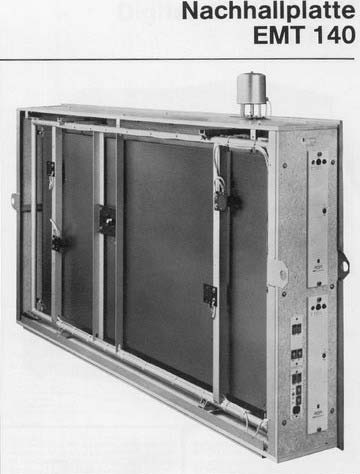
The EMT 140 plate reverb frame. The control electronics were in a separate rack unit in the studio. The plate was often located in a quiet location away from the studio.

For example, let’s consider the EMT 140 plate reverb. One can be bought for about $1500, which isn’t too bad, really. But plate ‘verbs are large, heavy pieces of gear that require a quiet, vibration-free location.  Usually found only in large studios, they were generally installed and left alone. So what’s a starving self-funded engineer/producer to do?

Enter Universal Audio. These folks make plugins that model classic gear, and they are very well done. I’ve had a UAD2 Solo/Laptop co-processor for quite a while now, but haven’t had the chance to use it much. But while mixing a recent location recording for Claire Lynch, her lovely vocals were begging for a second reverb. (The Solo comes with RealVerb Pro, and I was using this for the instruments.) I tried some free/shareware plugins, and although they sounded pretty good, I didn’t like the interfaces… I felt like I was writing Fortran code back in college rather than mixing, and never could get a very musical result. (like I said, I’m “of a certain age.”) I still had a credit with UAD from when I bought the Solo, so I sprung for a software version of the EMT 140 plate reverb.

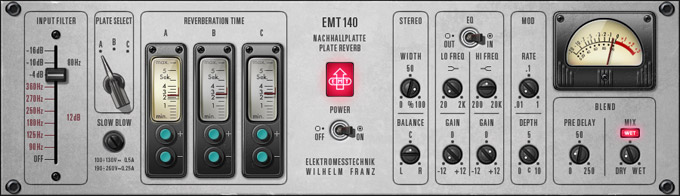
Universal Audio's EMT 140 plate reverb plugin interface looks similar to the original, it's intuitive and easy to use.

I’m happy to report it works like a charm. They are the perfect complement to Claire’s vocals. UAD’s graphic interface mimics the original very closely, and the original control panel is easy to figure out. I can make adjustments simply and get great results without having to “hunt around” for a particular parameter. (if you’d rather enter adjustments numerically, though, that option is available through keyboard shortcuts).

I don’t buy many plugins, since they’re only going to last as long as your current computer. When I can afford it, I prefer to buy the hardware version of the gear that I need. But in this case, I’ve gotta admit that the plugin has some significant advantages over the real thing. It’s far cheaper, infinitely more portable, fun to use, and most importantly, makes Claire’s voice sound like a million bucks.

More Fun With 5.1… The Double Mid-Side Technique

After my last post on an inexpensive 5.1 workflow, a reader (Peter Tooke… thanks, Peter) advised me to look into the double mid-side technique. This is a method used for 5.1 surround sound recording that I’ve seen used on feature films, and while it can be a little complex to wrap your head around, it’s pretty neat.

The “mid-side” mic technique is a method of recording stereo using a cardioid mic facing forward (the “mid” mic) and a bidirectional, or “figure-8″ mic facing left and right (the”side” mic). These mics require a little processing at the mixer, though, before we get a stereo signal.

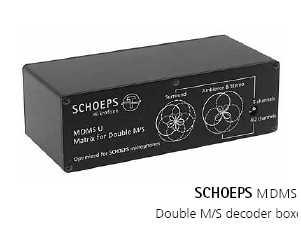
Schoeps has several hardware options to support a double mid-side setup

The mid mic is panned to the center, but the side mic is split into two equal signals. You can do this analog using a transformer-balanced splitter, or digitally by copying the input to duplicate channel. Pan one of these mid signals hard left, and pan the other hard right, but… and this is the key… invert the phase on the right channel.

The beauty of the mid-side technique is that if the left and right channels get summed together for a mono signal, you get no phase cancellation between the two signals. We used this technique in the early days of television, when some of the sets were mono and some were stereo. Using mid-side stereo, both stereo and mono televisions sounded fine. (More details about the mid-side technique are here.)

The double mid-side technique is an expansion of the mid-side technique. By simply adding a rear-facing mic we now have a system that can generate five channels of audio using only three tracks. Use a shotgun for the main mid mic, add a bidirectional mic for the side signal, and a cardioid rear-facing mic. The side signal is shared between the front and the rear mics. Each mic is recorded on its own track.

Decoding the three signals into a 5.1 mix is straightforward. The shotgun becomes our center channel, shotgun plus the mid (split, panned left and right, and phase-reversed for the right side)  becomes our left and right front signal,  rear cardioid plus the mid (split, panned left and right, and phase-reversed for the right side)  becomes our left and right rear signal… pretty neat, eh? And like the standard M-S stereo technique, the signals can be summed to mono without phase error.

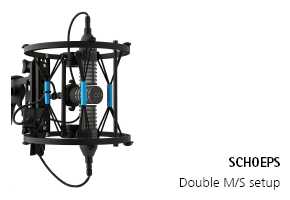
The Schoeps double mid-side recording solution has the advantage of the entire rig being able to fit inside a zeppelin.

Shoeps has a good bit of information about double mid-side technique on their website, including some elegant hardware solutions for implementing this system in the field. Hang on to your wallet, though, cause this ain’t a Chinese knockoff… it’s some serious hardware that is priced accordingly.

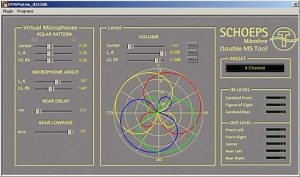
Schoeps even has a free double mid-side plugin that decodes the three signals for a double mid-side system. Order it here.

A screenshot from the free Schoeps double mid-side plugin

A Simple 5.1 Surround Workflow?

I received a call awhile back from my Director, Tim Coghill. Now, I haven’t worked for Tim in over 25 years, but he was, without reservation, the best director I’ve ever known. Period. I’d trust him to talk me through diffusing a roadside bomb.

Tim is the production manager at a SC ETV network station in Spartanburg, SC, and had just finished up a documentary for them. Until recently, PBS National had a requirement that all programs submitted to them must be mixed in 5.1 surround sound (they’ve backed off that requirement as of late).

What tim was asking me about was a simple way to capture 5.1 audio in the field. I know of lots of approaches to 5.1, but none of them could be called simple… other than mixing in plain old stereo and letting a 5.1 synthesizer do all the heavy lifting for you. I understand the newer ones do a pretty good job, too. But Tim was looking for another way, and even after 25 years, when Tim gives me a direction, that’s where I’m going.

I started ruminating on his idea of a simple, inexpensive method of capturing surround sound. I’ve come up with almost a solution. It’s far from perfect, but I figure it’s better than pocket lint.

At the core is the Zoom H4n. I’ve got one & use it a lot. I don’t love it, as it’s consumer-grade gear, and is loaded with compromises. But they’re small (it’s a handheld) battery powered (though it eats batteries like candy), and relatively cheap, about $300 street price. So far so good.

The Zoom H4n- it's ability to act as a pseudo-4-track makes it the key to this workflow

This little piggy has a pair of XLR inputs in addition to two onboard mics, and it has a 4-ch mode that allows you to record from both mics AND the XLRs. (Almost none of the commonly-available digital recorders can record more than two tracks at a time.) So you have a fairly cheap pseudo 4-track to work with. Six channels would be better, but let’s start with this.

Let’s imagine a single-person interview in a space with lots of background action… a deli, let’s say. You set your talent down and point the Zoom AWAY from your talent. The XLRs can be used to record a lav on one channel and a shotgun on the second channel.

The two tracks from the onboard mics are sent to the L/R rear channels. You’ll want to do some field testing to figure out which is the best way to orient the H4n… the soundfield might sound too extreme with the mics pointing away, and it may sound better if the mics face the talent, only placed some distance back.

The shotgun will likely pick up more “room” than the lav. Run the shotgun through a stereo generator and send that signal to the front left and right speakers and put the lav on the center channel. You’ll want to play around with this… the center channel might need a little shotgun, and the L/R fronts might need a little lav. But keep checking for phasing errors by summing everything to stereo and mono once and awhile to make sure you don’t get any really whacko-sounding phase cancellations. Some phasing will be unavoidable, but keep monitoring it just the same.

As you already know, the “.1” part of the 5.1 mix is the subwoofer. Pull these low frequencies wherever they sound best, perhaps the lav if you want to accentuate the speaker’s voice. Other sources might sound better if you want to accentuate the low frequency component of the environment… if you’re shooting on a battlefield, you’ll want those deep, rumbling explosions.

If you’re shooting two people on camera, then you’ll have to decide between two lavs, or a shotgun and a mixed lav signal, or just a shotgun and a single mic. Perhaps the single mic could get the rear signal, and use the zoom mics for the L/R fronts. You’ll need to experiment, and– here’s a crazy idea– use your ears and judgement.

The H4n is small enough that it can fit on a pole or a C-stand. Sometimes placing near a boundary surface, like a table, can give you a little boost as long as no one uses the table to shuffle scripts while you’re shooting. Camera noise will be an issue if you’re shooting a Red or an F900.

It’d be best if you did a dedicated stereo mix on a separate tape, and a 5.1 mix on another. This way you could avoid the whacko phase cancellations on your stereo mix, But rest assured, somebody somewhere will be listening to your 5.1 mix on only two speaker, so keep checking your mix folded down to stereo frequently.

This is about as close to a simple solution as I can come up with. One big drawback is the H4n records at 44.1/16 bit when it’s in 4ch mode. (I think it does, anyway… don’t have the manual in front of me at the moment.) This isn’t a broadcast standard, which unofficially has been decided should be 48K/24bit.

There are some more expensive and complex solutions that may be better… but I’m not sure if the degree of “better” would be worth the hassle. Zoom makes an R16 which I also have. It’s about the cheapest recorder that can record 8 tracks at the same time. And it can be run on battery power. But it too is limited to 44.1/16 when recording 8 channels at once (though I believe it has better specs when doing 4 channels), and the build quality leaves a lot to be desired. The benefit here is that you can use real mics for all 5 channels, and not depend on the recorder’s mics. (The recorder’s mics are OK… not bad, really, and very convenient… but I like having choices). Drawbacks are size, as the R16 is too big to fit in a bag, a more complex setup with five individual mics, and you may want a mixer for more control of the mics (but you’ll need one with direct outs, which is rare in small mixers… even good ones.  The PSC Alphamix (recently discontinued, unfortunately, and hard to fund used), Sound Devices 442 (also recently discontinued, but widely available on the used market), and the current Sound Devices 552 are about the only small ones that I know for certain have direct outs. Audio Developments might. My Eela 191 doesn’t.)

Direct audio outputs on the Sound Devices 552 mixer... a key feature.

My “real” 4-track would also be a better option for a recorder… an Edirol R4Pro, which has timecode and can record up to 96k, but it cost nearly $2k… not an inexpensive solution. Their R44 is a cheaper option at about a grand and is slightly smaller, but no timecode. They’re both too big for a bag, really.

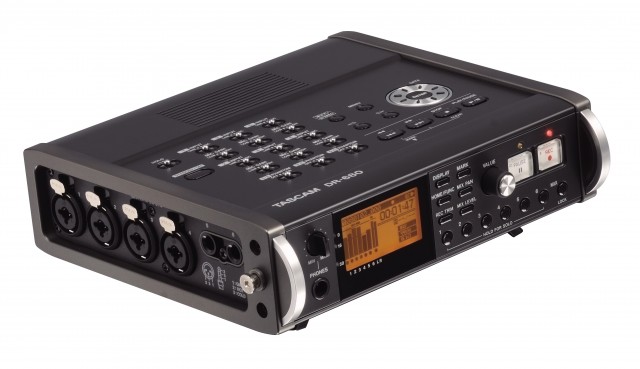
Tascam has some new recorders out. The DR680 can supposedly record eight channels at once, but it has only 4 XLRs. The specifications are a little cryptic as well, as it has

Tascam's DR-680 might be a relatively inexpensive solution for 5.1 field capture, but it's specifications are rather hard to decipher.

The Tascam 680

six mic preamps and claims “up to 96kHz” BWAV. Does that mean it can record 96K with all eight channels going at once? Perhaps…but as I’ve discovered with my Zoom, perhaps not. But the price is right, $800 from B&H. Their HSP82 can do a full 8 tracks, but it’s a full $5k. For that much, though, a Sound Devices 788T is $6-7k and would probably be a better investment.

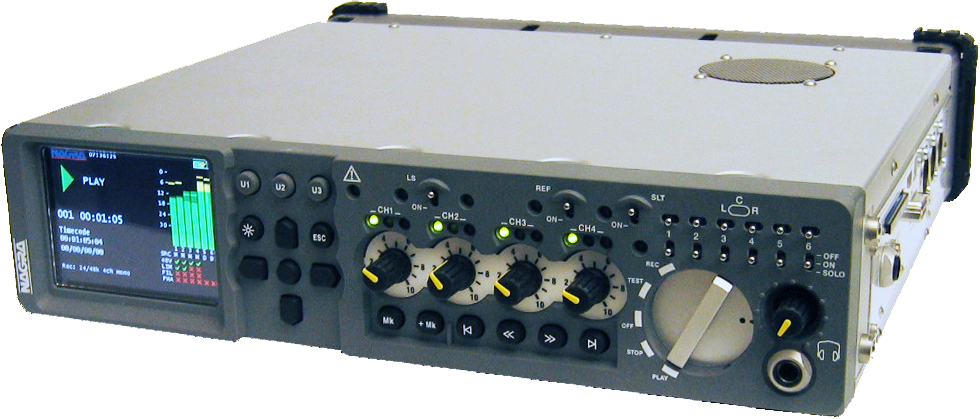
The A-list flagship recorders are Zaxcom’s Fusion at $8K, or their Deva 5.8Deva 16. Don’t get me started on the Fostex PD606, Sonosax SX-R4, or my favorite-though-I’ve-never-even-seen-a-real-one Nagra VI. (If any of these manufacturers would like me to
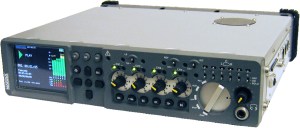
The Nagra VI. The gear junkie part of me wants one, but my rational brain won't let me do it

express a more authoritative opinion, they can send me one and I’ll be glad to handle it for them;-)

So there it is… at least a partial solution to the question of simple & inexpensive 5.1 capture. It’s isn’t perfect, but it is something to try, at least.

At The NETA Quality Workshop

Chattanooga is a comparatively small town in terms of media production, but living here has a number of advantages. A big advantage is our location… roughly equidistant to several very large metro areas, specifically Nashville and Atlanta. I can be in either place ready to work in about two hours. And while I do work in both places, there are sometimes other reasons to travel… continuing education, for example.

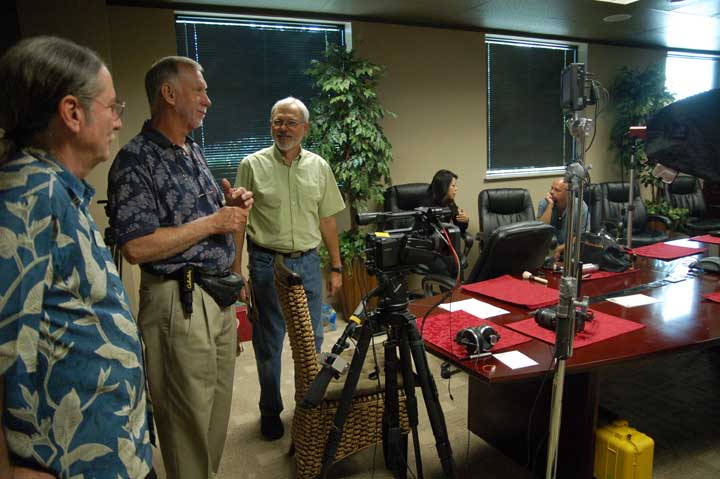
At the NETA Quality Workshop in Nashville, TN, Jan 2011

The National Educational Telecommunications Association’s (NETA) annual conference was held in Nashville last week. As a part of that conference,  the Public Television Quality Group held a one-day workshop on production quality standards within PBS. This working group is an active education and training effort on the part of PBS to help stations transition to digital broadcasting and create “best practices” for digital production. And since I have worked on several PBS shows in the past, I thought it would be advantageous to attend. Fortunately, their workshops are open to non-members, and not too expensive to attend (only $60 for the day).

Jerry Field discussing aspect ratio issues

Most of the people attending work in a PBS station environment… I believe Wallace Braud, myself, and two others were the only freelancers there out of about sixty people attending. Some of the presentations were really only applicable to station engineering staff, such as “Managing Your Broadcast Multiplex” and Practical Implementation of AFD at Your Station.” But several of the presentations were either directly or indirectly related to audio, field video production/data capture, or audio aspects of post production. Much of this material is directly related to how I work, and will help me to be a better audio engineer.

(I’m sure you won’t sleep until you know what AFD means… Active Format Description is a 4-bit code that describes the aspect ratio of a video signal, i.e., full frame 4:3 (standard television), pillarbox (black bars on the sides), letterbox (black bars top & bottom), full-frame 16:9(widescreen), etc. Can be incredibly confusing for a station. Without AFD, the broadcast signal is easily screwed up.)

There was a great deal of discussion about audio levels. In the analog days, this was easier… there was a maximum audio level that you could not exceed. It was easy enough to measure with an analog power meter, and

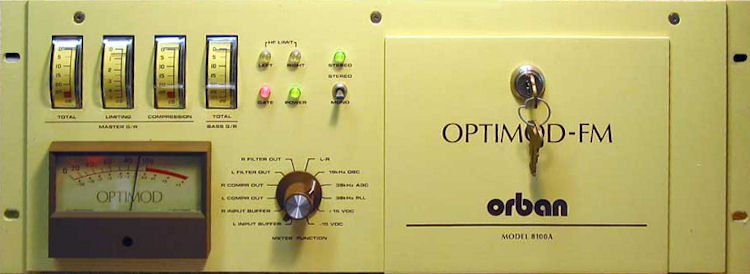
The Optimod 8100 comp/limiter, circa 1987

controlled by the OptiMod, an audio compressor/limiter placed just ahead of the transmitter. If a program was a little too hot, the OptiMod would clamp the signal and avoid a fine. With DTV, though, it’s now a matter of the maximum number of audio bits that are allowable, and there is still some ambiguity in the standard in terms of sample time. ( the legal level is set by ATSC A/85, “Recommended Practice: Techniques for Establishing and Maintaining Audio Loudness for Digital Television.” a 70-page document.)

Audio levels are measured in DBFS. Anything over 0 dBFS is Very Bad, and occurs when the audio level exceeds the number of bits available. It sounds extremely nasty. In DTVs early days, folks new they had to set their internal reference tone below 0, but where? After some wrangling, the standard is set at PBS for -24dBFS average loudness, tone set at -20, dialog peaks at -10.

While there was much more at the PBS Quality Group Workshop, (like a good explanation of Dialnorm and how it works) my clearer understanding about how the folks at PBS approach digital audio levels was worth the price of admission.

Recording Claire Lynch

I’ve scheduled a gig for next month, and I’m particularly looking forward to it. But first, the backstory… and for this one, we’ve gotta really crank up the Wayback Machine,* almost to full power.

Back in 1984, when I was an undergrad at the University of South Carolina, I managed to worm my way into a non-paying “job” at a place called the Quarter Moon in Columbia. Quarter Moon was a “listening” bar… in other words, the focus was on performing and live music, rather than consuming mass quantities of beer and bad-judgement hookups. I did the work mainly to avoid going broke on cover charges, as I was always going there to listen to bands.

The Front Porch String Band with Claire Lynch, Brian Thompson, Larry Lynch, and Terry Campbell.

One weekend Claire Lynch and The Front Porch String Band was booked to play, and I was absolutely hooked. Claire’s singing voice is so beautiful that, given some time and a good pair of speakers, it could turn a militant splinter cell into a Shriner’s club temple. And I’m not the only one with this opinion… Emmylou Harris has said, “I’ve always thought Claire Lynch has the voice of an angel.”

Jump ahead 26 years or so to 2010. Claire (winner of the IBMA Female Vocalist of the Year) comes to the Barking Legs Theater, a small performance space in Chattanooga, and I went to hear her and say hello. The Front Porch String Band morphed into the Claire Lynch Band years ago, and her voice is just as pretty as ever… even more so. Her years of experience songwriting, recording, and performing have refined her natural talent to a remarkable degree. Her band is equally phenomenal, and hearing her in such a small space is a real treat… a little like back in ’84. (See Claire’s complete song catalog here)

Claire Lynch

Claire Lynch about the time Friends For A Lifetime was recorded.

When I heard she’d be returning to Barking Legs in February, I took a chance and emailed her. The result is I’ll doing a live recording when she performs here on February 25th. It will be a little experimental… The evening will be a duo with Claire and her new guitarist Matt Wingate (winner of the Doc Watson Guitar Championship in 1997).

I’m really looking forward to doing some music recording again, especially with an artist of Claire’s caliber… we’ll see how it goes! If you’re anywhere near Chattanooga on Feb 25th, be sure to come down to Barking Legs (1307 Dodds Ave, Chattanooga, 37404… directions are here) to hear Claire live… tickets are $15.50 in advance. (You can listen to some of her songs here, with the Front Porch String Band.)

Claire Lynch

Claire Lynch on the cover of Bluegrass Magazine, 1994

*The Wayback Machine is a reference to a segment from The Rocky and Bullwinkle Show in which Mr. Peabody and Sherman use a time machine called the “WABAC machine” to witness, participate in, and, more often than not, alter famous events in history. (from Wikipedia)

BGilbertSound 2010 in review

The stats helper monkeys at WordPress.com mulled over how this blog did in 2010, and here’s a high level summary of its overall blog health:

Healthy blog!

The Blog-Health-o-Meter™ reads Fresher than ever.

Crunchy numbers

Featured image

A Boeing 747-400 passenger jet can hold 416 passengers. This blog was viewed about 5,400 times in 2010. That’s about 13 full 747s.


In 2010, there were 19 new posts, growing the total archive of this blog to 34 posts. There were 50 pictures uploaded, taking up a total of 65mb. That’s about 4 pictures per month.

The busiest day of the year was December 15th with 99 views. The most popular post that day was Discrete Operational Amps.

Where did they come from?

The top referring sites in 2010 were trewaudio.com, diyrecordingequipment.com, vinylengine.com, mail.yahoo.com, and facebook.com.

Some visitors came searching, mostly for harrison mixbus, api 2520, sound devices mm-1 review, harrison mixbus review, and sound devices mm-1.

Attractions in 2010

These are the posts and pages that got the most views in 2010.

1

Discrete Operational Amps March 2010
4 comments

2

Building A Transformer-Balanced Mic Splitter September 2009
2 comments

3

Harrison MixBus-A Pro Audio Secret Weapon May 2010

4

Equipment August 2009
1 comment

5

About Brian Gilbert August 2009
2 comments

Building Microphones

It wasn’t that long ago that the idea of building your own microphones was fine for a science fair project, but the end result wasn’t anything with a practical use. There are a few old articles about building microphones floating about the web. Take a look at The Bantam Velocity Microphone by L.J. Anderson and L.M. Wiginton, (Thanks to New York Dave at Prodigy Pro for posting this) Make This Ribbon Mic by M.H.O. Hoddinot, A Professional Condenser Microphone by R.Williamson,( originally published in AUDIO magazine, July, 1963)  A Stereo Condenser by Debenham, Robbinson, and Stebbings (image HERE) but the information is generally sparse, and it requires precision machining facilities. One person has even built his own gold vapor vacuum deposition chamber for gold-sputtering diaphragms. But with the rise of Chinese manufacturing and the resulting flood of Chinese-built microphones on the market, building a useable microphone is now a more realistic proposition. We can let the Chinese factories take care of the specialized machining, while we provide quality electronics, tuning, and care in assembly to end up with… possibly… a superior microphone, or at least one that’s custom-tailored.

Now, I don’t normally advocate buying Chinese audio gear. Quality control is often lacking, raw materials are questionable to poor, and the lifespan can be short as cheap components fail. And I dislike the idea of buying a look-alike product– i.e., a Chinese copy of a Schoeps or Neumann microphone. But there’s an opportunity here, if one looks at an inexpensive import mic as a source of raw materials. Others have realized this, and built successful small businesses by sourcing Chinese components, then tweaking the parts to yield some really nice results.

Don’t think for a moment that any mic that you or I will build will sound as good as, say, a mic by Neumann, Schoeps, DPA, etc. These mics will never replace those pieces of gear, and when you compare them side-by-side, the deficiencies of a lower-cost product will stand out like a sore thumb. But these mics are still useful, and depending on the situation, can even be a better choice than a top-grade mic. (For example, in an environment where a mic might get destroyed… wild flailing drummers, motocross races, mud wrestling, monsoon rainforests, etc.)

I’ve always been fascinated by the engineering that goes into microphones. It’s a combination of machining to almost unbelievable precision coupled with electronics circuitry that is, to my simple mind at least, almost magic that it works at all. Then when you get to hear the results of a REALLY  nice mic (say, a DPA or Neumann) in front of a good musician… the experience is unforgettable.

The only problem is the price, which is also unforgettable.  The pair of DPA 4016s I heard at the first Nashville AES Recording Workshop sounded absolutely beautiful… a truly AMAZING sound. The list price for the pair is over $3,800. In Brian Gilbert dollars, that price may as well be 38 million… in other words, until I can directly make $4k with that particular piece of gear, it’s an extravagant expense, no matter how much I love the sound. I’ve got a family to feed, after all.

So until I can afford a selection of really classic mics, I can experiment with making or modifying cheaper versions. While I’ll never expect to duplicate the sonic ability of a mic costing $1,900, perhaps there are some things I can do with a less expensive mic that can improve the sound a little.  And it turns out that I’m not alone. The MicBuilders forum (micbuilders@yahoogroups.com) has a lot of people who are interested in the same sort of experimentation. I don’t often contribute, as most of the folks there are far more advanced than I am. But the people there are very generous with their time and willingness to help others learn. Similar audio experimenters can be found at ProdigyPro.

Generally, mic builders have two options: A) buy a readily-available mic and modify, or B) source the parts and build from scratch.

The Neumann MA-200 mic capsule

Some parts, such as the capsule, can be hard to find, but they are out there. Capsules can be found on e-bay, or they are available from Peluso. Microphone bodies require precision machine-shop work if they’re going to look at all professional.

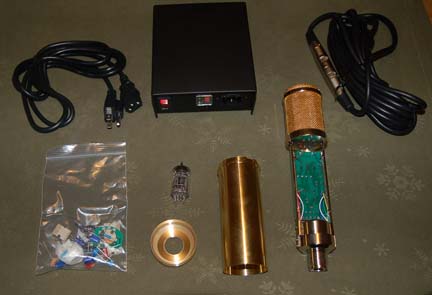
There is a third option that I recently discovered. A company called Aurycle sells condenser mic kits, along with a few completed mics. The prices for Aurycle kits are very affordable… lower than the sum of the parts if you bought them individually. I have built three of their microphones… two large-diaphragm FET mics, and a large-diaphram tube mic. Overall, I’m quite pleased with their products and the results, but like everything in life, there are pros and cons. Let’s start with the PROS:

  • The prices are affordable… downright cheap in fact.

    The Aurycle A460 FET mic frame and body

  • Entire kit is less than the cost of the parts alone.
  • Easy to substitute different components to see how they sound.
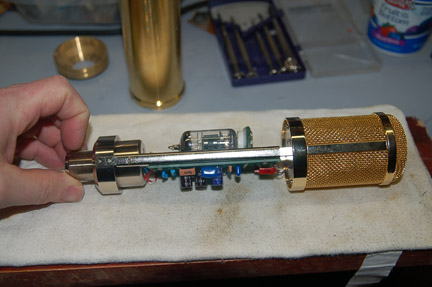
  • Modifications are easier, since it comes disassembled.
  • Transformer-based design lets you try a transformerless circuit easier than the other way around.
  • The low cost encourages experimentation. If I screw the pooch, I won’t loose too much sleep over it.

    Aurycle A5500 Tube mic kit as supplied. The high-voltage power supply comes assembled.

  • While these ARE NOT good first projects, they are great learning tools for teaching yourself about microphone electronics and developing skills.
  • The machining is pretty good, with all-brass bodies that are suitably heavy.

Now the CONS:

The completed 5500 tube mic.


  • The end result of the stock build is very typical of, and in some cases identical to, other low-cost Chinese mics.
  • Documentation is not nearly as good as it should be. In some cases, it’s incomplete… you’ll need to do some internet research in order to complete the microphone.
  • Electronic components are adequate, but rather low in quality… typical Chinese stuff. This is an easy upgrade, though.
  • The brightly-polished brasswork as supplied has a slightly cheesy look to it, and the brass itself seems pretty low grade. Again, fairly easy (though potentially expensive) to change if you want.
  • These don’t come with any sort of clips, suspension mounts or cases, which you’ll need. Clips don’t always fit… I bought some that won’t work because the threads are too short.

Microphone building certainly isn’t for everyone, but it is an option for those who want to dig a little deeper into microphones and how they work. The sonic character of these isn’t likely to change your life… just another crayon for your box… but it’s certainly fun to use a mic that you built yourself. Otherwise, contact me… I have several custom-built mics for sale.

Frontline and DSLR Production Workflows

I recently got “the call…” Frontline was going to be taping in Nashville and was looking for audio support. After confirming that my wife Karen would be in town, I jumped on the gig like an Aussie jumps on a Fosters. I’m a huge fan of the show, and have been watching it for many years. It’s about the only news-related program left that I trust anymore, as their reporting standards and production values are just about the best in the business.

Caitlin McNally, Sam Russell and Dallas Jackson interviewing for Frontline

I worked with Caitlin McNally and Sam Russell, both from Ark Media in NYC, a production company that supplies several Frontline documentaries. We shot on Wed, Dec 8th, at Rivals.com, a media office in Nashville, TN, that specializes in high school football… the subject for the documentary, scheduled to air in April of 2011. Our primary subject was Dallas Jackson, a senior analyst and radio host at Rivals.com

What surprised me about this shoot was that it was to be shot on a Canon 7D. I generally dislike DSLR video production. The images are truly beautiful, especially when the camera is in experienced hands with a good variety of lenses. But no matter how you slice it, a DSLR is still consumer equipment, and it’s stuffed full of compromises- especially from an audio standpoint. Everything from tiny, unreliable connectors, no  ability to monitor the audio or video, no timecode, no outputs, no controls, lousy camera balance… these are all factors that distract the crew. And every moment spent fussing with connectors is a moment that you aren’t concentrating on what you’re shooting.

But Sam has a good bit of experience on DSLR shoots, and I learned a bit about how they can work better from an audio standpoint. The first thing he did was forget feeding my audio to the camera, instead using the on-camera mic to record a reference track only. I think he did anyway All production audio was to be recorded in my bag, on my little Zoom H4n. Sam had an identical unit that he uses on location. Shooting is easier when your camera isn’t tethered to the mixer, but slates are critical. We would usually slate at the head of a cut, but the scenes would often go beyond the 12-minute limit of the camera (another compromise). When that happened, we’d both stop down (the H4n doesn’t actually burn a file until you press stop) and do a tail slate. One of the things I’ve identified a real need for is a very small one-handed clapper slate, as using the full-size one was sometimes a bit tricky with one hand. I’m designing one now. (UPDATE 12/13/10… ) I’ve finished a prototype, and it works great. I’ll probably build a second, slightly more refined version and post a photo, as my prediction is that these little things would be essential for a short-staffed DSLR shoot.

Another cool trick was Sam’s DSLR balance rig. I neglected to get a photo, but it was pretty neat. A homemade affair, it was just a board about 2 x 2 x 30. At one end was a tripod plate for the camera, at the other end was about 5 lbs of weight. On the bottom, Sam screwed a piece of flat steel bent into an upside down ‘U’ shape, padded with foam and wrapped with tape. The whole affair rode on his shoulder like a normal camera would, but the counterweight allowed him to keep the camera in front of him for long periods of time. He could even momentarily take both hands off the camera and it wouldn’t go anywhere.

Sam Russell's DSLR support rig

Harrison’s MixBus Nominated for TEC Award

As you probably know, I don’t particularly care for mixing on a computer. But I’m a realist, and I’ll be the first to admit that it is nice to have much of the capability of my old recording studio sitting in my laptop.

I’m also a particular fan on the Harrison MixBus DAW. It’s the closest thing available to working “old school” that I’ve been able to find, it’s flexible, VERY powerful, intuitive to use, and sounds great. And since everybody else uses ProTools, it gives me a bit of a competitive edge… plus it’s a little bit harder for someone to steal my settings.

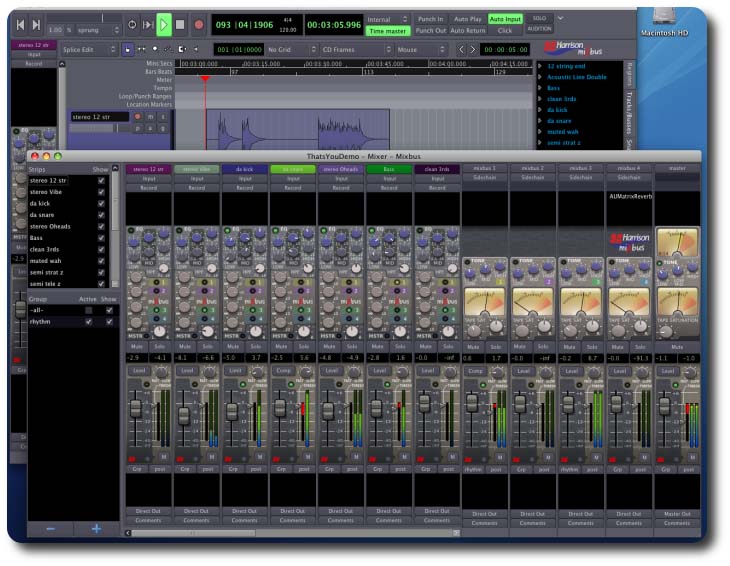
Harrison MixBus screenshot

That’s why I was pleased to see that MixBus has been nominated for a TEC award this year. Anyone who is professionally involved in the audio industry is eligible to vote. Registration is free, you can vote online here.

*Full disclosure… I’m not connected to Harrison in any way, other than I like using their gear.

For Music-Producer Types… Notes From MixNashville

I attended MixNashville earlier this year, held at SoundCheck Nashville, a giant warehouse/practice/tour support facility. (an amazing feat in itself, since the facility was completely submerged by flooding earlier this year.) It was a pretty good show, though I do wish they had scheduled more lectures geared towards music business and studio survival, and fewer “How to Mic an X” or “Anatomy of a Mix” lectures. The reason might be that few people have any answers to the studio survival question.

An exception was a lecture given by Jay Frank. He’s the author of FutureHit.DNA, which is a book I’d never heard of until the conference. I’ve just started reading it, and at first glance it looks like it should be required reading for anyone involved in the music business.

I took a bunch of notes during the lecture, which I’ve typed up for this post. If you never deal with music on a professional production basis, then you’ll probably find little of interest here, but as a sometime studio engineer and producer, I found his comments to be really enlightening. Enjoy…

(NOTE: My apologies to Mr. Frank if I’ve misquoted him or gotten something wrong in these notes… I was scribbling as fast as I could… for the authoritative version, get the book. It’s only $16 at Amazon)

ANATOMY OF A FUTURE HIT

Lecture by Jay Frank, author of Future Hit DNA

Presented at Mix Nashville, Tuesday, Sept 14th, 2010

The “radio paradigm” doesn’t work anymore, i.e., people don’t use the radio to find new music to go out and buy. People used to stumble upon a song via radio or TV.

You have seven seconds to impress the listener. Research has shown that people form an opinion, positive or negative, within that time frame.

Old songs from the 1950s had 10 second intros. This was space for DJs to intro the song… a short instrumental music bed, if you will.

During the period of radio consolidation, computers began selecting songs. Longer intros resulted in more selection. This was accidental, as it was just for the DJs to use that space for selling cars, but it illustrates the role of technology in creating #1 hits.

In 2000, average intros went from 15 seconds to 8 seconds. In Jan-June of that year, the top downloads had an average intro of 6 seconds. There are some exceptions to this rule.

Currently there are far too many choices in new music. How do you cut through all the clutter? If you can get a listener to hang on through the first 10 seconds, they are much more likely to stay. So you lengthen the song & own the listening experience… say, from 3:45 to 4:30. If your listener spends more time with your song, they are spending less with the competition. Also, longer songs are cheaper to stream using current models.

Pandora pays the same rate regardless of length.They’ve also started 4 minute programming, no punk or oldies. (4 minutes of commercials per hour of music) In general, songs are too short. Longer songs are more cost effective.(1) Live 365 is a different deal. Payment will change within the next five years to payment for length of songs, i.e., more $$$ for longer songs. (2)
The only way for artists and music producers to make money is via multiple listens or purchase. If this is the case, then multiple versions- acoustic version, hard rock version, etc… make sense.

Example- Seelo song F*ck You. The first video had just lyrics on screen. 2 weeks later, actual video is released. Had 100K downloads.

Second example- Bed Intruder. Auto-Tune the News Went viral. (3)

There are 3 points in a song where people tune out… the beginning, middle, and the end. We’ve discussed the beginning. The MIDDLE, say, 2 mins in, at the end of the second chorus… if the song doesn’t change, or somehow shift, people will tune out.

The END… Nowadays, people get “stuck” on a song that is unresolved- like an abrupt ending. Like a good hook, it becomes an itch the listener can’t scratch. Only 10% of the top downloads offer a fade. Most leave you hanging.

For more on this subject, read “This Is Your Brain On Music” by Daniel J. Levitin. Very dense reading, but very informative.

We are in a singles world. Listening is done by playlist w/ shuffle. Albums are a holdover from industry delivery models. Labels should release more songs… almost no sales are resulting from back catalog.

For a beginning artist, it’s important to release singles more often. Keep feeding your fan base. There is a band called Pretty Lights– all songs are given away free on the internet. The band sold out RedRocks.

Daily Online Updates- constant updates on your website for producers, artists, engineers is essential. You have to keep giving people a reason to talk and think about you. If you can get a thousand fans to spend $100 a year on your band, then you can make a living. Half the labels are using this philosophy in their A&R meetings.

Radio Play- Publishers want 3-31/2 minute songs for radio play. Make a radio edit, but make sure the long version is the upload version.

Marketing Strategies- Use music videos wherever possible.

A side note… the way producers and fans look at music is often backwards. The PRODUCER considers first artist’s talent, then lifestyle, which results in the song. The LISTENER experiences the song first, then looks at lifestyle, then talent of the artist.

Cover songs are a great way to introduce yourself to fans.

Book FUTURE HIT DNA

(1)  Pandora aiming to loosen radio’s grip on drive time, 12 October, 2010 12:56:00, http://www.rbr.com/radio/28218.html

(2) Spotloads, Perception, And Listener Tolerance MONDAY, MARCH 22, 2010, http://www.radio-info.com/new-media/the-future-is-now/spotloads-perception-and-listener-tolerance

Meeting Cory Booker

One of the reasons I love my work is that I occasionally get to meet some fairly famous folks. Normally, this is just a brief exchange of pleasantries… not like we’re best buds, hangin’ out with a beer or anything. But still, it’s kinda fun.

This week I was fortunate enough to be called for a 2-day job with Dave Porfiri of Mindflow Media to record the Benwood Foundation lecture series. The speakers are some really big names in politics, academia, etc. Last month, I got to meet author Malcolm Gladwell. In the ’08-’09 series, I met environmental justice advocate Majora Carter (that lecture can be seen here) This month, it was Cory Booker, Mayor of Newark, NJ.

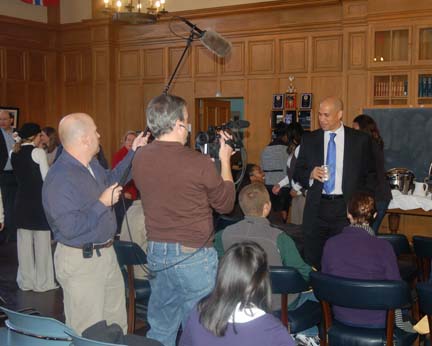
Dave and me shooting Cory Booker at the University of Tennessee at Chattanooga's Flag Room, Nov 19th, 2010. Photo by Lon Jordan.

Mayor Booker’s story is very well told in the documentary Street Fight, which was nominated for an Academy Award, but lost to March Of The Penguins. Mayor Booker is a vegetarian, but he allows himself one exception… PENGUIN MEAT! (“Tastes like chicken,” he claims.)

Mayor Booker at UTC

Mayor Booker at UTC breakfast Q&A session with students. Photo by Lon Jordan

Mayor Booker is an inspirational speaker. He’s certainly a politician, but seems a long way from your typical politician, since the major issues he faces in his city… guns, gang violence, drugs, poverty… can rarely be framed as “Democrat” or “Republican” problems. And he’s gotten results… something like a 40% reduction in shootings since taking office.

But probably what’s gotten the most attention was his defense of Newark on YouTube, where he “officially” put Conan O’Brien on the Newark Airport’s “no-fly list” (the Newark airport doesn’t have a no-fly list, but that’s really beside the point.) for a joke Conan made about Newark on his show.  “Try JFK, buddy!” If nothing else, it shows his sense of humor and his skill at using new media to get out his message. (the “feud” continued for quite awhile.)

It was an enjoyable shoot with good results, and I’ll certainly be watching Mayor Booker’s political career more closely in the future.

The RE50- A Broadcaster’s Swiss-Army Mic

I first encountered these mics at my first television station, WCBD, over 20 years ago. Electro-Voice RE50s were in some of the reporter’s kits but not everyone had them. Whenever we’d encounter a problem mic, the first thing we’d do is try a ’50. This often corrected problems.

RE50s are dynamic mics, so they don’t require phantom power. Their output is a little on the low side, but even so, they are usually fairly quiet. They’re omnidirectional, so they don’t suffer from proximity effect. This makes them excellent for interviews, but less great for live sound as they’re more prone to feedback.

The best feature, though,  is the isolation. They are built almost as a “mic within a mic.” The microphone diaphram, electronics, and transformer are housed in a closed cast aluminum chassis. This chassis is suspended by foam inside the mic body itself. The result is the mic is very well insulated from handling noise, and especially wind gusts. I’ve actually used these in live weather reports during a hurricane.

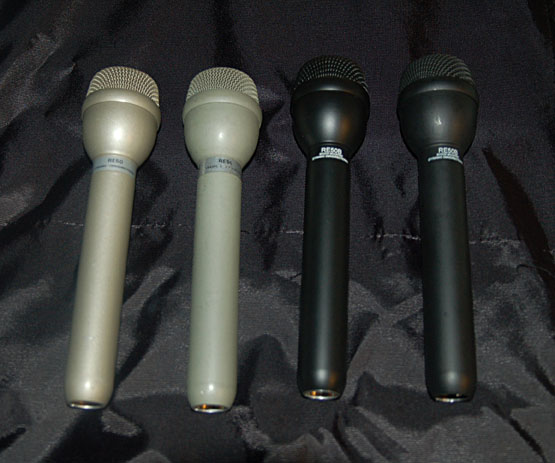
My current collection of ElectroVoice RE50s. More than I need, probably, but I like having them in my kit.

Whenever I see these on eBay for cheap, I snap them up. I currently have four in my inventory, two RE50s and two RE50B. One of these I bought for ten bucks as a parts mic. When I got it, I opened it up to find the foam surround completely gone. I cleaned out all the old adhesive and foam crumbs, made a new surround with a thin strip of foam around the base, added a circular bit inside the mic basket, and now it works. I’m trying to locate a source of OEM foam surrounds for these, but no luck so far.

Classic Audio Products VP26 Mic Preamp

One of my recent projects on the bench is a pair of mic preamps by Classic Audio Products of Illinois.  I can’t say enough good things about this company. They are providing parts, circuit bards, and instruction that make top-quality builds of classic audio circuits available to people who are passionate about sound.

I had started with their 2520 discrete opamp kit, described in a previous post. These mic preamps are the end use of those opamps. I’ve put off building these for awhile to save up the cash, but finally bit the bullet and bought most of the parts to complete a pair. They aren’t finished yet… I still have a few more parts to buy, and I’m deciding whether to fabricate my own faceplates or use theirs. But I’ve competed enough of the build to give at least a preliminary report.

A pair of VP26 mic preamps at my bench. Still have transformers, pots, and switches to add.

For me, building one of these is not a casual proposition. I’m not a component-level engineer, and the risk that I could somehow screw this up is very real. But if there’s one thing that defines this company, it’s quality. Everything they supply is top-grade.

For example, let’s start with the documentation. The VP26 assembly manual can be downloaded here, and it’s clear that Jeff spent a lot of time to make this as clear as possible. With a project like this, clarity is important… there are plenty of opportunities to botch any electronics circuit (even more so when I’m holding the soldering iron), and the extra photos, instructions, and advice help to ensure that you aren’t likely to end up with a non-functioning preamp.

The circuit is an all-discrete update of a classic mic preamp circuit that has been optimized for contemporary parts. I’ve often studied old circuitry, only to find that they use obsolete and unobtainable parts, and I lack the ability to re-design for modern components. Jeff Steiger, who owns a 1976 API 3232 console, founded Classic Audio Products after years of experience maintaining and tinkering with his own console.

The components used in this circuit are the other side of the quality coin. There are no shortcuts in this design. The circuit boards have nickel-plated holes… this means the they take up solder for better connections with less exposure to heat for the part. Pots are all Clariostat sealed conductive plastic, and a glance through any Mouser or DigiKey catalog will show you that these things ain’t cheap. They should last for decades. The design uses Nichicon electrolytics, which are widely regarded among the DIY community. And the transformers are custom-wound by Ed Anderson to be as close as possible to the original equipment used by API.

This company should be appreciated by everyone in the professional audio field. In this day and age, it’s all too common to find gear that’s cheaply made by overseas copycat suppliers, and this is the antithesis of the “cheap is good” mindset. These things AREN’T cheap… each kit comes out at a hair under $200. But if I went out and bough all the components from individual suppliers, it would likely cost more. Their profit margins must be pretty slim indeed, and I believe that a big part of their business plan is a passion for quality audio. I want to support that whenever I can, and the best way to support them is to buy their stuff.

I’m very much looking forward to completing these units, even though I won’t be using them much for live production. What I need to do now is beg and plead the folks at Classic Audio Products to design an EQ or compressor circuit board and/or kit that uses the 2520 op amp, so I can build some more!

Using The Sennheiser 415t

I recently got the chance to break out my old Sennheiser MKH415T. This jewel of a mic doesn’t get used a lot because its high-impedance circuitry is very sensitive to humidity and doesn’t do well with rough handling. It was a favorite among film crews back when it was new. The “T” refers to its power requirements, meaning 12-volt T power, sometimes called AB power. T power is less popular because it has a greater potential to damage microphones… if you plug a dynamic mic into a T-powered input, it can burn out the capsule, where 48 volt phantom generally won’t harm your mic unless the wiring is faulty. (Still, it’s good practice to plug in the mic first, THEN turn on the phantom power.) But T-power excels in battery-powered gear, with generally longer operating times and simpler circuitry.

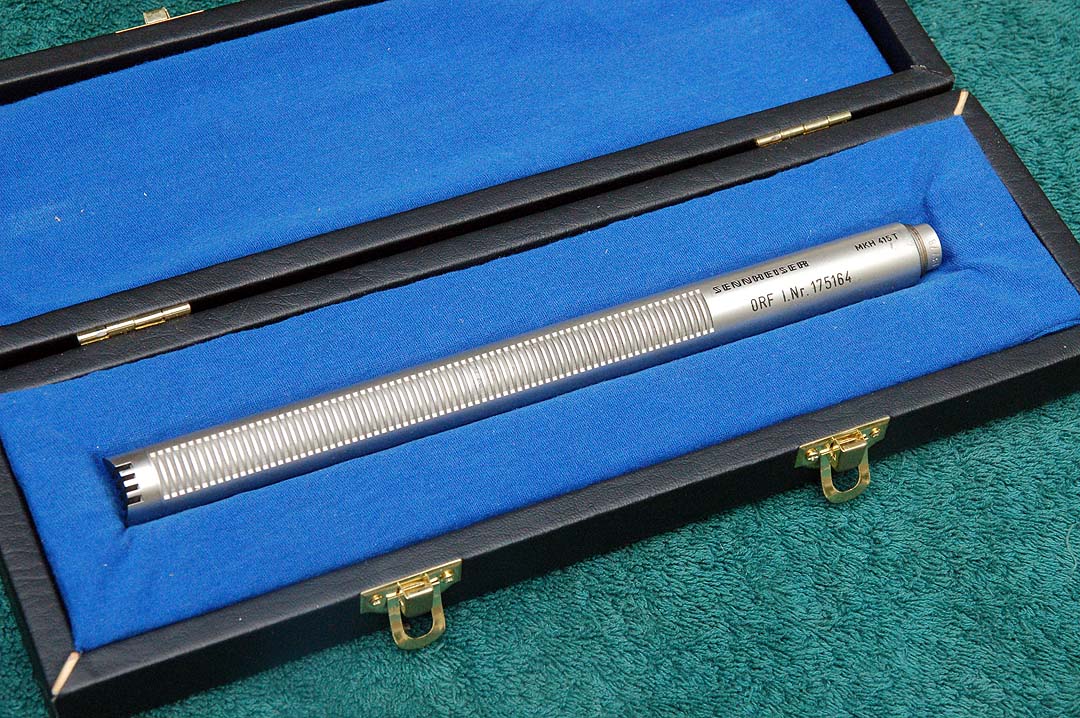
My 415T. It came without a box, so this one is a copy. These should always be kept in a case and carefully handled.

My mic was formerly owned by the The Office de Radiodiffusion-Télévision Française,  as it’s engraved ORTF. The ORTF was the French equivalent of PBS. Mine came without a case, so I copied the construction of the case from my 815t and built a box that is a close copy to the factory original. My 415 is fitted with a Tuchel screw-on connector, so I had to build a short Tuchel to XLR adapter. It needed minor repairs as well… one of the tuning chokes would shift whenever the mic was moved from side to side. This was repaired with a small lob of beeswax to secure the choke. (the original Sennheiser service manual can be seen here)

Tuchel connectors are smaller than standard XLR connectors, and are secured with a threaded ring. They’re more secure and protect the contacts better, but more expensive and harder to find.

At one point, I compared the sound from the 415t to my more-often-used Sennheiser ME66/k6. The only way to do this is to set up both side-by-side and switch between the two. The ME66 sounds good, but the 415 sounds better. It’s hard to describe, of course… the differences are subtle. But it’s most noticeable in the top end, which is definitely smoother.

These microphones are often available on the web. There were two variants – the 415T and the 415T-U, the difference being Tuchel or XLR. The 3-pin Tuchel connectors can still be found, but it’ll take some hunting… I bought mine from Mouser, if I remember correctly. Accessories for these mics used the “MZ” prefix… Sennheiser MZA15 (Tuchel) or MZA15-U (XLR)  is an in-line battery-powered T supply, it’d be very handy if you could find one. MZF15 is a 6bD roll-off filter @25Hz. MZA56P-U would be a real prize… this converts from phantom power to 12vT.

The 415T undressed. Tolerances are very tight. Don’t adjust the chokes without proper test equipment, as you’ll most likely degrade the performance significantly. I repaired mine with a very tiny spot of beeswax, which secured the loose choke cores while maintaining adjustability.

In the real world, my 415T doesn’t get quite as much use as I’d like, since it needs kid gloves. It’s pointless to use it on a noisy set, or outdoors unless we’re shooting in Arizona… the Tennessee humidity is generally on the high side. But when conditions are right, it’s a fantastic peace of old gear that gives great results.

Sound Devices 442 Mixer

For a long time now I’ve been saving up for a new mixer. I recently bought a used PSC Alphamix from Trew Audio, but it was doing some weird stuff when it was first powered up (one channel appeared to be -6dB down at the output for about 20 minutes, and then it “fixed itself…”) I can’t take a chance of that happening on the set, so I returned it to Trew. Unfortunately, I discovered that the Alphamix is no longer being made, so a new unit was out.

When I was in Nashville for the Mix Nashville conference, I stopped  by Trew Audio to talk about my options. Rob Milner suggested a Sound Devices 442.

The Sound Devices 442 has a very high build quality and a number of useful controls and features.

Sound Devices has a reputation in the industry for building some of the best equipment in the business, and this mixer has a number of features that make it a valuable and flexible tool. Of course, being able to mix four audio sources via an over-the-shoulder bag is handy, even though most mixing jobs are admirably covered by my trusty Shure FP33. And though I’ve owned a Shure 4-channel mixer (the FP42) for awhile, the 442 is really a different beast altogether.

The output side of the mixer. The battery tube has a badly-designed spring on the positive end that can short out rechargeables.

The primary reason this mixer was purchased is direct outputs on each channel…  in addition to sending a mixed signal out, I can also record each individual input on my R4Pro 4-track recorder.  I normally record audio for film directly into the R4 or mixed straight to camera, but with the 442, I can record four iso channels on the R4 while mixing to camera at the same time.

The build quality on all Sound Devices equipment that I’ve used has been stellar, but every Achillies has his heel. On this mixer, it’s the battery tube. It’s not correctly designed, with a spring at the POSITIVE end of the tube. All other battery holders have a spring at the NEGATIVE end. With some rechargeable battery types, this spring can short the battery to its case, burning up the battery and leaving the mixer useless. Even though  the manual says you can use rechargeables in this mixer,  I NEVER use rechargeables with anything Sound Devices makes! I know from experience, it happened to me with a brand-new MM1 preamp (that uses the same type of AA battery tube holder. At first, they wanted to charge me $100 for a repair. Eventually, they fixed it without charge, but it was a surprising and disappointing customer support experience. Even though I vowed not to buy Sound Devices after that, there really aren’t any other options that have direct output capability. I’m avoiding the battery tube altogether by using an NP-1 battery cup with a custom-built cable and case to power the mixer. Standard alkalines go in the tube as a backup for the main battery. (look for a how-to-make-it post on these subjects later.)

The big reason I bought this mixer are those four little TA-3 connectors on the right. These direct outs can go to the Edirol R4Pro input, allowing four tracks of isolated audio to be recorded while mixing to camera AND a 2-track backup recorder!

The 442 has been discontinued in favor of the 552, which features a built-in 2-channel flash recorder. A number of the 442s can be found on the used market. I bought mine from Trew Audio in Nashville, and I highly recommend them as a supplier.

I’ve used this mixer on several shoots now, and I really like it. the LED metering is daylight-visible, and just about every parameter can be adjusted to suit my particular workflow. It’s a big improvement to my gear list.

Recent Shoots

I’ve done several shoots for clients recently… a political spot for Zach Wamp andAtomic Films (he lost), a medical piece for Canon Medical Imaging with DP Ted Meirs and Director Dwight Adair, and a short film for local producer/director Chris Clark.

Shooting for Canon Medical Imaging with director Dwight Adair, DP Ted Miers, and grip Wallace Braud

These three jobs couldn’t have been more different. The political spot was shot with the Red camera, the Canon production was shot with a Sony HDV camera, and Chris’ film was shot on a DSLR. The sound was different as well. The first two were single-person on camera, no two shots or complex dialog arrangements. These were shot with shotgun mics only and sent directly to the camera– no mixing necessary.

The film shoot required “double system” audio, recorded using an Edirol R4Pro(see my previous post on DSLR Audio).

DSLR Audio

DSLR films present a unique challenge in terms of audio. The ability of the Canon 5d to record HD video in a number of frame rates has launched a revolution in filmmaking. I believe the 5d was the first camera to implement HD video in a way that was professionally viable. (If you’ve never seen the video from a 5d, have a look here… but notice that there’s NO sync sound.) Other cameras can do this now as well, but the 5d still holds a lead in the DSLR filmmaking arena.

The images from these cameras are beautiful,

My audio cart for DSLR production features the R4 and Lectrosonics wireless receivers.

but recording audio was definitely an afterthought at the Canon factory. Early versions of the Canon 5d software offered little more than audio on or off, with no way to defeat the automatic gain control. There were some hacks available, and the new firmware is much better in terms of recording, but this is still an area that requires a dedicated location sound person. The best way to handle audio with a DSLR is doing it “old school.” You use a slate (or clapper) at the head of every scene, and record the audio to a second dedicated recorder. Sound is still captured using the camera’s onboard mic, but this is just a reference track. The resulting files are synchronized manually in Final Cut Pro. (though there are some neat software solutions for this job, such as PluralEyes automatic sync software.)

For Chris’ film, I used my Edirol R4Pro 4-track field recorder. Track 1 was generally reserved for the shotgun mic, while tracks 2-4 were used to record wireless lav mics on the talent, with the occasional plant mic hidden on the set to grab SFX or dialog. The lavs always suffer from the occasional clothing rustle, but having each one on a separate track enables you to mute out offensive noises or wireless hits on the individual channel. Having several audio sources to choose from in post opens up other creative options as well, such as stereo placement and 5.1 surround mixing.

Key grip Glenn Stegall (SamauraiHammer) doubled as my boom operator for some of Chris' short film.

I haven’t gotten the chance to do any of the editing yet with Chris, but I’m looking forward to hearing the footage and playing around with the post production files. This is an area that I’m slowly expanding into here, and I’m setting up a Final Cut Pro postproduction workflow here.

Bargain Gear- Cowon iAudio transcription recorder

During a shoot for the PBS some years ago, the producer handed me a Cowon iAudio U2 MP3 player. This was to be used to record a copy of the audio sent to camera to send to the transcription

Cowon iAudio U2, 1mb model

service. These little things have two big things going for them… one, they’re pretty much dirt cheap (you can buy them used on eBay for $10-$20) and two, they’re TINY… about the size of a pack of gum.

The U2 has a provision for a line input via a 1/8″ jack, as well as an on-board mic. I bought one and added a small bit of velcro. I can stick it onto my bag or hide it on the set. The tiny little screen is a bit of a pain to use, and you have to navigate the menu maze to get it into record. But it can record WAV or MP3 file formats, and with 1gb of space, it holds a respectable amount of program.

I’ve just shipped mine back to Cowon to get the battery replaced, and they have yet to give me a quote. The battery on my unit is pretty much gone, and only operates the unit for about fifteen minutes before running out of power. Since there are so many options now for small MP3 recorders, the battery replacement cost will be the big factor for whether or not this unit will remain in service or retired. But it is a handy option to have in the bag.

UPDATE: Battery replacement for my unit is going to cost $27, which seems pretty reasonable. They’re working on it now, and it’ll be placed back in service as a basic standby recorder, giving me a similar capability as the Sound Devices mixer with the onboard recorder, but at a significantly lower cost. Until increased bookings allow the upgrade, this is a workable alternative. (My rule about expensive gear is get the business FIRST, THEN buy the hardware.)

UPDATE 2: I’ve received my iAudio back from Cowon. Their service department gets five stars… I’m not positive, but it looks like they’ve done more than just replaced the battery. The unit looks brand new. There’s not a scratch on it anywhere, and the little rubber cover for the USB connector seems new as well. I haven’t gotten around to doing battery life tests yet… i.e., how long it will record on a fully-charged battery… but I’ll post the results when I get them in.

Critiquing Someone’s Music

I’ve recently read an interesting discussion on the Nashville Music Pros forum that many music professionals deal with in one form or another. Bret Teegarden, a very accomplished and well-respected engineer/producer who I’ve met, had someone ask (via Facebook) to “listen to his music” and asked for advice. (The entire conversation can be read here)

As (current or future) industry professionals, we’ve all been approached with this sort of question in one form or another. If it hasn’t happened to you yet, it will be.

The way it went down is this: Bret was asked for his opinion, and in a nutshell, the music was not marketable. The singing ability was lacking, and the singer’s abilities were not on par with what is commercially available. Bret’s response was genuine and was intended to help this person, even though the truth was surely painful to hear.

Bret should be commended for handling the situation as he did… his honest appraisal was intended to help this person learn and improve. Unfortunately, we cannot win in this situation no matter what we say. If we are honest, they get pissed off… if not, then we are lying… and that will always come back to bite you in the butt.

I make it a point to ALWAYS be straight with people. There are times when it’s difficult, i.e., when someone in a hiring position asks you to work on a substandard concept. But it is an extremely rare situation where lying makes things better.

Personally, I am a bit less altruistic than Bret when I’m presented with this kind of situation. I can’t get involved in a big flame war with this kind of person… it just isn’t worth the time and emotional energy.  Many people aren’t honest with themselves about their abilities, they don’t want to do the work required to improve… they just want their magical daydream to be true, where you just step into a studio and become an instant hit. This myth makes a good story, and that’s why it’s so often repeated. But it almost never happens that way in real life… professional musicians spend years honing their craft and marketing their skills, and even then it requires a bit of luck to be successful in the music business.

I try to never give a professional opinion about someone’s music unless specifically asked (as Bret was), and then I preface that opinion by outlining our position in the industry… where stroking an ego does no one any good, and honest critique just pisses ’em off. I tell them that ANY critique is going to be hard to take, and if they cannot understand that my intent is to help them improve, then I’ll save us all a lot of pain and just keep my thoughts to myself. I also tell them to take what I say with a grain of salt, since it’s just one opinion after all… there are others out there as well, and performers MUST develop a thick skin to survive in the industry. (And to be honest, specific, detailed coaching is reserved for clients.) I think Bret did the right thing, but you often can’t win with these folks.

There were several good discussions in this particular forum exchange. One of the best tips was to never give this sort of advice and critique via email, only in person. There really is no substitute for face-to-face communication, and you just can’t read a person through an email. Your meanings are often misinterpreted as well.

A great quote from Jim Evans– “You are never closer to victory than when you fail… IF you learn WHY you failed.”