Category Archives: Uncategorized

The Mic Van

I came across the COOLEST vintage VW van while shooting for ZDF at the Volkswagen factory in Chattanooga. For you non-audio geeks, Telefunken was a German company that made some very nice tube studio microphones (in addition to their much more common radio and television stuff). Telefunken mics are highly sought after today, and are still used in studios where price is no object.

I was trying to figure out how far I could get if I tried to drive it out of VW’s conference center, since they left the key in the ignition.

The coolest van ever, a 1951 VW Type 2 Commercial, with Telefunken markings.

The coolest van ever, a 1951 VW Type 2 Commercial, with Telefunken “Delivery and Service” markings.

The Daily Show

Here’s a look at a recent Times Free Press story about a shoot that I was on for the Daily Show, which was in Chattanooga recently to do a segment on the GA border dispute/water takeover. Comedian Al Madrigal and Producer Ian Berger were both very funny… a common question was, “Do you see yourselves as the Palestinians or the Israelis in this conflict,” and, “So when did the rockets start landing?” When told that Georgia hasn’t launched any rockets toward Tennessee, he said, “Really? “Cause it looks like a bomb went off around here… this place looks like shit… I think it might have been a meth bomb…”

I also got to meet Nashville sound mixer Steve LePard, which was a rare thing… he was on one camera and I on the other. Having a sound person on each camera was a luxury that few productions can afford. It was a little bit of overkill on a few occasions, but good insurance on others.DailyShowTimesFreePress

FCC Radio Station License

A few days ago I received my FCC radio station authorization from the FCC. It was a long process… I tried to fill out the application myself, but in the end I had to hire a consultant (Bill Ruck) to make sure that I’d done it correctly. He said I’d gotten it almost right… just a little bit was missing at the very end.

Unfortunately, it came in with a very short life… the expiration date is listed as 08-01-2013, giving it a total lifespan of two months. Thanks, FCC. (I understand I’m not the only person this has happened to, but I’m pretty sure that there’s not much I can do about it… all licenses in a given area expire at the same time, so I just happened to have bad timing.)

Fortunately, renewal isn’t nearly as difficult or expensive as the original application… and of course, a renewal notice came in today’s mail. Ten minutes and sixty dollars later, and my renewal is submitted. Once this gets processed, I should be legal for a long time. UPDATE- My new station license came in about a week after sending in the renewal form… expiration date 8/01/2021. It may last longer than I do.

The main reason that I wanted my FCC license was simply to be counted as a legal user of the wireless spectrum. This is even more important now that the FCC has announced their intention to take away the 600 MHz  band like they did with the 700 and above. This is going to take A LOT of letters to congress, so if you’re a wireless mic user, start your drafts now.

A DIY Equipment Rack

When I designed the table to hold my mixer, I added a pair of sloped racks on either side for rackmount gear. My thinking was that I’d put the gear that I’d use for tracking on the left, and the mixdown gear on the right, so that’s pretty much what I did.

But after a time, it became obvious that this wasn’t the best solution for several reasons. For one, having the equipment relatively low down means a lot of bending over to make adjustments and monitor what the gear is doing… not so ergonomically friendly. I also discovered that I need to have patch points near the interfaces, so I can change the signal routing into and out of the mixer and interfaces. Keeping the interfaces and preamps on the left seems to be ok, but for mixing, I needed a better solution… something at eye level and close to the patchbays, so that cable runs could be kept short.

I decided that I needed another rack. But this one should have casters so I could move it around… and roll it out of the way when I don’t need it. It’ll be taller so I can have some of my gear at eye level.

It will have a similar look to my existing racks, though, so it won’t look out of place. The lower section is slightly angled, while the top section is straight. I did some scribbling on the back of an envelope and came up with a design, and then ran to Home Depot. Here’s a rough cost breakdown:

  • 1 sheet of 3/4″ birch plywood- $48
  • 1 8′ length of 4″ white pine for the rails- $6
  • a box of 1 5/8″ drywall screws- $6
  • Lag screws for casters- $2.50

A set of 5″ casters, 2 swivel and 2 straight, $8 from a local discount industrial supply.

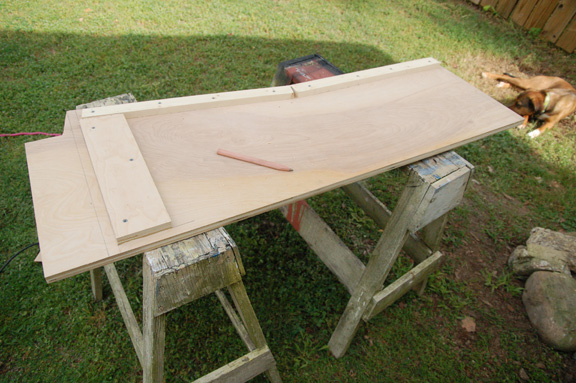
To start, I had the nice folks at the Depot make a couple cuts with their panel saw. This is a huge time saver, and the cuts are always accurate and square. The sides are 20″ wide by 48″ long, and I had them just split the remainder in two pieces so I could get it home easier.
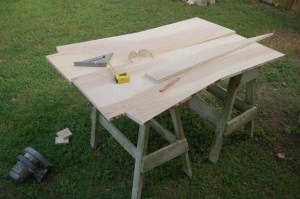
The panels were laid out  back-to-back to increase accuracy.

The panels were laid out back-to-back to increase accuracy.

Once at home, the sides were cut with a circular saw. I clamped the two panels together so the sides would be identical, and made some cuts to make the angled bottom half of the rack and the little notch at the bottom. I cleaned up these cuts with a saber saw and a sander, and then laid the two pieces out side by side on the sawhorses, opened up like a book. This way I would be sure to mark and screw in pieces to the inside face of the rack.

One of the sides with the blocks screwed into place

One of the sides with the blocks screwed into place

Since this rack was going to have casters, I decided it would be easier to have a flat bottom that the casters could screw to. But this flat bottom would be holding a lot of weight, so I added two blocks of plywood to the insides to help take the weight of the rack. They were screwed and glued into place. The wooden “rails” that the equipment screws in to were mounted on the sides, but these were mounted with screws only, since I could envision a time when these pieces would get replaced if/when the mounting holes get chewed up.
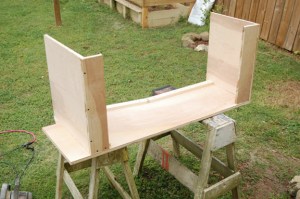
Using L-shaped top and bottom panels means that it's easier to screw them to the sides.

Using L-shaped top and bottom panels means that it’s easier to screw them to the sides.

After the side panels were ready, the top and bottom panels were built up. The inside space of the rack is 19 1/8″ wide, so I needed a piece for the bottom (20 x 19 1/8″), a piece for the top (16 x 19 1/8) and two small pieces to reinforce the back (4″ x 19 1/8″) I screwed and glued the small reinforcing pieces to the to and bottom panels. If they’re cut accurately, the rack will be square when you add these pieces. But if you’re not careful and these pieces are misaligned, the whole thing will be crooked. Since the top and bottom panels were now “L” shaped, the panels are a lot easier to screw into the sides without falling over.

Once this was done, it’s a fairly small matter to add on the other side. You’ll want to use screws and glue for these joints, since the rack will be supporting a lot of weight and the gear inside is rather expensive. A weak or wobbly rack just won’t do here. I wouldn’t use cheap plywood, either… use the good stuff. I had some 2″ screws left over from another project, and that’s what I used to secure the top and bottom.

Cutting a square hole with radiused corners is easy... just drill four holes with a spade drill and cut along the edges with a saber saw.

Cutting a square hole with radiused corners is easy… just drill four holes with a spade drill and cut along the edges with a saber saw.

With the other side mounted in place, all that’s left is detail work. I made a cutout in the back for a power switch by drilling four holes with a spade drill, and sawing out the waste with a saber saw.

I didn’t mount the bottom panel on the very bottom of the rack, though. The bottom panel is raised about four inches from the bottom edge of the rack so the large, rather ugly casters are partially hidden. They are exposed in the front, though, so it isn’t a perfect solution.
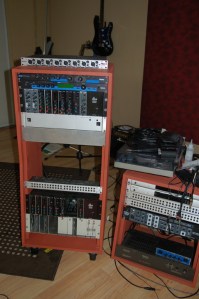
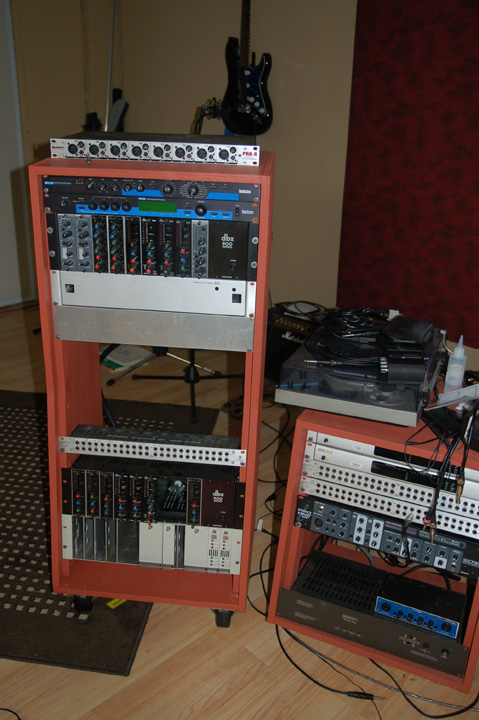
My completed rack with some of the equipment installed. The two blank panels below the 900 rack are for a pair of Universal Audio 1176 compressors that I'm building.

My completed rack with some of the equipment installed. The two blank panels below the 900 rack are for a pair of Universal Audio 1176 compressors that I’m building.

I had the rack assembled by lunchtime. In the afternoon, I filled the screw holes with drywall compound, sanded the sharp edges, and slapped on a coat of latex paint. The casters were screwed to the bottom, and that’s it… one new equipment rack.

Well, almost. I still need to mount a power switch to the back and screw a surge protector to the side of the rack. Yet another improvement that I’ve yet to finish is a small light to go on the inside of the rack. It’s extremely irritating to try to trace wiring in the back of a rack while you hold a flashlight in your teeth because you need both hands to hold the wiring. I’m still looking for a simple, small, low-wattage lighting solution for the back of my rack that doesn’t cost an arm and a leg.


Back To The Drawing Board

Awhile back, I wrote a post about building a ribbon mic. I completed the first one, with a completely custom fabricated shell and everything. It sounded pretty good, if I do say so myself, and I was quite pleased.

But I use the past tense for a reason. When I went to place the mic in its case, I noticed that my design is fatally flawed. The glue holding the magnets to the plexiglas frame has failed, bringing the two magnets together and obliterating the carefully placed ribbon. (it took three tries before I finally got it right… what a pain in the butt!)

So it’s pretty clear that the whole thing should be redesigned. I’ve learned a few things that should improve the performance anyway. The first and most obvious it my method for holding the magnets. I’d actually considered this before, but I need to include a small spacer to set the magnet gap. This way it’s physically impossible for the magnets to come together. An added benefit is that controlling the gap dimensions can be more precise, since the spacer determines the gap width rather than the frame.

Another design change for this version will be a metal frame rather than a plastic one. Metal (ferrous) provides a magnetic return path that can increase the output a few dB, and I need all I can get. It’s a little more difficult to machine, but I have the tools to do it, so why not?

It’ll be awhile before I can get to this, though. Every time I think of the hours put into the current mic, it really drains my energy and I hesitate. But I’ll start doing doodles on the backs of junk mail shortly, and I’ll get going on another design soon.

Sound Devices 664

After a nearly two-month wait, I’ve finally taken delivery of the new Sound Devices 664 mixer/recorder. It’s a nice bit of kit, though it is naturally more complex than my standard 442 mixer.  This unit will enable me to provide a number of additional services to my clients, mainly a) the ability to record iso tracks, and b) timecode audio files.

DSC_8805

The 664 housed in a PortaBrace bag. I’ve since replaced this with a Petrol bag, which is much better, but still not ideal.

Iso tracks are a digital copy of all the signals that are coming into the mixer. These can save the day if you are in a noisy environment, or you experience hits on a wireless transmitter… you can load the isos into a DAW, and then go back and mute the individual channel where the hits occur. This sort of work is standard for film and scripted projects, but less common for certain productions where speed in post is essential. I’ve worked on both types of productions. It takes time and adds complexity to a project, but the option is there if a client wants it.

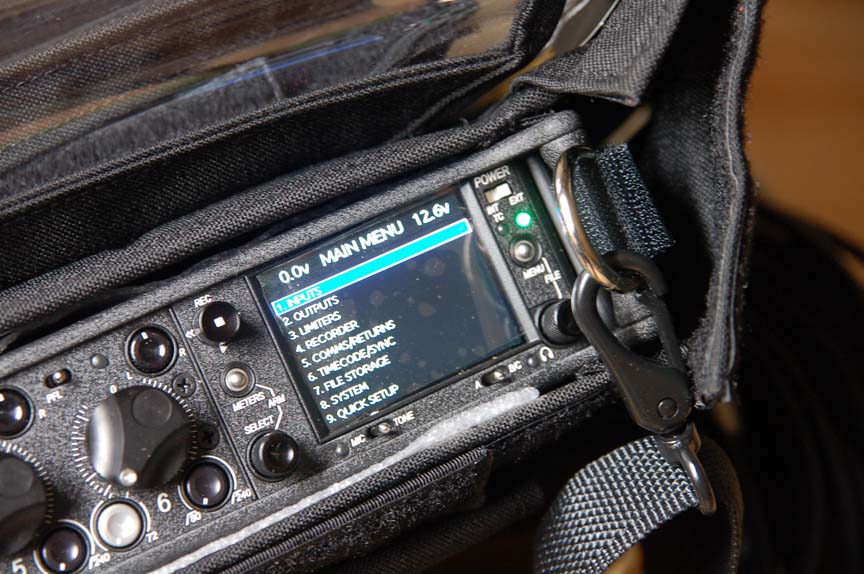
DSC_8807

The main menu screen. The visibility is fine in anything but direct sunshine… a soft velcro screen shade would be really handy… I might try to sew something up someday.

Timecode-stamped audio files can be a big help to the audio post process, and some post production workflows depend on it. I’ve had a limited ability to work in timecode for awhile now, but my current timecode setup is rather cumbersome, and completely impractical for quick work out of a bag… which is 80% of my business. Small timecode-capable recorders are not available, other than this unit from Zaxcom, which I’ve avoided buying because I knew I would be upgrading to the 664. It has an onboard timecode generator that can be jammed to a camera or other external timecode source.

These additional features come at a price, of course… not the least of which is the price, which is more than double the cost of my 442. (But to be fair, my 442 was bought used. That isn’t an option with the 664, and it’ll probably stay that way for quite some time.) And the expense doesn’t end with the mixer… the larger format means that I needed a new bag. The media requirements are very specific as well… it uses CF and SD cards, but there are just a handful that are approved for the 664. Using unapproved cards can cause the unit to lock up during use. None of my old cards work with this mixer, so I’ve had to buy all new cards.

DSC_8809

The output side of the 664. The memory cards are under the cover at the bottom of the frame… thankfully this cover is very solid, as some cases (like the Petrol case) press against it rather heavily when it’s opened to change cards. Just above this is the Hirose connector for timecode in and out… it’s a tight spot.

It’s also rather power hungry as well. The normal Sound Devices battery tube is included, but others have said the internal batteries are only good for about 30 minutes of recording time. The manual hints at this, as it says “Internal batteries can be used as a back-up in the event that external power is removed or depleted.” Another indicator of large current draws is found in the specification for the AC power supply, which is rated at 3.75 amps… much larger than your standard wall-wart.  An external battery supply is required. Fortunately I already own a BDS system from Remote Audio that I use with a pair of NP1 batteries. I normally get an entire day’s use from a single charge, powering a mixer and several Lectro receivers. That isn’t the case with the 664. I can drain an NP1 in about four hours, more or less depending on the age of the battery and the number of wireless receivers being used. I’ve since purchased the 664 power supply, which gets used whenever I’m stationary.

Using the 664 will take some getting used to as well, simply because there are so many different signal routing options available. For example, sending 48v phantom power to a microphone requires scrolling through a menu and finding the correct combination of multi-function button presses. Physical switches are always my preference, as they are on the 442. But I have found these knocked out of position before, and at least that shouldn’t happen with a menu-based system.

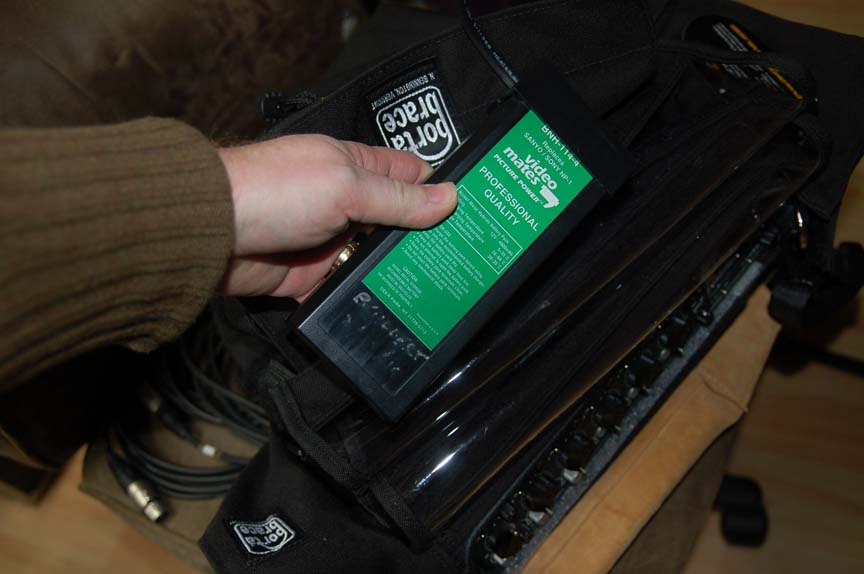
DSC_8811

The 664 requires a larger current draw than AA batteries can provide. I’m currently using a Remote Audio BDS system with three NP1 batteries.

The 664 has an input for a USB keyboard, and this will be great for adding metadata notes to the recorded files. It isn’t something that I’ll be using much for bag work, but it’s a really nice option. The 664 can also store commonly used phrases for generating sound reports, so adding a note like “wind noise” or  “clothing rustle” is a push-a-button affair, rather than typing out a note. But Sound Devices method of data entry without a keyboard is easy to figure out, and very quick to use. I don’t enter in long strings of info, but I can change a track name on the fly without a problem.

One of the changes that I would really like to see in “version 2” of the 664 is the ability to transfer data via the USB port. Currently, it’s only being used for the keyboard. But it would be extremely helpful to connect the 664 to the client’s laptop, and have the unit appear as a drive. Right now, you have to eject one of the cards and place it in a card reader. I don’t like to do this… the cards are tight, and I have a tough time gripping the CF card with my fingers… there isn’t enough room. And I’ve already experienced a bent pin on my card reader after only three or four insertions. My solution is to write the same data to both cards, then use the SD card for transferring the files as it’s easier to eject and seems a little more robust. I can get about 4 hours of recording time on a 16gb card, and I have yet to do a shoot requiring more than one card… but I bought three SD and three CF cards, just in case. I’m using the recommended Delkin cards, and (insert favorite superstitious ritual here) haven’t had a data issue so far. I believe Sound Devices put a lot of attention into their transport architecture to make it as robust as possible, because they understand that a corrupted file could be absolutely fatal to me AND to them.

Another “Version 2” change that I’d like would be the ability to use the BNC connectors on the unit for timecode in and out. Timecode is currently accessed via a Hirose connector, and you need to buy a rather expensive custom cable. These connectors are very high quality, but they are smaller and longer than a BNC, and are more likely to break from side pressure. The BNC AES digital ins and outs are a feature that isn’t going to be needed by me anytime soon, and even though the connectors are in an inconvenient spot, I’d rather have them available for timecode.

These are fairly small gripes, though, and I’d still buy this unit again without hesitation. I’ve used my 664 on almost every shoot I’ve done over the last six months, and overall, I love it.  I’m not a big fan of menu-operated gear, but I’ve adapted. This recorder is doing a complex job, so there’s lots of info that has to be presented somehow. Sound Devices seem to have taken pains to make these menus as logical as possible, and with a little practice, it begins to make sense. I have gotten several jobs directly as a result of having this unit, so it is clearly earning its keep. About the only real downside is that some clients seem to think that there MUST be a wireless receiver connected to every input, so they are requiring more lavs in their spec sheets. I’m in the process of buying a couple more, but the FCC is posturing to take away MORE spectrum from us, so now isn’t the smartest time to be buying radios.

Cleaning Penny and Giles 1000 Series Faders

Here’s how to clean the faders on a Soundcraft 800. This isn’t exactly a tutorial, rather, it’s just a look at how I’m doing it on my mixer. These are Penny and Giles 1000-series conductive plastic type and are long out of production, so it’s best to keep them clean and working well. It’s time consuming, but an easy job once you get the hang of it.

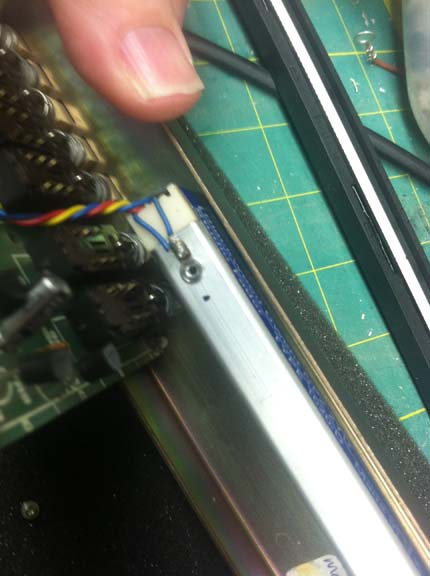
First, unscrew the ground wire on the back

First, unscrew the ground wire on the back

According to P&G, you shouldn’t use contact cleaner on these faders, only distilled water. To do that, you have to take the faders apart, which is time consuming, but when you’re done, they’ll be properly clean and more likely to stay that way for longer. Cooper Sound published a guide for cleaning P&G faders. It refers to more recent models, but the instructions would still apply. You can find it HERE.

Next, remove the fader's mounting screws

Next, remove the fader’s mounting screws

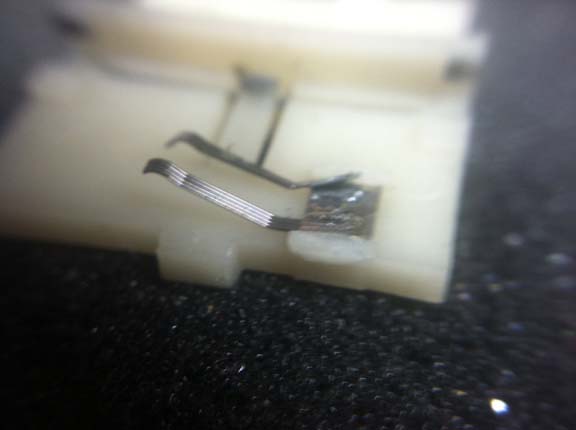
I did find one of the slider brushes with a broken solder joint. It was still electrically connected, but hanging by a a broken bit of solder. These are too delicate to resolder, so I carefully bent the brushes back into position and added a drop of super glue. Hopefully this will reinforce the brushes for a few more years, but I do need to be on the lookout for a donor console in good condition.

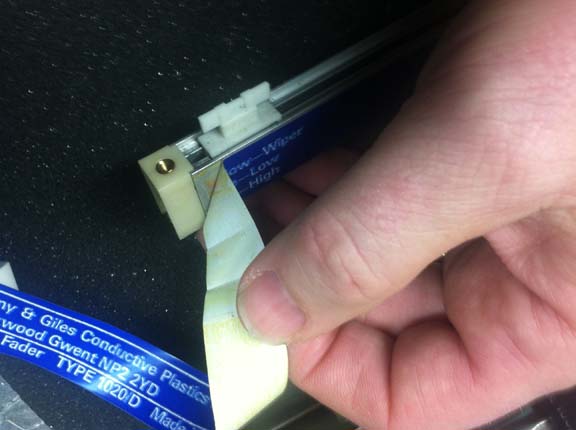
Peel off the tape that holds the fader together. If you're careful, this can be reused.

Peel off the tape that holds the fader together. If you’re careful, this can be reused.

On this console, you don’t have to desolder the fader in order to remove and disassemble it, which is a huge advantage.

With everything apart, I cleaned out the dust with a cheap artist’s brush and cotton rags. The plastic strip was wiped with water and a paper towel and dried.

Assembly is just the reverse of the disassembly. Once you’ve cleaned one or two, it becomes a rather simple process, but be careful, especially with the delicate slider brushes. They are easily damaged and not easily repaired. Replacement is only possible by removing parts from an old mixer… I contacted Penny and Giles, and they told me they have no more repair parts and could not even suggest a replacement.

I lubricated the sliding parts on my fader with a tiny drop of light oil. Penny and Giles instructions specify a lightweight silicon oil. I used an oil designed for sewing machines.

After you’ve cleaned the fader, remember to place a small maintenance sticker on the fader that says “cleaned” along with the date. I have to do this, or I risk forgetting which faders I’ve cleaned and which I haven’t, and you  don’t want to do these twice.

This is the kind of crud that you'll find. This is dust buildup around the fader slider.

This is the kind of crud that you’ll find. This is dust buildup around the fader slider. I cleared the worst of this with an inexpensive art brush for acrylics.

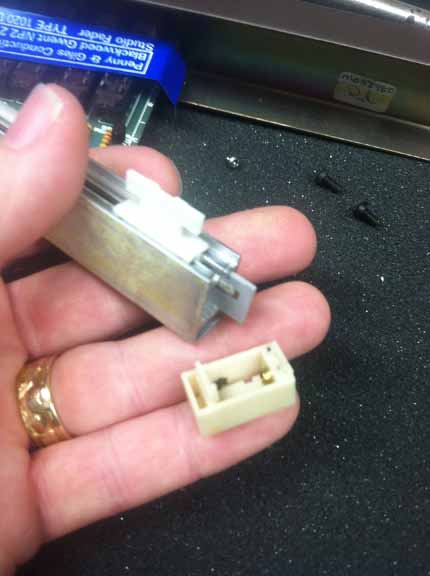
With the tape removed, carefully pull off the cap without wires attached

With the tape removed, carefully pull off the cap without wires attached

CAREFULLY pull out the slider

Next, gently pull the cap with the wires on the end. The conductive plastic strip should come out of the aluminum shell.

The entire fader disassembled

The entire fader disassembled

I cleaned the shell by pushing a bit of soft cotton cloth through the shell with a knitting needle.

I cleaned the shell by pushing a bit of soft cotton cloth through the shell with a knitting needle.

Eww, gross! This is what I got out of the shell. Of course, just about anything would be gross after 30 years.

Eww, gross! This is what I got out of the shell. Of course, just about anything would be gross after 30 years.

Not the best photo, but this is a closeup of the nearly-broken wiper brushes. I fixed it with a drop of super glue.

Not the best photo, but this is a closeup of the nearly-broken wiper brushes. I fixed it with a drop of super glue.

2012 in review

The WordPress.com stats helper monkeys prepared a 2012 annual report for this blog.

Here’s an excerpt:

4,329 films were submitted to the 2012 Cannes Film Festival. This blog had 33,000 views in 2012. If each view were a film, this blog would power 8 Film Festivals

Click here to see the complete report.

My New Tape Machine

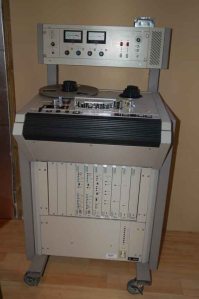
Here’s the latest acquisition for my studio… an Otari MTR10. This was purchased from Chris Mara of MaraMachines and Welcome To 1979 Studios in Nashville, TN. I saw it when I was there for the Producer’s and Engineer’s Summit. Unfortunately it violates my “large equipment rule” (don’t buy anything that’s too big to resell on eBay if you need to), but this one is worth the exception.

My Otari MTR10

My Otari MTR10

We had a similar MTR12TC of these at On Line Audio in Charleston, SC. It was the same machine, with the addition of a special head that laid a narrow timecode track in the center of the tape. We only used this a handful of times, and that feature isn’t quite as useful nowadays.

I’m a big fan of these machines. Their large size means they’re easy to align and maintain. Now that they are all “of a certain age,” they’ll need more care and attention than they did at my old studio (if I recall correctly, both our MTR12 and  our Otari MX80  24track version were brand new. Of course, they worked like a charm.) Fortunately this machine is in fantastic condition… everything works except the return to zero function, and even though it’s non-essential, I’ll have that sorted in a few days.

This one has probably seen quite a few miles of tape through it, as it was formerly owned by Disney. The heads were at the end of their service life, so Chris had John French of JRF Magnetics put on a pair of refurbished heads. Now the record and repro spec is back up to factory standard. (JRF Magnetics was the go-to company for any kind of head work as far back as I can remember, and I was pleased to hear that they are still doing work on tape machines. I wish I’d thought to have John sign my head stack somewhere… he’s a rock star in the tape machine world.)

The deck lifts up for easier servicing... no screwdriver necessary

The deck lifts up for easier servicing… no screwdriver necessary

I’m especially excited to have this machine in my inventory. As far as I know, I’ve got the only real analog tape machine left in town, so that’s a competitive advantage. It opens up several creative options… in addition to using it as a straight mastering deck, it can also be used as a tape delay, as well as for straight tape-to-digital transfers.

There is a real difference in the sound of projects that have been mastered on analog tape. It is very subtle, but it’s there. And while plug-in emulations of tape machines are cheaper and more convenient, they aren’t the same… they will always be copies, and this is the real deal.


The Ribbon Mic Transformer Challenge!

Here’s a little bit of fun for all you mic builder and engineer types. I put two different transformers onto the same ribbon motor for a very casual test. One of these transformers is found in the typical Chinese ribbon mic. The other is a US- made, high-performance custom wound transformer from Les Watts. (Les tells me that he may have more of these available soon.) I hooked each up and recorded a few lines lines of voice and some scratches with my fiddle.

The fiddle playing sucks… really, I’m not being modest here… because I just got it back from the shop, it has brand-new strings, and a brand-new bow as well that doesn’t have enough rosin on it yet, so the strings slide and scratch all over the place. It also sucks because I can’t really play fiddle.

You’ll notice a good bit of hum with these samples because the transformer is dangling in the air & has no shielding. When I did my final installation, most of that noise went away.  It’s pretty impossible to do an actual evaluation with all this noise present, and perhaps in the future I’ll do some better samples with shielding, etc. But this was all I had time for… at least for now. There are only two transformers in this test… if someone has a pal at Cinemag, Lundhal, or Samar, get them to send me a transformer and I’ll make it a larger comparison. I’ll probably order an Edcor in a few weeks, and perhaps then I’ll do some better samples.

These are really casual samples, so they’re MP3 files recorded at 44.1kHz, 320kbps files using an M-Audio Duo preamp and a Sony PCM-10 recorder. And remember that it isn’t really a fair test… there are lots of variables that might make one transformer work better than another with any given ribbon motor. I just wanted to see if I could hear the differences.

So here are the samples… transformer “B” first:

XfmrBedit

And now transformer “A:”

XfmrAedit

Which transformer do you prefer? Can you guess which one is the cheapy and which is the better? I certainly have my favorite, but it might be because I know which one is supposed to sound better. (This kind of bias is well documented, and it’s surprisingly difficult to overcome!)

I’ll show you the man behind the curtain here in about a week.

UPDATE: Time to spill the beans… transformer A was the better grade unit, and transformer B was the less expensive garden variety type. I’ll try to put together a better transformer review in the future using more transformers and a better (less noisy) samples. Thanks for playing our game, and here are some lovely parting gifts for you. Sorry, our production assistants appear to have eaten those.

Ribbon Mic Test

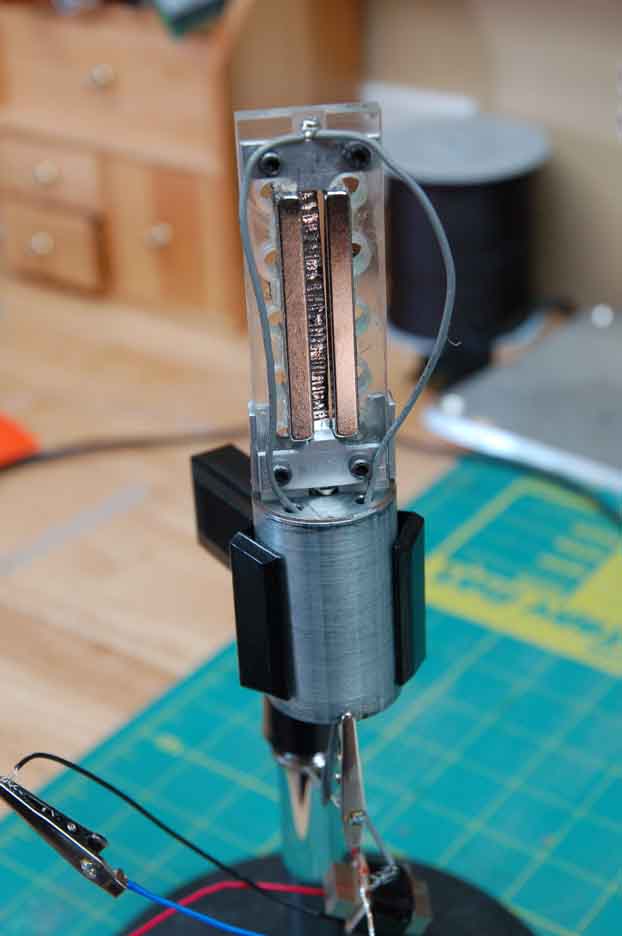
Here’s a look at my latest… a ribbon mic motor under test on my bench. Right now, it sounds pretty good. In fact, I’m tempted to just toss it into the case and call it done as it is, but I’m going to wait a bit. I can see some tiny problems with this one that I’d like to correct first. I’m not sure if you can tell in this photo, but the ribbon has a very slight curve… it’s closer to the magnet on the middle on one side, and the edges on the other. This is probably due to the way I corrugated the ribbon, using a fluted dowel pin and rolling it on a mousepad. This method works, but it is hard to get an even amount of pressure, and I probably pressed down a hair more on one side than I should have.

A completed ribbon motor of my own design

Still, it sounds quite nice. It has a fair amount of output, though I might like to squeeze out a bit more signal. A more accurate assessment will have to wait for a new ribbon… I’ve bought a “Paplin Crimper” on ebay for $15, which should be adaptable into a better ribbon corrugator. It’ll at least be an improvement on my current method.

I’m especially pleased with the transformer on this mic. I managed to get a pair of these from Les Watts. He has them wound for use in his microphones, and they have specifications that rival some of the best ribbon transformers available. Of course, it’s hard for me to tell what is due to the transformer and what’s the result of my ribbon motor design. Hopefully I’ll be able to source some cheap Chinese ribbon transformers soon so that I can compare the two.

A “Paplin Crimper Tool.” These are readily available on eBay for about $15, and I’m told they make good ribbon corrugators… we’ll see shortly!

Remaining work on this microphone is a new ribbon and adding some ground connections, but apart from replacing the ribbon, it’s just a matter of wiring it up and screwing it closed. The shell will certainly affect the sound to a degree, but I don’t think it will be too detrimental… the EM shielding that a mic shell provides will likely be an improvement, though I’m not hearing much in terms of self noise as it is.

Here’s a voice test MP3 of this mic just as it appears in the photo above. This isn’t a critical test, just a check to hear if it’s working. It’s on my workbench, not the perfect place for this… I hear reflections from the rear, and the fan noise from the laptop is audible. The cable being used to connect the mic was quite prone to noise depending on it’s position… I just placed everything where the noise was lowest. The mic is connected directly into an M-Audio Duo interface, sample rate was 44.1. Have a listen… comments and opinions are most welcome.

RibbonTestRevA

Austin Ribbon Mic Completed

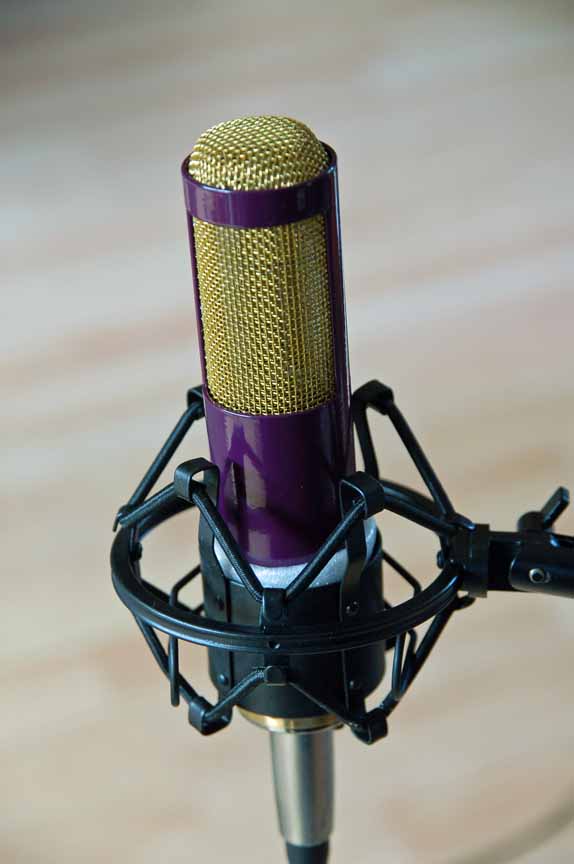
The completed Austin ribbon mic. This one will be given away at the Producer’s and Engineer’s Summit at Welcome To 1979 in Nashville, coming up in November.

Here’s a look at my Austin ribbon mic, I completed it yesterday. Building this mic certainly was actually really easy, except for one part… installing the ribbon in the frame. I had to do this several times… six, to be exact. I  had various problems. One, for example, didn’t show it’s ugly head until I’d completed an installation… tiny tears all along the edge of the ribbon. I learned they were caused by the ruler I was using, which had a cork backing that was set slightly behind the ruler’s edge. This small unsupported space allowed the foil room to stress and tear. I corrected this by using a length of rectangular aluminum as a straightedge, this pressed down on the foil right at the cutting edge.

Another problem I had was corrugating the ribbon. I was trying to protect the ribbon by corrugating it with the release paper on the top and bottom, but doing so a) causes the ribbon to curl up, and b) makes the corrugations shallower. If the ribbon isn’t sufficiently corrugated, it is extremely difficult to get it tensioned properly. The tension is important… the ribbon can neither sag in the frame, nor should it be too tight. I had the latter problem, and the ribbon developed a longitudinal curl, so scratch that ribbon.

But thanks in no small part to Rick’s patient support via several emails, I finally got one in. It wasn’t perfect… it could be centered just a hair better… but it looked ok, so I closed it up and finished the mic.

And considering everything, it sounds quite lovely. The last time I used a ribbon mic was 25 years ago, when I did my thesis recording using a pair of RCA TK77’s that the university owned, so I don’t have much of a frame of reference, but it seems to have a nicely balanced frequency response. From what I understand, construction errors show up as poor highs or lows. I don’t have a frequency analyzer set up yet so I can’t give any numbers, but my subjective analysis says “nice.” Now, like all ribbons, the output is rather low, and I did my testing using a rather crappy mic preamp. On voice, one has to crank the gain up quite a bit, and this gave me a lot of preamp noise. For someone who is a low talker, this wouldn’t work. But I got a rather useable level on my acoustic guitar.

Again, I can recommend Rick’s kit quite highly, especially if you’ve never built a mic before. He’s done everything that can be done to insure a good outcome, and the one I built certainly worked out well. That’s not to say it’s simple… you need patience, and good, steady hands will help as well. But I’ve already got parts here to build four more for myself!

DIY Discussion Panel at Nashville Producers’ and Engineers’ Summit

I’ve been invited to be on the DIY Gear panel at this years’ Producers and Engineers Summit at Welcome To 1979 Studios in Nashville. This year the P&E Summit will be November 9-11, 2012. I’ll be there to discuss mic building and modification, and general do-it-yourself studio electronics.

A session at last years’ P&E Summit at Welcome To 1979

The summit is limited to 60 attendees ( it’s held in a working studio, not a conference center, so space is naturally limited) and costs $150 per person for the weekend. I’m very much looking forward to it. See you there!

United Bates of America Airs Aug 13th

The latest reality show that I’ve been working on is scheduled to air at 9pm on Monday Aug 13th. I’ve done the location sound work for much of season one, along with Raleigh sound mixer Neal Gettinger and Nashville mixer Steve Grider. The Bates family lives just north of Knoxville, TN, and is  little larger than most… 19 children, age 23 to 4 months. My favorite one is, of course, whoever I’m talking to at the time… a running joke, especially with the little ones, is to say, “you know you’re my favorite… but don’t tell anybody!” It always brings a smile.

On a break with some of the Bates kids.

Some of the crew when we flew out to Texas… That’s John Rotan, camera, who also shoots for the Duggers, Steve Grider, Nashville soundmixer, Will Rodriguez, Producer, and Zach Bates.

A LARGE chunk o’ glass…

Here’s a quick snapshot for all you photogs out there… some glass lust. This was for an ESPN shoot that I worked on recently in Knoxville, a documentary about Pat Summitt. The DP (Christian Hoagland) pulled out a Sony F3 with an Angenieux Optimo 24-290mm T2.8 zoom lens… the biggest piece of glass I’ve seen on a EFP shoot. It gave some gorgeous images, though it was a bear to lug around. I understand this lens probably cost more than my house… good thing it’s a rental!

Image

DP Christian Hoagland from NYC at Pat Summit’s house

Image

Sony F3 with Angenieux 12x lens

A New Shotgun

Thanks to some series work that I’ve landed in Knoxville, I’ve recently made an upgrade to my mic locker. My workhorse mic, a Sennheiser ME66/k6 combo, is a very good mic… for the price. They can be bought new for around $500. But it’s long been on my list of things that I’d like to improve, if ever I could afford it.

For critical applications, I have a MKH415T that I love. It’s a beautiful old mic, once used by the ORTF (the French equivalent of PBS). But there are some considerations that prevent me using this mic as much as I’d like. Mainly, it’s the fact that 415’s don’t like humidity, and begin to develop self-noise in damp air. Once things dry out, they return to normal, but the unpredictable nature of the mic means that it stays in the box 95% of the time. (According to Sennheiser, the 416 was a later development and uses improved circuitry to eliminate fluctuations in performance from humidity.)

The other soundperson on the series, Raleigh mixer Neal Gettinger, loaned me his 416T to use for the shoot, and it sounds markedly better than the mic I normally use. Thanks to some sales of used gear at Trew, I had a balance that I applied to a brand-new Sennheiser MKH416p48.

It doesn’t seem like much until you plug it in. Physically, it’s a bit smaller and slightly heavier than the 66, so I had to get new mounting clips for my Rycote suspension. Soundwise, though, there’s a big difference in the two. It’s hard to describe in words, but the 416 has a smoother overall quality… the top end is more defined, and the low end seems extended. These differences really show up when you compare the mics side-by-side and switch between them. But almost as important is the familiarity factor… most people know the 416, and it’s been a common player in movie production…. so much so that years ago, when the 416 was discontinued for a model with improved specs, the resulting uproar from the location sound community caused them to put it back into production.

I hate to do it, but I’ll probably sell my 415T to help pay for the new mic. I’ll most likely need to sell the ME66 as well, but I haven’t quite decided yet. The fact that the 66 can be battery powered gives it a slight advantage, since this mic can be plugged directly into any camera without the need of a mixer. Like many true condenser mics, The 416 needs  48 volts phantom power to operate properly, and some  cameras (and even mixers… older Shures are reported to deliver only 18 volts) can’t provide enough voltage.

Free Resources for Independent Filmmakers

Someone recently shared the following link with me:

http://www.dependentfilms.net/files.html

It’s a website filled with downloadable forms and tools for independent filmmakers. It includes contracts, location release forms, excel spreadsheets, word files PDFs… even color bars and a timecode calculator. Hope you find this useful!

My First Place & the Ambient EMP Eumel

I was recently in Nashville, TN shooting an episode of HGTV’s My First Place. I was glad to finally get the gig… they’d called me a number of times before, and I was always booked. And because of the way things work out on this show, they don’t usually give their crew much notice (less than 24 hrs on one occasion). Scheduling last-minute shoots is difficult… I try to make them work, but I’m often booked. That’s how it’s been with My First Place in the past, so I was especially pleased that I was able to make this shoot work.

I worked with two Nashville freelancers, producer Laura Douglas and DP Chris Conder. Both have been working in and around Nashville for a number of years, and Laura had worked in news, so we all had similar experiences to share. The show is produced by High Noon Entertainment in Colorado. I’ve worked with them before, but this particular shoot was done with an all-local crew… no one flew in for the show.

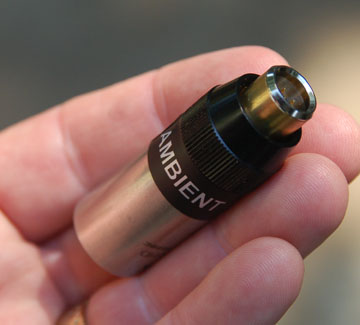
One of two Ambient EMP 5s transformers that I recently bought. I've been needing these for a long time, and they work like a charm.

I tried out a new piece of gear on this trip… an Ambient EMP 5s eumel. (a eumal–pronounced “oymal–” is German for widget.) It isn’t a very sexy bit of kit, and it’s pretty pricey (about $118 each from Trew Audio) but it’s extremely handy to have. All they are is a transformer built into a nicely machined Neutrik connector. What they do is convert a wireless lav microphone– in this particular case, my Audio Technica 899– into a hard-wired version. Since these were going to be seated interviews, I figured this would be the perfect application. I’m happy to report they work like a charm. I have several mics that are wired for Lectrosonics transmitters, and now I can use these all as hardwires if the job calls for it. In the past, I have used a Sony ECM55b for my hardwire jobs, and while it works great, I have often wished to use a mic with a smaller head– like my Countryman EMWs or my ATs, since the Sony is a little harder to hide. My Ambient EMPs give me more options, and options are always nice to have on the set!

The guys that were buying their first place had a budget of $140K, and wanted a minimum of 1,000 square feet. Nashville is a nice town, but the real estate prices are pretty steep for most people. (In contrast, we’re looking at a 2,800 square foot house here in Chattanooga, and the selling price is $192K. That’s nearly 3x the house for about $50k more dollars. There’s just no music industry here, unfortunately.)

Producer Laura Douglas interviews first-time homebuyers Bret Marchbanks and Daniel Sircy for HGTV's My First Place. Chris Conder on camera.

The only bad part about the shoot was the drive home. I work as a local in Nashville for one-day shoots, so  had to drive home that night. We finished the interviews at 10PM local time, and since Nashville is in a different time zone than Chattanooga, I pulled into my driveway at 2AM. But I’m looking forward to working with them again soon.

Recording Claire Lynch

I’ve scheduled a gig for next month, and I’m particularly looking forward to it. But first, the backstory… and for this one, we’ve gotta really crank up the Wayback Machine,* almost to full power.

Back in 1984, when I was an undergrad at the University of South Carolina, I managed to worm my way into a non-paying “job” at a place called the Quarter Moon in Columbia. Quarter Moon was a “listening” bar… in other words, the focus was on performing and live music, rather than consuming mass quantities of beer and bad-judgement hookups. I did the work mainly to avoid going broke on cover charges, as I was always going there to listen to bands.

The Front Porch String Band with Claire Lynch, Brian Thompson, Larry Lynch, and Terry Campbell.

One weekend Claire Lynch and The Front Porch String Band was booked to play, and I was absolutely hooked. Claire’s singing voice is so beautiful that, given some time and a good pair of speakers, it could turn a militant splinter cell into a Shriner’s club temple. And I’m not the only one with this opinion… Emmylou Harris has said, “I’ve always thought Claire Lynch has the voice of an angel.”

Jump ahead 26 years or so to 2010. Claire (winner of the IBMA Female Vocalist of the Year) comes to the Barking Legs Theater, a small performance space in Chattanooga, and I went to hear her and say hello. The Front Porch String Band morphed into the Claire Lynch Band years ago, and her voice is just as pretty as ever… even more so. Her years of experience songwriting, recording, and performing have refined her natural talent to a remarkable degree. Her band is equally phenomenal, and hearing her in such a small space is a real treat… a little like back in ’84. (See Claire’s complete song catalog here)

Claire Lynch

Claire Lynch about the time Friends For A Lifetime was recorded.

When I heard she’d be returning to Barking Legs in February, I took a chance and emailed her. The result is I’ll doing a live recording when she performs here on February 25th. It will be a little experimental… The evening will be a duo with Claire and her new guitarist Matt Wingate (winner of the Doc Watson Guitar Championship in 1997).

I’m really looking forward to doing some music recording again, especially with an artist of Claire’s caliber… we’ll see how it goes! If you’re anywhere near Chattanooga on Feb 25th, be sure to come down to Barking Legs (1307 Dodds Ave, Chattanooga, 37404… directions are here) to hear Claire live… tickets are $15.50 in advance. (You can listen to some of her songs here, with the Front Porch String Band.)

Claire Lynch

Claire Lynch on the cover of Bluegrass Magazine, 1994

*The Wayback Machine is a reference to a segment from The Rocky and Bullwinkle Show in which Mr. Peabody and Sherman use a time machine called the “WABAC machine” to witness, participate in, and, more often than not, alter famous events in history. (from Wikipedia)

BGilbertSound 2010 in review

The stats helper monkeys at WordPress.com mulled over how this blog did in 2010, and here’s a high level summary of its overall blog health:

Healthy blog!

The Blog-Health-o-Meter™ reads Fresher than ever.

Crunchy numbers

Featured image

A Boeing 747-400 passenger jet can hold 416 passengers. This blog was viewed about 5,400 times in 2010. That’s about 13 full 747s.


In 2010, there were 19 new posts, growing the total archive of this blog to 34 posts. There were 50 pictures uploaded, taking up a total of 65mb. That’s about 4 pictures per month.

The busiest day of the year was December 15th with 99 views. The most popular post that day was Discrete Operational Amps.

Where did they come from?

The top referring sites in 2010 were trewaudio.com, diyrecordingequipment.com, vinylengine.com, mail.yahoo.com, and facebook.com.

Some visitors came searching, mostly for harrison mixbus, api 2520, sound devices mm-1 review, harrison mixbus review, and sound devices mm-1.

Attractions in 2010

These are the posts and pages that got the most views in 2010.

1

Discrete Operational Amps March 2010
4 comments

2

Building A Transformer-Balanced Mic Splitter September 2009
2 comments

3

Harrison MixBus-A Pro Audio Secret Weapon May 2010

4

Equipment August 2009
1 comment

5

About Brian Gilbert August 2009
2 comments